

What is Unit testing: A unit is a piece of code or usually method that
invokes another piece of code and checks the correctness of some assumptions
afterward? If the assumptions turn out to be wrong, the unit test has failed. A
unit test is a method or function.
This definition is from Wikipedia
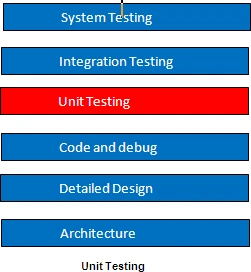
Property of Unit test: A unit test has the following properties
- It should be automated and repeatable.
- It should be easy to implement.
- Once written, it should remain for future use.
- Anyone should be able to run it.
- It should run quickly.
Many of us get confused with the act of testing of software with the concept of a unit test. To start off, ask yourself the following questions about the tests you've written up to now:
- Can I run and get results from a unit test I wrote two weeks or months or years ago?
- Can any member of my team run and get the results from unit tests I wrote two months ago?
- Can I run all the unit tests I've written in no more than a few minutes?
- Can I run all the unit tests I've written at the push of a button?
- Can I write a basic unit test in no more than a few minutes?
If you've answered "no" to any of these
questions, there's a high probability that what you're implementing isn't a unit
test. It's definitely some kind of test, and it's as important as a unit test,
but it has drawbacks compared to tests that would let you answer "yes" to all of
those questions.
A simple unit test example: It's possible to write an automated unit test
without using a test framework. In this section, I'll show what writing such a
test without a framework can look like, so that when I later in article
demonstrate, you can contrast this with using a framework.
Assume we have a SimpleParser class that we'd like to test. It has a method
named ParseAndSum that takes in a string of 0 or more comma-separated numbers.
If there are no numbers, it returns 0. If there's a single number, it returns
that number as an int. If there are multiple numbers, it adds them all up and
returns the sum (although, right now, the code can only handle 0 or 1 number).
public class SimpleParser
{
public int
ParseAndSum(string numbers)
{
if (numbers.Length == 0)
{
return 0;
}
if (!numbers.Contains(","))
{
return int.Parse(numbers);
}
else
{
throw new InvalidOperationException(
"I can only handle 0 or 1 numbers
for now!");
}
}
}
We can create a simple console application project that has a reference to the
assembly containing this class, and we can write a SimpleParserTests method as
shown in below code. The test method invokes the production class (the class to
be tested) and then checks the returned value. If it's not what's expected, it
writes to the console. It also catches any exception and writes it to the
console
public class SimpleParserTests
{
public static void TestReturnsZeroWhenEmptyString()
{
try
{
SimpleParser p = new
SimpleParser();
int result = p.ParseAndSum(string.Empty);
if (result != 0)
{
}
Console.WriteLine(
@"***SimpleParserTests.TestReturnsZeroWhenEmptyString:
-------
Parse and sum should have returned 0 on an empty string");
}
catch (Exception
e)
{
Console.WriteLine(e);
}
Next, we can invoke the tests we've written by using a simple Main method run
inside a console application in this project, as seen in code below. The Main
method is used here as a simple test runner, which invokes the tests one by one,
letting them write out to the console. Because it's an executable, this can be
run without human intervention (assuming the tests don't pop up any interactive
user dialogs).
public static void Main(string[] args)
{
try
{
SimpleParserTests.TestReturnsZeroWhenEmptyString();
}
catch (Exception e)
{
Console.WriteLine(e);
}
}
It's the test method's
responsibility to catch any exceptions that occur and write them to the console,
so that they don't interfere with the running of subsequent methods. We can then
add more method calls into the Main method as we add more and more tests to the
project. Each test is responsible for writing the problem output (if there's a
problem) to the console screen.
Obviously, this is an ad hoc way of writing such a test. If you were writing
multiple tests like this, you might want to have a generic ShowProblem method
that all tests could use, which would format the errors consistently. You could
also add special helper methods that would help check on various things like
null objects, empty strings, and so on, so that you don't need to write the same
long lines of code in many tests.
The below code shows what this test would look like with a slightly more generic
ShowProblem method.
Using a more generic implementation of the ShowProblem method.
public class TestUtil
{
public static void ShowProblem(string test, string message)
{
string msg = string.Format(@"
---{0}---
{1}
--------------------
", test, message);
Console.WriteLine(msg);
}
}
public static void TestReturnsZeroWhenEmptyString()
{
//use .NET's reflection API to get the current
method's name it's possible to hard code this,but it's a useful technique to
know
string testName = MethodBase.GetCurrentMethod().Name;
try
{
SimpleParser p = new SimpleParser();
int result = p.ParseAndSum(string.Empty);
if(result!=0)
{
//Calling the helper method
TestUtil.ShowProblem(testName,
"Parse and sum should have returned
0 on an empty string");
}
}
catch (Exception e)
{
TestUtil.ShowProblem(testName, e.ToString());
}
}
Unit-testing frameworks can help make helper methods more generic like this, so
tests are written more easily.
What is NUnit: A new way to writing real-world unit tests with a
framework called NUnit-a .NET unit-testing framework. It's my favorite framework
in .NET for unit testing because it's easy to use, easy to remember, and has
lots of great features.
So before we start working with NUnit, we need to look at what a unit-testing
framework is, and at what it enables us to do that we couldn't and wouldn't have
done without it.
The points to be remembered about NUnit are listed below:
-
NUnit is not an automated GUI testing tool.
-
It is not a scripting language, all test are written in .NET supported language, e.g., C#, VC, VB.NET, J#, etc.
Join the conversation! Your thoughts help the community grow.