Purpose
We will learn how a request is processed in the code and various activities that happen in any MVC application start up. Every time we come across these but never see the basics of them. For example when a request comes, how are the routes filled and how is an area request handled in our application. When, how and why bundles are handled. These activities are done within a very important event handler that is called in a MVC application on the Application Start event.
I have taken a default template of MVC Web API. I will debug and walk you through and we will learn many basic concepts of MVC at the application start of a request processing and their implementation that is implemented in every MVC project.
As we know on an HTTP request from a client's browser comes to the web server and then finally though the MVC framework until in the Global.asax.cs a WebApiApplication object that implements HttpApplication.
Let's start in detail and do some debugging and I will walk you through the entire code. See the following: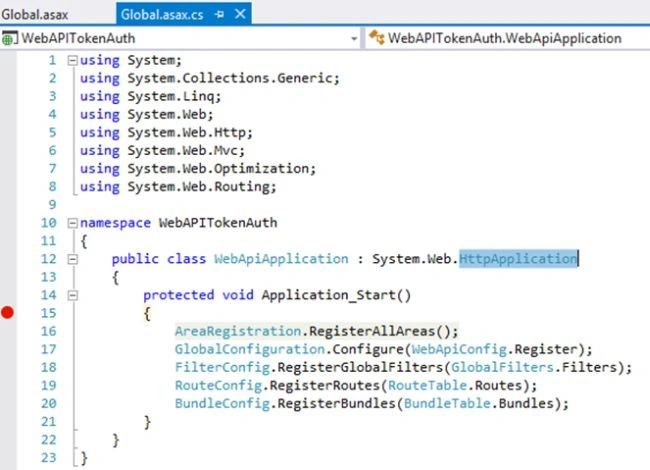
1. Area (Organization application on the functional segment)
Since AreaRegistration is an abstract class with a static method, when we create an Area in our MVC project, it creates an AreaNameAreaRegistration.cs file. Let us understand it by looking in the class implementing this abstract class in our project. 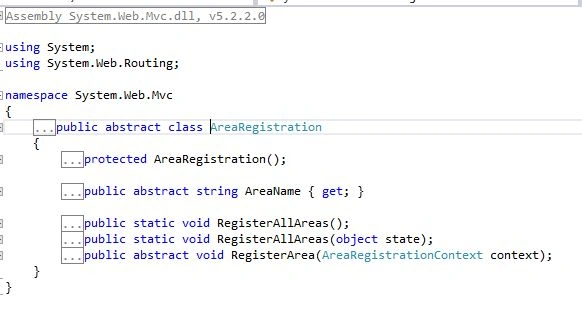
And it finds only one call implementing the AreaRegistration abstract class and overriding both the necessary and the abstract property AreaName and the abstract method RegisterArea for registring the routes. As we can see in the following, the AreaRegistration class has been implemented automatically by our area.
If you have multiple Areas in your application, all of them in the application will be registered one by one before execution going back to the Global.asax.cs.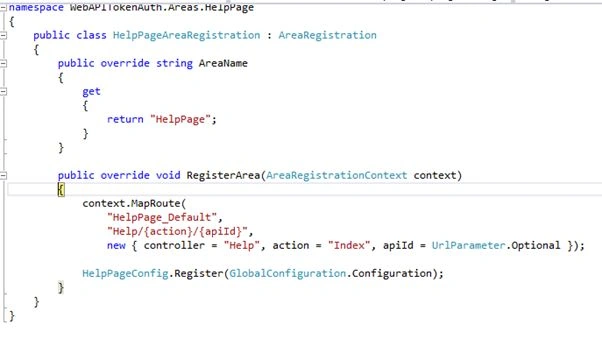
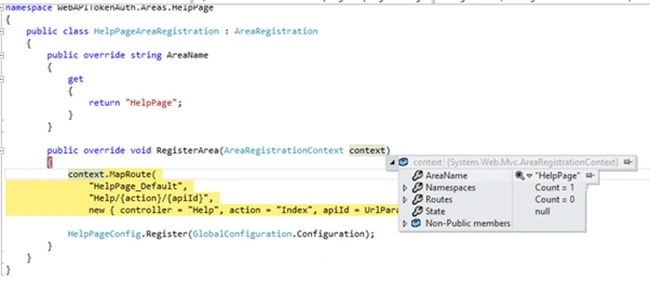
As you can see, the context name is being set from the AreaName property and will create the route for the HelpPage Area that exists in the Area folder. 
Now the route is added as you can see in the preceding screen, in the route collection at index 6.
After this, execution again comes to the Global.asax.cs, to the next line to execute.
2. GlobalConfiguration.Configure(WebApiConfig.Register);
Please refer to this: Configuring ASP.NET Web API 2.
If you go to the GlobalConfiguration static class:
And then to the Action that is a delegate.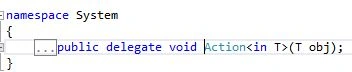
So, this method Configure of GlobalConfiguration takes a delegate as input (generic template) and as we can see it is of type HttpConfiguration.
So in our case, WebApiConfig.Register is the input to configure: 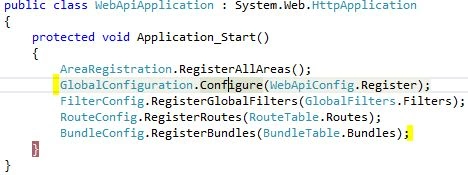
As you can see here, both classes exist, RouteConfig.cs and WebApiConfig.cs, in the App_Start Folder.
Now, let's go to WebApiConfig.Register that does all the Web API configuration as well as routing for the WebApi.
This is the current WebAPI Config code: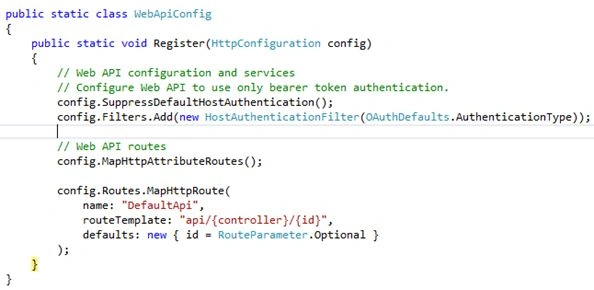
Route Config code: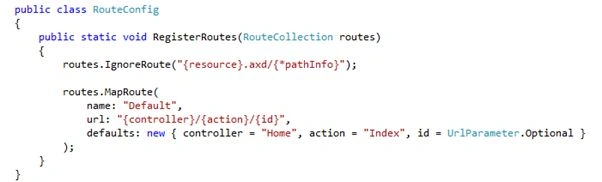
Importing everthing to see in the WebAPI and that it is:

Understating MVC Application Start and Various Components
Join the conversation! Your thoughts help the community grow.
Sign in to leave a comment
It is the same account you read, post and publish with — and you will come straight back to this page.
Sibeesh VenuPosted Aug 2, 2015, 4:04 AM
Nice Share. Thank you
Santhakumar MunuswamyPosted Aug 2, 2015, 2:31 AM
Good article. Thanks for sharing
Neeraj KumarPosted Aug 1, 2015, 11:57 AM
Great Article
RahulPosted Aug 1, 2015, 9:17 AM
Appreciate your comments Sir!
RakeshPosted Aug 1, 2015, 8:24 AM
Good explain
RahulPosted Aug 1, 2015, 7:42 AM
Thank you Debasis Sir!
Debasis SahaPosted Aug 1, 2015, 6:14 AM
Nice one..
Gopi ChandPosted Aug 1, 2015, 5:38 AM
Good one
RahulPosted Aug 1, 2015, 3:51 AM
Thanks Sir!!
Rajeesh MenothPosted Aug 1, 2015, 1:17 AM
Good One :)
Nilesh JadavPosted Aug 1, 2015, 12:54 AM
Nice one sir