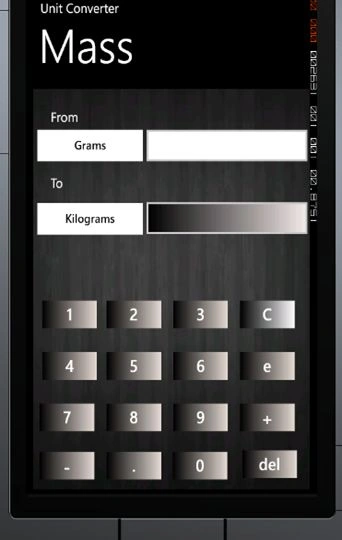
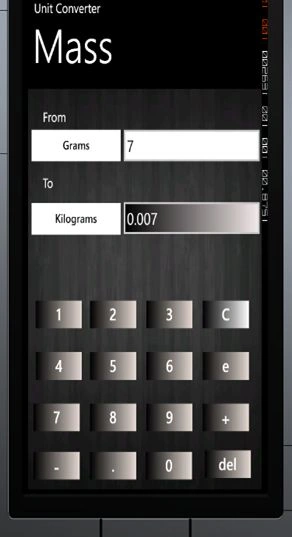
This is a very basic engineering Mass converter. The following units can be converted with the use of this example:
Grams, Kilograms, Metric tonnes, Short ton, Long ton, Pounds, Ounces
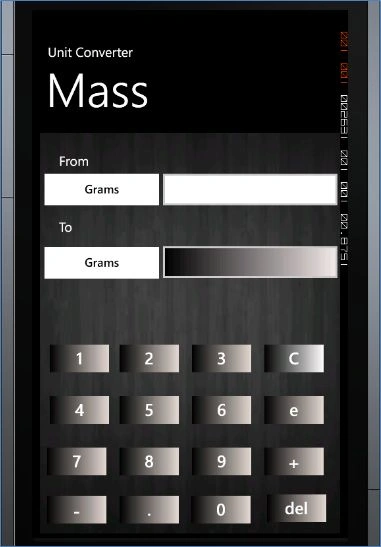
Step 1
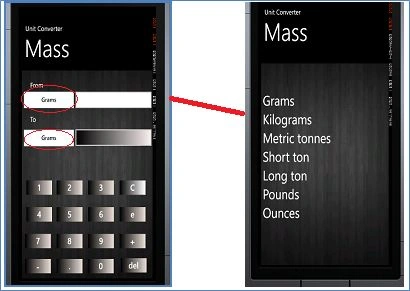
First we create Buttons to enter the numbers, a TextBox to show the result and a ListBox to show the sub units of the Mass Unit, like Grams, etc. like this:
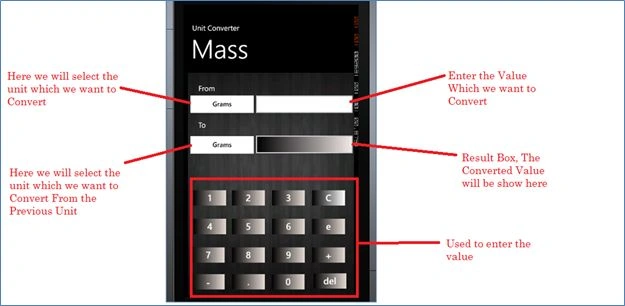
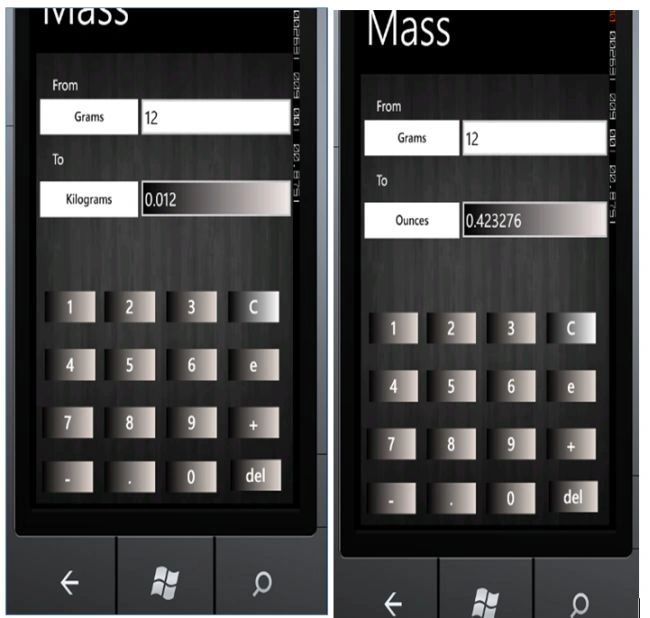
The following ListBox will be shown when we click on the From and To Units:
Step 2
After that we will use two classes, one for the Mass List and the other is MassUnit. These files are basically used to fill the ListBox. First we will write the code for Mass Unit:
Here we include a .cs file (MassUnit.cs):
- public class MassUnit
- {
- public string MassUnits { get; set; }
- }
- public class MassList : List<MassUnit>
- {
- public MassList()
- {
- Add(new MassUnit { MassUnits = "Grams" });
- Add(new MassUnit { MassUnits = "Kilograms" });
- Add(new MassUnit { MassUnits = "Metric tonnes" });
- Add(new MassUnit { MassUnits = "Short ton" });
- Add(new MassUnit { MassUnits = "Long ton" });
- Add(new MassUnit { MassUnits = "Pounds" });
- Add(new MassUnit { MassUnits = "Ounces" });
- }
- }
After that we will write the following code to fill the ListBox in the Mass.xaml.cs page like this:
- public Mass()
- {
- InitializeComponent();
- FillMassBox();
- }
- private void FillMassBox()
- {
- lstFrom.ItemsSource = new MassList();
- lstTo.ItemsSource = new MassList();
- }
Now we will write the code for our From ListBox:
- private void lstFrom_SelectionChanged(object sender, SelectionChangedEventArgs e)
- {
- MainGrid.Visibility = Visibility.Visible;
- FromGrid.Visibility = Visibility.Collapsed;
- if (txtFrom.Text == "")
- {
- txtError.Visibility = Visibility.Visible;
- }
- else
- {
- if (lstFrom.SelectedIndex.Equals(0))
- {
- btnLstFrom.Content = "Grams";
- }
- if (lstFrom.SelectedIndex.Equals(1))
- {
- btnLstFrom.Content = "Kilograms";
- }
- if (lstFrom.SelectedIndex.Equals(2))
- {
- btnLstFrom.Content = "Metric tonnes";
- }
- if (lstFrom.SelectedIndex.Equals(3))
- {
- btnLstFrom.Content = "Short ton";
- }
- if (lstFrom.SelectedIndex.Equals(4))
- {
- btnLstFrom.Content = "Long ton";
- }
- if (lstFrom.SelectedIndex.Equals(5))
- {
- btnLstFrom.Content = "Pounds";
- }
- if (lstFrom.SelectedIndex.Equals(6))
- {
- btnLstFrom.Content = "Ounces";
- }
- if (txtResult.Text == "")
- {
- txtResult.Text = "1";
- }
- // Grams //
- if ((btnLstFrom.Content.Equals("Grams") && (btnLstTo.Content.Equals("Grams"))))
- {
- if (txtFrom.Text.Contains('.'))
- {
- txtResult.Text = txtFrom.Text;
- }
- else
- {
- txtResult.Text = txtFrom.Text;
- }
- }
- if ((btnLstFrom.Content.Equals("Grams") && (btnLstTo.Content.Equals("Kilograms"))))
- {
- txtResult.Text = Convert.ToString(Convert.ToDouble(txtFrom.Text) * 0.001);
- }
- if ((btnLstFrom.Content.Equals("Grams") && (btnLstTo.Content.Equals("Metric tonnes"))))
- {
- txtResult.Text = Convert.ToString(Convert.ToDouble(txtFrom.Text) * 0.000001);
- }
- if ((btnLstFrom.Content.Equals("Grams") && (btnLstTo.Content.Equals("Short ton"))))
- {
- txtResult.Text = Convert.ToString(Convert.ToDouble(txtFrom.Text) * 0.000001);
- }
- if ((btnLstFrom.Content.Equals("Grams") && (btnLstTo.Content.Equals("Long ton"))))
- {
- txtResult.Text = Convert.ToString(Convert.ToDouble(txtFrom.Text) * 9.84e-07);
- }
- if ((btnLstFrom.Content.Equals("Grams") && (btnLstTo.Content.Equals("Pounds"))))
- {
- txtResult.Text = Convert.ToString(Convert.ToDouble(txtFrom.Text) * 0.002205);
- }
- if ((btnLstFrom.Content.Equals("Grams") && (btnLstTo.Content.Equals("Ounces"))))
- {
- txtResult.Text = Convert.ToString(Convert.ToDouble(txtFrom.Text) * 0.035273);
- }
- }
- }
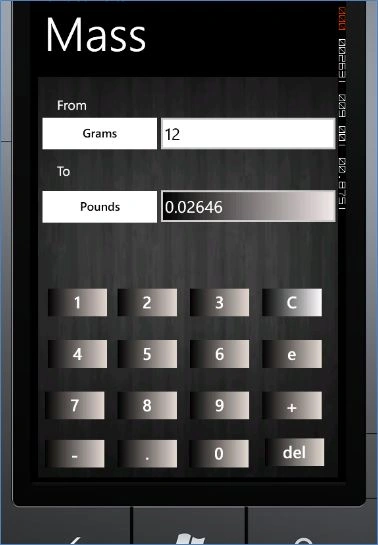
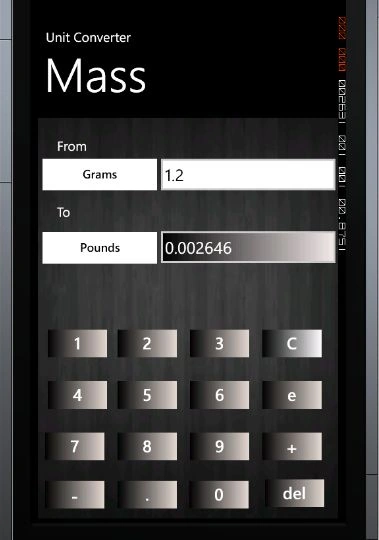
the output will be:


Step 5
Now we will write the code for the To ListBox:
- private void lstTo_SelectionChanged(object sender, SelectionChangedEventArgs e)
- {
- MainGrid.Visibility = Visibility.Visible;
- ToGrid.Visibility = Visibility.Collapsed;
- if (txtFrom.Text == "")
- {
- txtError.Visibility = Visibility.Visible;
- }
- else
- {
- txtError.Visibility = Visibility.Collapsed;
- if (lstTo.SelectedIndex.Equals(0))
- {
- btnLstTo.Content = "Grams";
- //txtLstTo.Text = "Millimeters";
- if (btnLstFrom.Content.Equals("Grams"))
- {
- txtResult.Text = txtFrom.Text;
- }
- if (btnLstFrom.Content.Equals("Kilograms"))
- {
- txtResult.Text = Convert.ToString(Convert.ToDouble(txtFrom.Text) * 1000);
- }
- if (btnLstFrom.Content.Equals("Metric tonnes"))
- {
- txtResult.Text = Convert.ToString(Convert.ToDouble(txtFrom.Text) * 1000000);
- }
- if (btnLstFrom.Content.Equals("Short ton"))
- {
- txtResult.Text = Convert.ToString(Convert.ToDouble(txtFrom.Text) * 907200);
- }
- if (btnLstFrom.Content.Equals("Long ton"))
- {
- txtResult.Text = Convert.ToString(Convert.ToDouble(txtFrom.Text) * 1016000);
- }
- if (btnLstFrom.Content.Equals("Pounds"))
- {
- txtResult.Text = Convert.ToString(Convert.ToDouble(txtFrom.Text) * 453.6);
- }
- if (btnLstFrom.Content.Equals("Ounces"))
- {
- txtResult.Text = Convert.ToString(Convert.ToDouble(txtFrom.Text) * 28);
- }
- }
- // Kilograms //
- if (lstTo.SelectedIndex.Equals(1))
- {
- btnLstTo.Content = "Kilograms";
- //txtLstTo.Text = "Millimeters";
- if (btnLstFrom.Content.Equals("Grams"))
- {
- txtResult.Text = Convert.ToString(Convert.ToDouble(txtFrom.Text) * 0.001);
- }
- if (btnLstFrom.Content.Equals("Kilograms"))
- {
- txtResult.Text = txtFrom.Text;
- }
- if (btnLstFrom.Content.Equals("Metric tonnes"))
- {
- txtResult.Text = Convert.ToString(Convert.ToDouble(txtFrom.Text) * 1000);
- }
- if (btnLstFrom.Content.Equals("Short ton"))
- {
- txtResult.Text = Convert.ToString(Convert.ToDouble(txtFrom.Text) * 907.2);
- }
- if (btnLstFrom.Content.Equals("Long ton"))
- {
- txtResult.Text = Convert.ToString(Convert.ToDouble(txtFrom.Text) * 1016);
- }
- if (btnLstFrom.Content.Equals("Pounds"))
- {
- txtResult.Text = Convert.ToString(Convert.ToDouble(txtFrom.Text) * 0.4536);
- }
- if (btnLstFrom.Content.Equals("Ounces"))
- {
- txtResult.Text = Convert.ToString(Convert.ToDouble(txtFrom.Text) * 0.02835);
- }
- }
- }
- }

Step 6
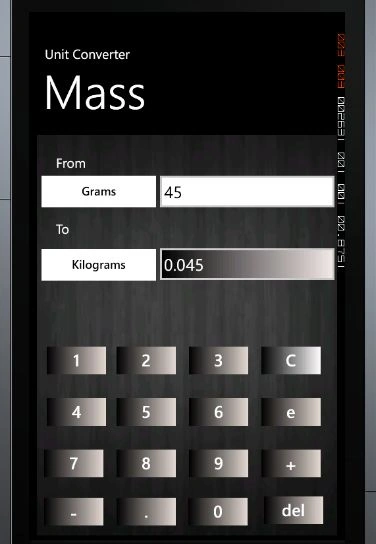
Now we write the code for the TextBox (txtFrom) in which we enter the value. So when we change the value of the TextBox the result will change depending on our From and To values like this:

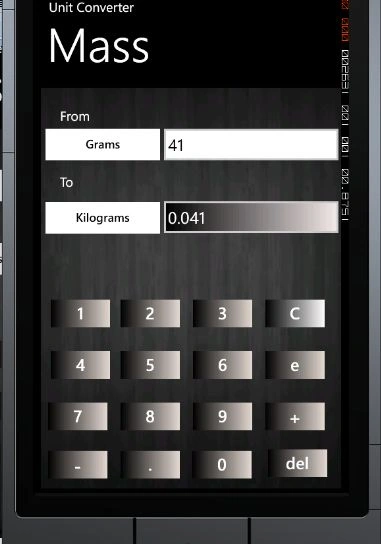
Now we will change the value in the TextBox (45 to 41). The value of the ListBox will be changed:

Now we enter some value in the empty TextBox:


So now we write the code for that:
- txtError.Visibility = Visibility.Collapsed;
- if (txtFrom.Text == "")
- {
- txtFrom.Text = "";
- txtResult.Text = "";
- }
- else
- {
- // Grams //
- if ((btnLstFrom.Content.Equals("Grams") && (btnLstTo.Content.Equals("Grams"))))
- {
- if (txtFrom.Text.Contains('.'))
- {
- txtResult.Text = txtFrom.Text;
- }
- else
- {
- txtResult.Text = txtFrom.Text;
- }
- }
- if ((btnLstFrom.Content.Equals("Grams") && (btnLstTo.Content.Equals("Kilograms"))))
- {
- txtResult.Text = Convert.ToString(Convert.ToDouble(txtFrom.Text) * 0.001);
- }
- if ((btnLstFrom.Content.Equals("Grams") && (btnLstTo.Content.Equals("Metric tonnes"))))
- {
- txtResult.Text = Convert.ToString(Convert.ToDouble(txtFrom.Text) * 0.000001);
- }
- if ((btnLstFrom.Content.Equals("Grams") && (btnLstTo.Content.Equals("Short ton"))))
- {
- txtResult.Text = Convert.ToString(Convert.ToDouble(txtFrom.Text) * 0.000001);
- }
- if ((btnLstFrom.Content.Equals("Grams") && (btnLstTo.Content.Equals("Long ton"))))
- {
- txtResult.Text = Convert.ToString(Convert.ToDouble(txtFrom.Text) * 9.84e-07);
- }
- if ((btnLstFrom.Content.Equals("Grams") && (btnLstTo.Content.Equals("Pounds"))))
- {
- txtResult.Text = Convert.ToString(Convert.ToDouble(txtFrom.Text) * 0.002205);
- }
- if ((btnLstFrom.Content.Equals("Grams") && (btnLstTo.Content.Equals("Ounces"))))
- {
- txtResult.Text = Convert.ToString(Convert.ToDouble(txtFrom.Text) * 0.035273);
- }

Michael BledigPosted Dec 12, 2021, 8:33 PM
What version of Visual Studio are you using? when I try to load your project file, I get: Mass Converter (incompatible)This project is incompatible with the current edition of Visual Studio