We are going to discuss the Unit of work design pattern with the help of a generic repository and step-by-step implementation using .NET Core 6 Web API.
Agenda
- Repository Pattern
- Unit of Work
- Step-by-step Implementation
Prerequisites
- Visual Studio 2022
- SQL Server
- .NET Core 6 SDK
Repository Pattern
- The repository pattern is used to create an abstraction layer between the data access layer and the business layer of an application
- This pattern helps to reduce code duplication and follows the DRY principle.
- It also helps to create loose coupling between multiple components, when we want to change something inside the data access layer that time does not need to change another layer where we consume that functionality.
- Separation of concern makes things easier to maintain the code.
- Implementing repository patterns helps us write unit test cases efficiently and easily.
Unit of Work
- Repository pattern helps us create an abstraction, decouple the code, and avoid redundant code.
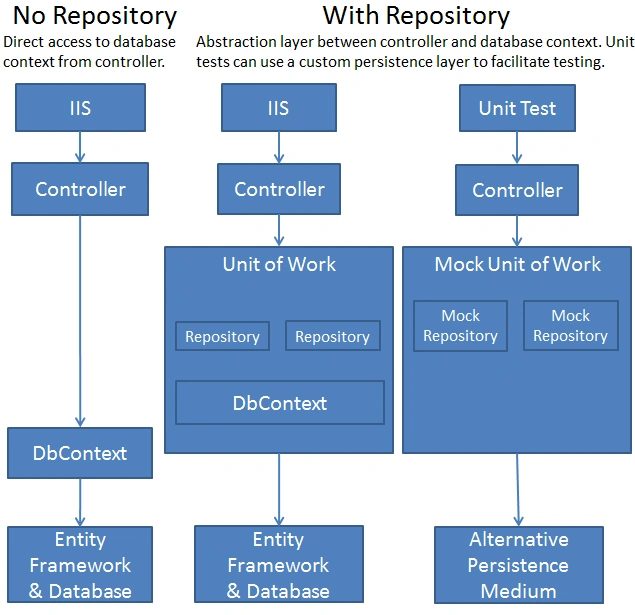
Fig- diagram is from Microsoft technical documentation
- But sometimes it could partially update data because when the application is huge and repositories share the same database context throughout the application and perform operations like insert, update and read. So, in that case, there might be a chance fail some transactions and few are executed successfully due to concurrency issues. So, for this reason, we use a unit of work to maintain the data integrity inside the application.
- Also, the unit of work manages an in-memory database when we perform CRUD operations on some entity classes as one transaction and if there are some database operations will fail then that case all operations will roll back.
- It also helps to make layers loosely coupled using dependency injection and follow Test Driven Development (TDD) principles.
Step-by-step Implementation
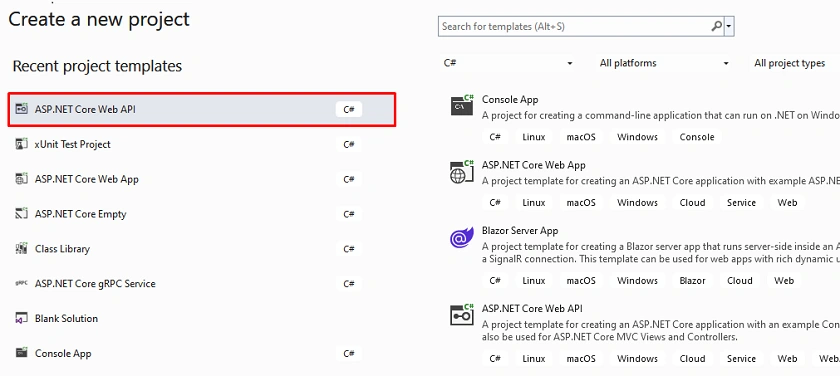
Step 1
Create a new .NET Core Web API
Step 2
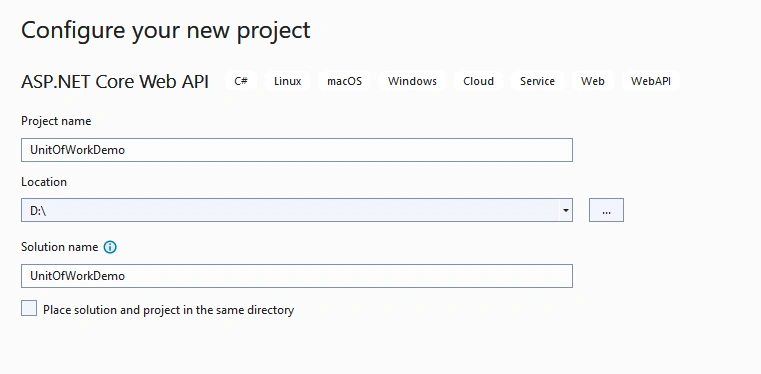
Configure your application
Step 3
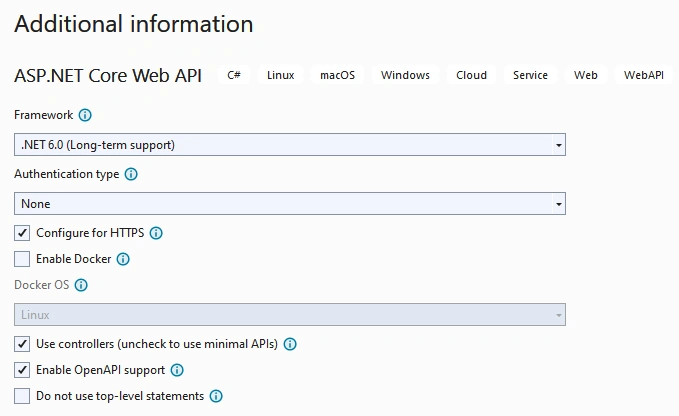
Provide some additional details
Project Structure
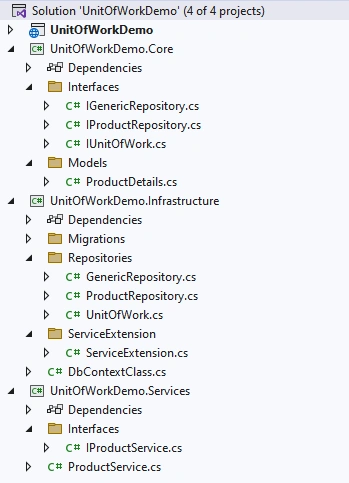
Step 4
Create three class library projects inside the main solution
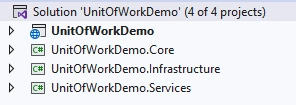
Step 5
Next, add one model class inside UnitOfWorkDemo.Core project and also add some interfaces.
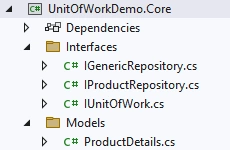
ProductDetails.cs
namespace UnitOfWorkDemo.Core.Models
{
    public class ProductDetails
    {
        public int Id { get; set; }
        public string ProductName { get; set; }
        public string ProductDescription { get; set; }
        public int ProductPrice { get; set; }
        public int ProductStock { get; set; }
    }
}
IGenericRepository.cs
using System;
using System.Collections.Generic;
using System.Linq;
using System.Text;
using System.Threading.Tasks;

namespace UnitOfWorkDemo.Core.Interfaces
{
    public interface IGenericRepository<T> where T : class
    {
        Task<T> GetById(int id);
        Task<IEnumerable<T>> GetAll();
        Task Add(T entity);
        void Delete(T entity);
        void Update(T entity);
    }
}
IProductRepository.cs
using UnitOfWorkDemo.Core.Models;

namespace UnitOfWorkDemo.Core.Interfaces
{
    public interface IProductRepository : IGenericRepository<ProductDetails>
    {
    }
}
IUnitOfWork
namespace UnitOfWorkDemo.Core.Interfaces
{
    public interface IUnitOfWork : IDisposable
    {
        IProductRepository Products { get; }

        int Save();
    }
}
Step 6
Now, we are going to add an implementation of all repositories which we created earlier and also create one DbContextClass inside that.
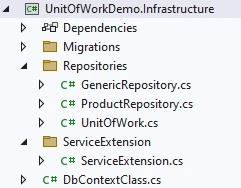
Project file
<Project Sdk="Microsoft.NET.Sdk">

  <PropertyGroup>
    <TargetFramework>net6.0</TargetFramework>
    <ImplicitUsings>enable</ImplicitUsings>
    <Nullable>enable</Nullable>
  </PropertyGroup>

  <ItemGroup>
    <ProjectReference Include="..\UnitOfWorkDemo.Core\UnitOfWorkDemo.Core.csproj" />
    <PackageReference Include="Microsoft.EntityFrameworkCore" Version="6.0.8" />
    <PackageReference Include="Microsoft.EntityFrameworkCore.SqlServer" Version="6.0.8" />
    <PackageReference Include="Microsoft.EntityFrameworkCore.Tools" Version="6.0.8" />
  </ItemGroup>

</Project>
GenericRepository.cs
using Microsoft.EntityFrameworkCore;
using System;
using System.Collections.Generic;
using System.Linq;
using System.Text;
using System.Threading.Tasks;
using UnitOfWorkDemo.Core.Interfaces;

namespace UnitOfWorkDemo.Infrastructure.Repositories
{
    public abstract class GenericRepository<T> : IGenericRepository<T> where T : class
    {
        protected readonly DbContextClass _dbContext;

        protected GenericRepository(DbContextClass context)
        {
            _dbContext = context;
        }

        public async Task<T> GetById(int id)
        {
            return await _dbContext.Set<T>().FindAsync(id);
        }

        public async Task<IEnumerable<T>> GetAll()
        {
            return await _dbContext.Set<T>().ToListAsync();
        }

        public async Task Add(T entity)
        {
            await _dbContext.Set<T>().AddAsync(entity);
        }

        public void Delete(T entity)
        {
            _dbContext.Set<T>().Remove(entity);
        }

        public void Update(T entity)
        {
            _dbContext.Set<T>().Update(entity);
        }
    }
}
ProductRepository.cs
using UnitOfWorkDemo.Core.Interfaces;
using UnitOfWorkDemo.Core.Models;

namespace UnitOfWorkDemo.Infrastructure.Repositories
{
    public class ProductRepository : GenericRepository<ProductDetails>, IProductRepository
    {
        public ProductRepository(DbContextClass dbContext) : base(dbContext)
        {

        }
    }
}
UnitOfWork.cs
using System;
using System.Collections.Generic;
using System.Linq;
using System.Text;
using System.Threading.Tasks;
using UnitOfWorkDemo.Core.Interfaces;

namespace UnitOfWorkDemo.Infrastructure.Repositories
{
    public class UnitOfWork : IUnitOfWork
    {
        private readonly DbContextClass _dbContext;
        public IProductRepository Products { get; }

        public UnitOfWork(DbContextClass dbContext,
                            IProductRepository productRepository)
        {
            _dbContext = dbContext;
            Products = productRepository;
        }

        public int Save()
        {
            return _dbContext.SaveChanges();
        }

        public void Dispose()
        {
            Dispose(true);
            GC.SuppressFinalize(this);
        }

        protected virtual void Dispose(bool disposing)
        {
            if (disposing)
            {
                _dbContext.Dispose();
            }
        }

    }
}
DbContextClass.cs
using Microsoft.EntityFrameworkCore;
using Microsoft.Extensions.Configuration;
using System;
using System.Collections.Generic;
using System.Linq;
using System.Text;
using System.Threading.Tasks;
using UnitOfWorkDemo.Core.Models;

namespace UnitOfWorkDemo.Infrastructure
{
    public class DbContextClass : DbContext
    {
        public DbContextClass(DbContextOptions<DbContextClass> contextOptions) : base(contextOptions)
        {

        }

        public DbSet<ProductDetails> Products { get; set; }
    }
}
After that, create one extension class which we are used to registering DI services, and configure that inside the Program.cs file inside the root project.
ServiceExtension.cs
using Microsoft.EntityFrameworkCore;
using Microsoft.Extensions.Configuration;
using Microsoft.Extensions.DependencyInjection;
using System;
using System.Collections.Generic;
using System.Linq;
using System.Text;
using System.Threading.Tasks;
using UnitOfWorkDemo.Core.Interfaces;
using UnitOfWorkDemo.Infrastructure.Repositories;

namespace UnitOfWorkDemo.Infrastructure.ServiceExtension
{
    public static class ServiceExtension
    {
        public static IServiceCollection AddDIServices(this IServiceCollection services, IConfiguration configuration)
        {
            services.AddDbContext<DbContextClass>(options =>
            {
                options.UseSqlServer(configuration.GetConnectionString("DefaultConnection"));
            });
            services.AddScoped<IUnitOfWork, UnitOfWork>();
            services.AddScoped<IProductRepository, ProductRepository>();

            return services;
        }
    }
}
Next, add migration and update the database inside the infrastructure project using following command
add-migration “v1”
update-database
Step 5
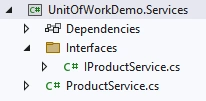
Next, create a product service inside the Services project which we inject and consume inside the main controller
IProductService.cs
using System;
using System.Collections.Generic;
using System.Linq;
using System.Text;
using System.Threading.Tasks;
using UnitOfWorkDemo.Core.Models;

namespace UnitOfWorkDemo.Services.Interfaces
{
    public interface IProductService
    {
        Task<bool> CreateProduct(ProductDetails productDetails);

        Task<IEnumerable<ProductDetails>> GetAllProducts();

        Task<ProductDetails> GetProductById(int productId);

        Task<bool> UpdateProduct(ProductDetails productDetails);

        Task<bool> DeleteProduct(int productId);
    }
}
ProductService.cs
using System;
using System.Collections.Generic;
using System.Linq;
using System.Text;
using System.Threading.Tasks;
using UnitOfWorkDemo.Core.Interfaces;
using UnitOfWorkDemo.Core.Models;
using UnitOfWorkDemo.Services.Interfaces;

namespace UnitOfWorkDemo.Services
{
    public class ProductService : IProductService
    {
        public IUnitOfWork _unitOfWork;

        public ProductService(IUnitOfWork unitOfWork)
        {
            _unitOfWork = unitOfWork;
        }

        public async Task<bool> CreateProduct(ProductDetails productDetails)
        {
            if (productDetails != null)
            {
                await _unitOfWork.Products.Add(productDetails);

                var result = _unitOfWork.Save();

                if (result > 0)
                    return true;
                else
                    return false;
            }
            return false;
        }

        public async Task<bool> DeleteProduct(int productId)
        {
            if (productId > 0)
            {
                var productDetails = await _unitOfWork.Products.GetById(productId);
                if (productDetails != null)
                {
                    _unitOfWork.Products.Delete(productDetails);
                    var result = _unitOfWork.Save();

                    if (result > 0)
                        return true;
                    else
                        return false;
                }
            }
            return false;
        }

        public async Task<IEnumerable<ProductDetails>> GetAllProducts()
        {
            var productDetailsList = await _unitOfWork.Products.GetAll();
            return productDetailsList;
        }

        public async Task<ProductDetails> GetProductById(int productId)
        {
            if (productId > 0)
            {
                var productDetails = await _unitOfWork.Products.GetById(productId);
                if (productDetails != null)
                {
                    return productDetails;
                }
            }
            return null;
        }

        public async Task<bool> UpdateProduct(ProductDetails productDetails)
        {
            if (productDetails != null)
            {
                var product = await _unitOfWork.Products.GetById(productDetails.Id);
                if(product != null)
                {
                    product.ProductName= productDetails.ProductName;
                    product.ProductDescription= productDetails.ProductDescription;
                    product.ProductPrice= productDetails.ProductPrice;
                    product.ProductStock= productDetails.ProductStock;

                    _unitOfWork.Products.Update(product);

                    var result = _unitOfWork.Save();

                    if (result > 0)
                        return true;
                    else
                        return false;
                }
            }
            return false;
        }
    }
}
Step 6
Now, we create Products Controller inside the main project and add multiple endpoints.
ProductsController.cs
using Microsoft.AspNetCore.Mvc;
using UnitOfWorkDemo.Core.Models;
using UnitOfWorkDemo.Services.Interfaces;

namespace UnitOfWorkDemo.Controllers
{
    [Route("api/[controller]")]
    [ApiController]
    public class ProductsController : ControllerBase
    {
        public readonly IProductService _productService;
        public ProductsController(IProductService productService)
        {
            _productService = productService;
        }

        /// <summary>
        /// Get the list of product
        /// </summary>
        /// <returns></returns>
        [HttpGet]
        public async Task<IActionResult> GetProductList()
        {
            var productDetailsList = await _productService.GetAllProducts();
            if(productDetailsList == null)
            {
                return NotFound();
            }
            return Ok(productDetailsList);
        }

        /// <summary>
        /// Get product by id
        /// </summary>
        /// <param name="productId"></param>
        /// <returns></returns>
        [HttpGet("{productId}")]
        public async Task<IActionResult> GetProductById(int productId)
        {
            var productDetails = await _productService.GetProductById(productId);

            if (productDetails != null)
            {
                return Ok(productDetails);
            }
            else
            {
                return BadRequest();
            }
        }

        /// <summary>
        /// Add a new product
        /// </summary>
        /// <param name="productDetails"></param>
        /// <returns></returns>
        [HttpPost]
        public async Task<IActionResult> CreateProduct(ProductDetails productDetails)
        {
            var isProductCreated = await _productService.CreateProduct(productDetails);

            if (isProductCreated)
            {
                return Ok(isProductCreated);
            }
            else
            {
                return BadRequest();
            }
        }

        /// <summary>
        /// Update the product
        /// </summary>
        /// <param name="productDetails"></param>
        /// <returns></returns>
        [HttpPut]
        public async Task<IActionResult> UpdateProduct(ProductDetails productDetails)
        {
            if (productDetails != null)
            {
                var isProductCreated = await _productService.UpdateProduct(productDetails);
                if (isProductCreated)
                {
                    return Ok(isProductCreated);
                }
                return BadRequest();
            }
            else
            {
                return BadRequest();
            }
        }

        /// <summary>
        /// Delete product by id
        /// </summary>
        /// <param name="productId"></param>
        /// <returns></returns>
        [HttpDelete("{productId}")]
        public async Task<IActionResult> DeleteProduct(int productId)
        {
            var isProductCreated = await _productService.DeleteProduct(productId);

            if (isProductCreated)
            {
                return Ok(isProductCreated);
            }
            else
            {
                return BadRequest();
            }
        }
    }
}
Also, add a database connection string inside the appsetting.json file
{
  "Logging": {
    "LogLevel": {
      "Default": "Information",
      "Microsoft.AspNetCore": "Warning"
    }
  },
  "ConnectionStrings": {
    "DefaultConnection": "Data Source=DESKTOP;Initial Catalog=UnitOfWorkDemoDB;User Id=sa;Password=database;"
  }
}
After that, register some services inside the Program class
using UnitOfWorkDemo.Infrastructure.ServiceExtension;
using UnitOfWorkDemo.Services;
using UnitOfWorkDemo.Services.Interfaces;

var builder = WebApplication.CreateBuilder(args);

// Add services to the container.
builder.Services.AddDIServices(builder.Configuration);
builder.Services.AddScoped<IProductService, ProductService>();

builder.Services.AddControllers();
// Learn more about configuring Swagger/OpenAPI at https://aka.ms/aspnetcore/swashbuckle
builder.Services.AddEndpointsApiExplorer();
builder.Services.AddSwaggerGen();

var app = builder.Build();

// Configure the HTTP request pipeline.
if (app.Environment.IsDevelopment())
{
    app.UseSwagger();
    app.UseSwaggerUI();
}

app.UseHttpsRedirection();

app.UseAuthorization();

app.MapControllers();

app.Run();
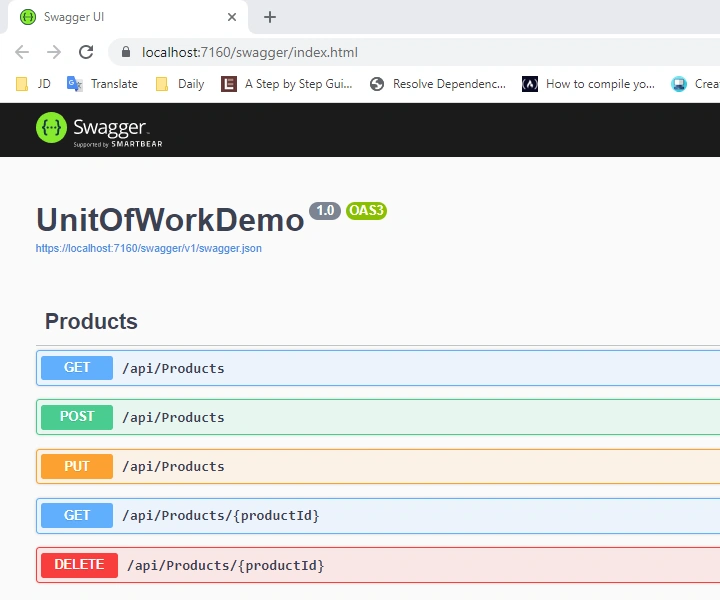
Finally, run the project
Conclusion
Here we discussed repository patterns and units of work. Also, the benefits and step-by-step implementation using .NET Core Web API.
Happy Coding!


Khaja MoizuddinPosted May 12, 2024, 7:03 AM
This article doesn't seems to be step by step, DbContextClass is declared before its actual implementation, and also there is no proper code explanation in this article, its difficult for beginners to understand.
Oluwasegun OmoladePosted May 4, 2023, 7:18 AM
How do you add more model to this pattern, say a user model or order
Tanval ValPosted Apr 21, 2023, 1:27 PM
Hi , I am facing issue while doing post call that is while calling create and add new. on the line where --- await _unitOfWork.Employees.Add(employeeDetails); The key value at position 0 of the call to 'DbSet<Employee>.Find' was of type 'Employee', which does not match the property type of 'int'. Please be advised.
Mayur PadhiyarPosted Mar 10, 2023, 8:33 AM
When doing the migration step it throws an error that required Microsoft.EntityFrameworkCore.Design by main project solution.
Serhii KryvetsPosted Dec 7, 2022, 1:49 PM
Quite good article - nice simple start - but there are few problems even here | | Lack of Async suffixes in names | | await _dbContext.Set<T>().ToListAsync(); | should be | await _dbContext.Set<T>().AsEnumerable(); | no reason to convert to list | | public int Save() { return _dbContext.SaveChanges(); } | should be | public async Task SaveAsync() { await _context.SaveChangesAsync().ConfigureAwait(false); } | | Implementation of UnitOfWork - very-very bad - this is antipattern | - adding new repo requires change of UoW class | - this breaks SOLID | - UoW should only save and share dbContext accross repos | UnitOfWork | public sealed class UnitOfWork : IUnitOfWork { private bool _disposed; private DbContext _context; public UnitOfWork(DbContext context) { _context = context; } public DbContext DatabaseContext => _context; public async Task CommitAsync() { await _context.SaveChangesAsync().ConfigureAwait(false); } public void Dispose() { Dispose(true); GC.SuppressFinalize(this); } private void Dispose(bool disposing) { if (_disposed) return; if (disposing) { if (_context != null) { _context.Dispose(); _context = null; } } _disposed = true; } ~UnitOfWork() { Dispose(false); } } | | GenericRepository | private readonly DbContext _databaseContext; protected GenericRepository(IUnitOfWork unitOfWork) { if (unitOfWork == null) { throw new ArgumentNullException(nameof(unitOfWork)); } _databaseContext = unitOfWork.DatabaseContext; } | | Regarding Krzysztof K comments | - repos is antipatternt - you are not right | - repos allow to separate DAL from BL | - get by X, get by Y - you also not right | public async Task<IEnumerable<TResult>> GetAsync<TResult>(Expression<Func<TEntity, bool>> filter, Expression<Func<TEntity, TResult>> select, params Expression<Func<TEntity, object>>[] includes) | public async Task<TResult> FindAsync<TResult>(Expression<Func<TEntity, bool>> filter, Expression<Func<TEntity, TResult>> select, params Expression<Func<TEntity, object>>[] includes) | - 2 methods - 1 to get 1 element and 1 to get list | - BL decides what to do | - enough for standard cases | - for complex you need to create custom complex LINQ in repo - in this way you separate DAL from BL
MatzePosted Dec 6, 2022, 9:40 AM
What I find interesting about the demo is that it attempts to showcase the repository- and unit-of-work pattern to reduce repetitive code and strengthen DRY, but the opposite is true. To the worse, it also showcases a bunch of anti-patterns and the unnecessary implementation of idioms. For instance, there are empty (marker) interfaces, unwanted exposure of received dependencies, potentially broken service lifetimes (cruel relation of the IUnitOfWork and IDisposable), and a structure somewhat different from what is conventionally used with the .NET Core ecosystem. Furthermore, the module boundaries are not aligned with the layers (not even sure if layering was intended). If you came here to learn about the mentioned patterns, you better consult other sources and hopefully not blindly derive a project template from the provided sample code. Just my two cents.
Krzysztof KPosted Dec 6, 2022, 8:51 AM
Using Repository Pattern together with EF is antipattern. EF is already a repository, but implements IQuerable interface. Like that, you are building another layer over EF loosing all powers of it like linq and IQuerable with sorting, quering, aggregating and joining capabilities. With large application you will end up with huge repository with hundreds of function getting eg. person by name another by id, another by something else and another joined with related records and so on...
Innocent LangaPosted Dec 5, 2022, 8:13 AM
You are a star man, this is precisely what i was looking for.
Vishal YelvePosted Dec 4, 2022, 11:29 AM
Nicely explained