

Here’s the definition from Mocha website that gives a high level overview of Mocha framework.
Mocha is a feature-rich JavaScript test framework running on Node.js and the browser, making asynchronous testing simple and fun. Mocha tests run serially, allowing for flexible and accurate reporting, while mapping uncaught exceptions to the correct test cases.
I am using Sublime editor for developing Node.js applications. Feel free to use any text editor which you are comfortable.
Before working on the demo app, make sure to install Node.js. Please refer the following article for installing Node.js on Windows platform.
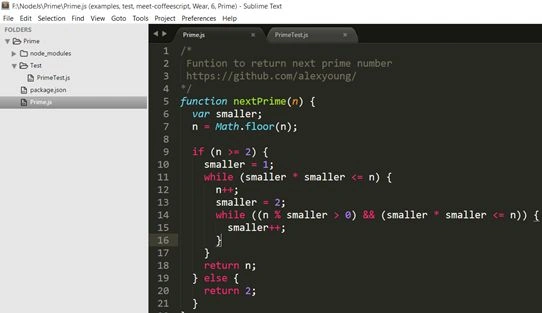
Here’s our Prime number application on Sublime editor. You can see below, there is a folder for node_module where all the application specific packages are installed. Packages are installed by running the following command “npm install <packagename>”.
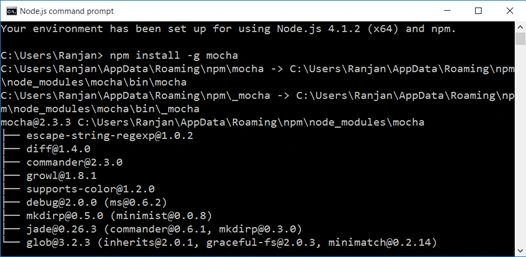
We are going to run the following command to install Mocha as a global package so all the applications can make use of.
Create a JavaScript file named “Prime.js” and code a function to check whether the number is prime or not. Do not forget to export the same, else we won’t be able to access the function.
- /*
- Function to test whether a number is prime
- https://blog.nraboy.com/2015/04/determine-if-a-number-is-prime-using-javascript/
- */
- function isPrime(value) {
- for(var i = 2; i < value; i++) {
- if(value % i === 0) {
- return false;
- }
- }
- return value > 1;
- }
- module.exports.isPrime = isPrime;
- var assert = require('assert')
- , isPrime = require('../Prime').isPrime;
- describe('isPrime Demo', function()
- {
- it('isPrime should return true for prime number. Else it should return false', function()
- {
- assert.equal(false, isPrime(1));
- assert.equal(true, isPrime(3));
- });
- });
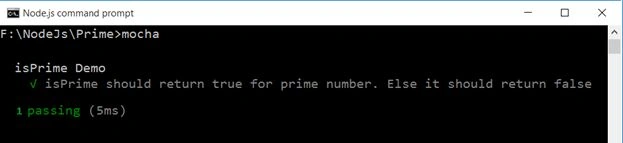
In order to run the unit test, all you have to do is, open up command prompt and navigate to the folder where you have Prime demo. Key in “mocha” and hit enter; that should trigger running the unit test and you should be able to see the unit test result either pass or fail.
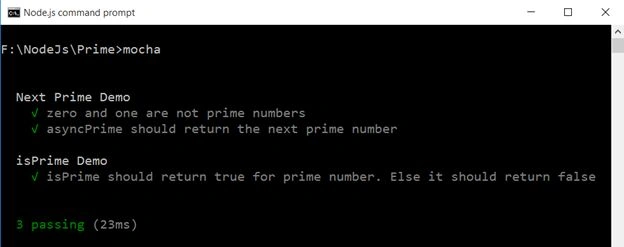
Next, we are going to write few more prime number related functionalities and perform unit test on the same. The following is the code snippet, reused from the following github.
We have two methods, both are used to calculate or return the next prime number. The only difference between the two is, one run synchronously and the other asynchronously using setTimeout function.
- /*
- Function to return next prime number
- https://github.com/alexyoung/
- */
- function nextPrime(n) {
- var smaller;
- n = Math.floor(n);
- if (n >= 2) {
- smaller = 1;
- while (smaller * smaller <= n) {
- n++;
- smaller = 2;
- while ((n % smaller > 0) && (smaller * smaller <= n)) {
- smaller++;
- }
- }
- return n;
- } else {
- return 2;
- }
- }
- function asyncPrime(n, fn) {
- setTimeout(function() {
- fn(nextPrime(n));
- }, 10);
- }
- describe('Next Prime Demo', function ()
- {
- it('zero and one are not prime numbers', function ()
- {
- assert.equal(2, nextPrime(0));
- assert.equal(2, nextPrime(1));
- });
- it('asyncPrime should return the next prime number', function(done)
- {
- asyncPrime(128, function(n) {
- assert.equal(131, n, 'Wrong number');
- done();
- });
- });
- });
There are other useful functions or hooks of mocha that you can use within your unit tests. Please take a look into the following articles for more understanding on the same.
Conclusion
Mocha is a tiny and easy to use powerful unit testing framework that one can use to perform unit or integrated tests. In this article, we have seen a tiny bit of mocha’s feature. There’s a lot one can learn and use.
Sr KarthigaPosted Feb 14, 2016, 7:53 AM
Good one sir
Mukesh KumarPosted Oct 21, 2015, 12:37 AM
Great Work
Harshad PansuriyaPosted Oct 20, 2015, 3:20 AM
Nice one
Sibeesh VenuPosted Oct 20, 2015, 3:06 AM
Nice Share
Nilesh JadavPosted Oct 20, 2015, 1:15 AM
Great Work sir!
Mohammed IbrahimPosted Oct 19, 2015, 10:02 PM
nice
Vinodh NarayananPosted Oct 19, 2015, 1:08 PM
Good one....
Priyaranjan K SPosted Oct 19, 2015, 12:41 PM
Good One