Introduction
TDD (Test-driven development) is a developmental approach in which TFD (Test-First Development) is there, and where we write a test before writing a code for the production. TDD is also supported by both MVC and Web API. In this article, we will learn how to write unit test case for Web API controller.
Following is a very common pattern in Unit Testing.
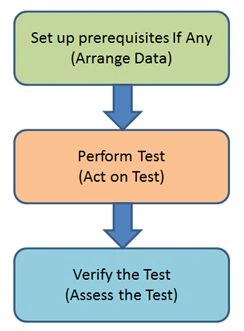
In the first step, we will have to create test data for testing, using a mock or stub object. This approach will minimize the number of dependencies.
Set up Unit test project
We have an option to create a Unit test project when we create a Web API project. When we create a unit test project with a web API project, Visual Studio IDE automatically adds Web API project reference to the unit test project.
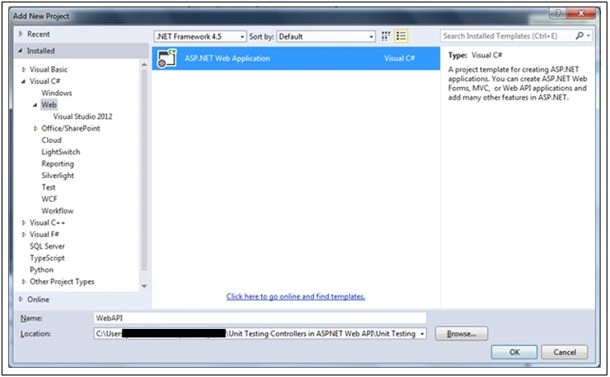
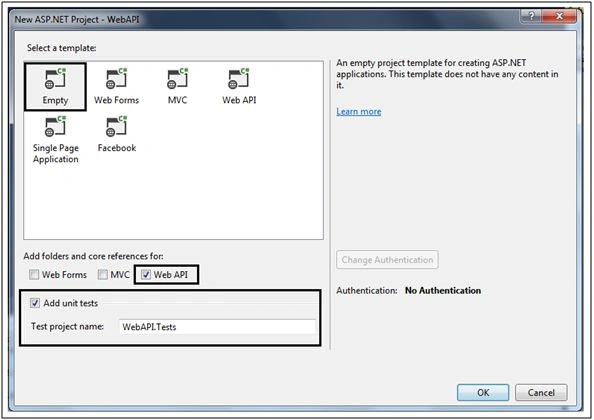
Apart from this, we need to install the following packages to the Unit test project, because our unit test is dependent on these.
- Microsoft.AspNet.WebApi
- EntityFramework (if applicable)
If we want to inject any dependency to the controller, we can use the mock object. Using the following NuGet command, we can download a mock library.

Unit Test which returns HttpResponseMessage
In this following example, I have GET method in the controller and want to write a Unit test for this API method.
Controller Code
- namespace WebAPI.Controllers
- {
- using System.Linq;
- using System.Net;
- using System.Net.Http;
- using System.Web.Http;
- using WebAPI.Models;
- publicclassEmployeeController: ApiController
- {
- EntityModel context = newEntityModel();
- publicHttpResponseMessage Get(int id)
- {
- var employee = context.Employees.Where(p => p.Id == id)
- .FirstOrDefault();
- if (employee == null)
- {
- return Request.CreateResponse(HttpStatusCode.NotFound);
- }
- return Request.CreateResponse(HttpStatusCode.OK, employee);
- }
-
-
-
-
- protectedoverridevoid Dispose(bool disposing)
- {
- context.Dispose();
- base.Dispose(disposing);
- }
- }
- }
- namespace WebAPI.Tests
- {
- using Microsoft.VisualStudio.TestTools.UnitTesting;
- using System.Net.Http;
- using System.Web.Http;
- using WebAPI.Controllers;
- using WebAPI.Models;
- [TestClass]
- publicclassEmployeeUnitTest
- {
- [TestMethod]
- publicvoid EmployeeGetById()
- {
-
- var controller = newEmployeeController();
- controller.Request = newHttpRequestMessage();
- controller.Configuration = newHttpConfiguration();
-
- var response = controller.Get(1);
-
- Employee employee;
- Assert.IsTrue(response.TryGetContentValue < Employee > (out employee));
- Assert.AreEqual("Jignesh", employee.Name);
- }
- }
- }
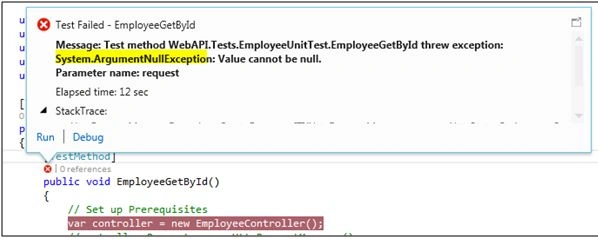
Here we set "Request" and "Configuration" on the controller. It is very important otherwise the Unit test will throw ArgumentNullException or InvalidOperationException.
 Unit Test which returns IHttpActionResult
Web API also supports
IHttpActionResult as a return type. This interface has a pre-defined command pattern to create HTTP responses. This approach is quite easy because IHttpActionResult creates the response. It is very easy to write a Unit test case with this approach because we can skip many things which are required for the setup
HttpResponseMessage.
Example
In the following example, I created the controller called "DepartmentController" and GET method in the controller class. This method returns OK (department) when department is found in the database.
Controller Code
- namespace WebAPI.Controllers
- {
- using System.Linq;
- using System.Web.Http;
- using WebAPI.Models;
- publicclassDepartmentController: ApiController
- {
- EntityModel context = newEntityModel();
- publicIHttpActionResult Get(int id)
- {
- Department department = context.Departments.Where(p => p.DepartmentId == id)
- .FirstOrDefault();
- if (department == null)
- {
- return NotFound();
- }
- return Ok(department);
- }
- publicIHttpActionResult Post(Department department)
- {
- if (department != null)
- {
- context.Departments.Add(department);
- context.SaveChanges();
- return CreatedAtRoute("DefaultApi", new
- {
- id = department.DepartmentId
- }, department);
- }
- return BadRequest();
- }
- }
- }
I have written the Unit test case, which returns 200 with the response body. In this Unit test, I have GET content result, using OkNegotiatedContentResult and I check whether the return object has the same departmentId.
- namespace WebAPI.Tests
- {
- using Microsoft.VisualStudio.TestTools.UnitTesting;
- using System.Web.Http.Results;
- using WebAPI.Controllers;
- using WebAPI.Models;
- [TestClass]
- publicclassDepartmentUnitTest
- {
- [TestMethod]
- publicvoid DepartmentGetByIdSuccess()
- {
-
- var controller = newDepartmentController();
-
- var response = controller.Get(1);
- var contentResult = response asOkNegotiatedContentResult < Department > ;
-
- Assert.IsNotNull(contentResult);
- Assert.IsNotNull(contentResult.Content);
- Assert.AreEqual(1, contentResult.Content.DepartmentId);
- }
- }
- }
The following unit test is written to test the response of the action method, when the department is not found in the database.
- [TestMethod]
- publicvoid GetDepartmentNotFound()
- {
-
- var controller = newDepartmentController();
-
- IHttpActionResult actionResult = controller.Get(100);
-
- Assert.IsInstanceOfType(actionResult, typeof(NotFoundResult));
- }
In the example given above, the Post method calls CreatedAtRoute for returning a Status code 201. In the following Unit test, I have verified that the action sets the correct routing value.
- [TestMethod]
- publicvoid AddDepartmentTest()
- {
-
- var controller = newDepartmentController();
- Department department = newDepartment
- {
- DepartmentName = "Test Department",
- };
-
- IHttpActionResult actionResult = controller.Post(department);
- var createdResult = actionResult asCreatedAtRouteNegotiatedContentResult < Department > ;
-
- Assert.IsNotNull(createdResult);
- Assert.AreEqual("DefaultApi", createdResult.RouteName);
- Assert.IsNotNull(createdResult.RouteValues["id"]);
- }
We can also verify the status code of the action methods.
For example, Put method return status is code 202 (Accepted), OK (200) etc.
Controller Method
- publicIHttpActionResult Put(Department department)
- {
- if (department != null)
- {
-
- return Content(HttpStatusCode.Accepted, department);
- }
- return BadRequest();
- }
- [TestMethod]
- publicvoid UpdateDepartmentTest()
- {
-
- var controller = newDepartmentController();
- Department department = newDepartment
- {
- DepartmentId = 4,
- DepartmentName = "Test Department",
- };
-
- IHttpActionResult actionResult = controller.Put(department);
- var contentResult = actionResult asNegotiatedContentResult < Department > ;
- Assert.IsNotNull(contentResult);
- Assert.AreEqual(HttpStatusCode.Accepted, contentResult.StatusCode);
- Assert.IsNotNull(contentResult.Content);
- }
Unit test is a code that helps us in verifying the expected behavior of the other code in isolation. Here “In isolation" means there is no dependency between the tests. This is a better idea to test the Application code, before it goes for quality assurance (QA).


Ramendra KumarPosted Jun 21, 2021, 3:15 PM
HI Getting Error In Test Class , That Login Failed For User Sa, Where as I Changed In Web.Config File, For Sql Express, Grid View is Populating using that Connection, so please let me know where you Setted Sa Else From Web .Config File
jubula samalPosted May 13, 2020, 4:01 PM
Superb, well described and very very helpful.
nitesh sahuPosted Jan 24, 2018, 12:57 AM
Very nice article thanks
siva kumarPosted Nov 2, 2017, 6:31 AM
HI,I have one doubt how to call paramertiezed constructor from test cases.
Jimit GandhiPosted Mar 21, 2017, 4:08 AM
Very Informative and well presented!!
Manas MohapatraPosted Mar 16, 2017, 2:24 AM
Very Informative and nicely described....
Bikesh SrivastavaPosted Sep 11, 2016, 2:45 AM
Very helpful
Santhakumar MunuswamyPosted Jun 25, 2016, 12:46 AM
Thank you for nice article
GokulPosted Jun 23, 2016, 3:12 AM
Thanks for sharing
Guest UserPosted Jun 22, 2016, 11:15 PM
*read
Guest UserPosted Jun 22, 2016, 11:15 PM
interesting to rea
kalu singh raoPosted Jun 22, 2016, 2:02 PM
Nice...
Vignesh ManiPosted Jun 21, 2016, 4:59 PM
good one
Kuppurasu NagarajPosted Jun 21, 2016, 12:39 PM
Nice Sharing..
Govind KhandelwalPosted Jun 21, 2016, 3:18 AM
Nice..
RajaPosted Jun 21, 2016, 1:32 AM
Good One...
Ravi PatelPosted Jun 21, 2016, 1:12 AM
very helpful thanks a lot
Thiruppathi RPosted Jun 21, 2016, 1:07 AM
i dont konw how can i test mvc controller,but not know ,thanks for an articles..
Debasis SahaPosted Jun 21, 2016, 12:46 AM
Good One..