

Introduction
For those who are very new to JavaScript, it is a programming language similar to any other programming language like Java, C#, Python, or PHP. Using JavaScript, we can develop any application. Before Node.js or npm came into the picture, JavaScript was able to run only in the browser, i.e., JavaScript was the only client-side scripting language but this was the picture in 2000. Today, JavaScript has evolved a lot. Today one can develop not only client side script but we can do some complex server-side script as well with very good performance.
This is possible because of one thing, that is node js. Node.js or node is a framework which we need to install on our local machine so that we can easily execute JavaScript code locally. To understand more on node.js, please visit nodejs.org. Here, you can find the latest NodeJS installer that you can easily download and install in a couple of steps.
After the node gets installed successfully, you can use node or npm command on the command prompt.
If someone is very new to JavaScript, then please go through the below links to get a good understanding of it.
- https://www.w3schools.com/js/
- https://developer.mozilla.org/bm/docs/Web/JavaScript
- https://www.tutorialspoint.com/JavaScript/
- https://nodejs.org/en/
Some background of unit testing
As per Wiki, unit testing is a software testing method by which the individual units of source code, sets of one or more computer program modules together with associated control data, usage procedures, and operating procedures, are tested to determine whether they are fit for use. In simple words, whatever functionality or code the developer has written, he/she needs to add some test cases which will validate that those lines of code are giving the right result.
JavaScript Unit testing - Now, we can move to JavaScript frameworks for unit testing like jasmine, mocha, and jest. These are not only three frameworks available but these three are very popular among many more frameworks.
Jasmine is very first we can say. To get more information, let's visit here.
First, we will create a sample and run so that we can get more information.
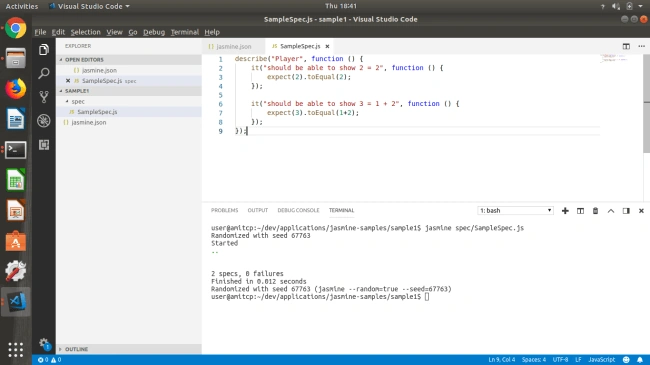
- Create a sample project
- Create a file as jasmine.json
- Create the specs folder
- Inside specs folder, create a file named SampleSpec.js
jasmine.json
- {
- "spec_dir": "spec",
- "spec_files": ["**/*[sS]pec.js"],
- "stopSpecOnExpectationFailure": false,
- "random": true
- }
SampleSpec.js
- describe("Calculator Application", function() {
- it("should be able to show 2 = 2", function() {
- expect(2).toEqual(2);
- });
- it("should be able to show 3 = 1 + 2", function() {
- expect(3).toEqual(1 + 2);
- });
- });
Run this file using the command jasmine spec/SampleSpec.js
If this command is not working, this means jasmine is not installed on your machine; so, please install that using the command npm install -g jasmine
Jasmine provides some hook to where we can store some common code or functionality that will execute before and after executing each test case.
- beforeEach(() => {
- ···})
- afterEach(() => {
- ···})
Jasmine provides the below expected conditions so that we can easily compare the expected and actual results.
- expect(true).toBe(true)
- expect(true).not.toBe(true)
- expect(a).toEqual(bar)
- expect(message).toMatch(/bar/)
- expect(message).toMatch('bar')
- expect(a.foo).toBeDefined()
- expect(a.foo).toBeUndefined()
- expect(a.foo).toBeNull()
- expect(a.foo).toBeTruthy()
- expect(a.foo).toBeFalsy()
- expect(message).toContain('hello')
- expect(pi).toBeGreaterThan(3)
- expect(pi).toBeLessThan(4)
- expect(pi).toBeCloseTo(3.1415, 0.1)
- expect(func).toThrow()
JASMINE FOR NODE.JS
Add Jasmine to your package.json.
npm install --save-dev jasmine
Initialize Jasmine in your project.
node node_modules/jasmine/bin/jasmine init
Set Jasmine as your test script in your package.json
"scripts": { "test": "jasmine" }
Run your tests
npm test
Also, Jasmine provides some commands to create the folder structure and
Create one folder sample-app
npm install -g jasmine
-g is used to globally install a node package
Init a Project
Initialize a project for Jasmine by creating a spec directory and configuration in JSON for you.
jasmine init
To develop a JavaScript application, we need an IDE. I am using Visual Studio Code a free IDE. If you don’t have, then please download and install it on your local machine.
Note that if you have installed Jasmine locally, you could still use the command line like this,
node node_modules/jasmine/bin/jasmine init
Generate example spec and source files
- jasmine examples
- Running tests
- jasmine
Using jasmine command we are able to run all test cases.
For some more information and updates please visit here.
swathi pujariPosted May 5, 2019, 10:57 AM
This is helpful article, I want CRUD operation testing framework in jasmin. can u please update about it