

Intelligent Document Processing (IDP)
Intelligent Document Processing is one of the niche technologies which combines Artificial Intelligence (AI) and Machine Learning (ML) that automates and extracts information from unstructured documents like Invoices, Receipts, Business Cards, Identity Documents, Health Insurance Cards, and US Tax W-2.
US Tax 1098, US Tax 1098 - E, and US Tax 1098 - T are in private preview. User has to request if they want to access it and other benefits.
Azure Form Recognizer Studio is one of the Applied AI services and Cognitive Services which uses Optical Character Recognition (OCR) and Machine Learning (ML) technology to identify and extract key/value pairs and table data from form documents using prebuilt models or create your custom models.
Prebuilt Models
Extracting data and information from unique documents using Prebuilt Models.
- Invoices - Extract invoice ID, customer details, vendor details, ship to, bill to, total tax, subtotal, and so on.
- Receipts - Extract time, date of the transaction, merchant information, amount of taxes, totals, and more.
- Business Cards - Extract person's name, job title, address, email, company, and phone numbers from business cards.
- Identity Documents - Extract name, expiration date, machine readable zones, and more from passports and ID cards.
- Health Insurance Cards - Extract insurer, member, prescription, group number, and more information from US health insurance cards.
- US Tax W-2 - Extract employee, employer, and wage information from US W-2 Tax Form.
- US Tax 1098 - Extract mortgage interest information from US 1098 Tax Form.
- US Tax 1098 -E - Extract student loan information from US 1098 – E Tax Form.
- US Tax 1098 -T - Extract tuition information from US Tax 1098 – T form.
- Contracts - Extract the title and signatory parties' information, including names, reference names, and addresses from contracts.
Custom Models
Train custom models to classify documents and extract text, structure, and fields from your forms or documents.
Custom extraction model – Extract specific schema from your forms and documents.
Custom classification model – Split and classify documents.
Getting Started from Azure Form Recognizer
- Log into Azure Portal
- Search for the Form Recognizer service in the search pane.
- First, provide the Azure subscription
- Create a new resource group.
- Choose the Azure region and provide a Name.
- And then choose the pricing tier.
- Finally, click the Review + Create button.
- You will get a popup message stating that Validation passed.
- Then you click create button.
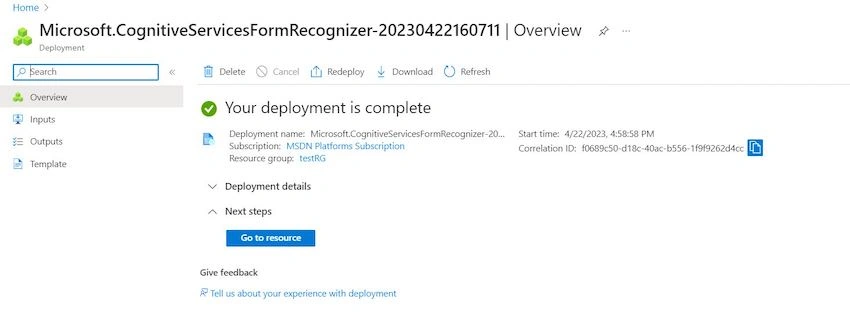
- The deployment started initialized in a minute or two it will become successful.

Once deployment succeeds, you will get the message "Your deployment is complete".


Subarta RayPosted Dec 24, 2023, 2:43 PM
Informative and engaging! This article provides valuable insights with brevity.
Naga MaheshPosted Apr 27, 2023, 2:19 PM
Thanks for sharing your grate knowledge with all us ??
Mohamed Azarudeen ZPosted Apr 27, 2023, 11:54 AM
Informative
Prathap ReddyPosted Apr 27, 2023, 8:06 AM
Awesome jana