

Introduction
In this article, I will explain how to update a record in a database using a TextBox in JavaScript.
Note: This program will work only with Internet Explorer.
First I created a database EmpDetail. I created a table in this database.
Query Code
- CREATE TABLE [dbo].[EmpSalary_Info](
- [id] [int] NULL,
- [name] [varchar](50) NULL,
- [salary] [int] NULL
- ) ON [PRIMARY]
Now insert some data into the "EmpSalary_Info" table. Then use the following procedure.
Complete Program
Update_Record.html
- <!DOCTYPE html PUBLIC "-//W3C//DTD XHTML 1.0 Transitional//EN" "http://www.w3.org/TR/xhtml1/DTD/xhtml1-transitional.dtd">
- <html xmlns="http://www.w3.org/1999/xhtml">
- <head>
- <title></title>
- <script type="text/javascript">
- function ShowAll()
- {
- var connection = new ActiveXObject("ADODB.Connection");
- var connectionstring = "Data Source=.;Initial Catalog=EmpDetail;Persist Security Info=True;User ID=sa;Password=password@123;Provider=SQLOLEDB";
- connection.Open(connectionstring);
- var rs = new ActiveXObject("ADODB.Recordset");
- rs.Open("select * from EmpSalary_Info ", connection);
- rs.MoveFirst();
- var span = document.createElement("span");
- span.style.color = "Blue";
- span.innerText = " ID " + " Name " + " Salary";
- document.body.appendChild(span);
- while (!rs.eof) {
- var span = document.createElement("span");
- span.style.color = "green";
- span.innerText = "\n " + rs.fields(0) + " | " + rs.fields(1) + " | " + rs.fields(2);
- document.body.appendChild(span);
- rs.MoveNext();
- }
- rs.close();
- connection.close();
- }
- function UpdateRecord()
- {
- var txtid = document.getElementById('txtid').value;
- var txtname = document.getElementById('txtname').value;
- if (txtid.length != 0 && txtname.length!=0) {
- var connection = new ActiveXObject("ADODB.Connection");
- var connectionstring = "Data Source=.;Initial Catalog=EmpDetail;Persist Security Info=True;User ID=sa;Password=password@123;Provider=SQLOLEDB";
- connection.Open(connectionstring);
- var rs = new ActiveXObject("ADODB.Recordset");
- rs.Open("update EmpSalary_Info set EmpName = '" + txtname + "' where EmpId=" + txtid,connection);
- alert("Update Record Successfuly");
- txtid.value = " ";
- connection.close();
- }
- else
- {
- alert("Please textbox's value");
- }
- }
- </script>
- <style type="text/css">
- #txtname
- {
- z-index: 1;
- left: 230px;
- top: 94px;
- position: absolute;
- }
- #txtid
- {
- z-index: 1;
- left: 230px;
- top: 54px;
- position: absolute;
- }
- </style>
- </head>
- <body style="height: 89px">
- <div id="show"
- style="font-size: x-large; font-weight: bold; height: 185px; color: #009999;">
- Update Employee Record<p style="font-size: medium; color: #000000;">
- Enter Employee ID
- <input id="txtid" type="text" /></p>
- <p style="font-size: medium; color: #000000;">
- Update Employee Name
- </p>
- <input id="txtname" type="text" /><p>
- <input id="ShowRecord" type="button" value="Update" onclick="UpdateRecord()"
- style="font-weight: bold" />
- <input id="showall" type="button" value="Show All Record" onclick="ShowAll()"
- style="font-weight: bold" /></p>
- </div>
- </body>
- </html>
Output 1
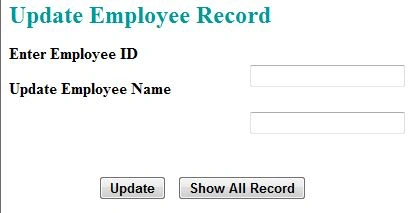
Click on the "Show All Record" button.
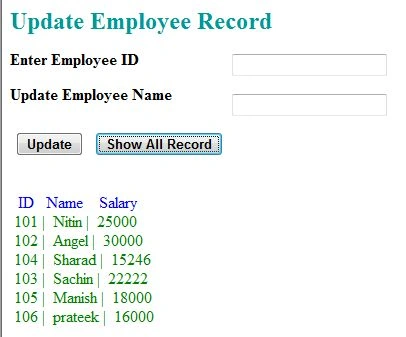
Output 2
Enter an employee id in the TextBox that you want to update in the database and then enter the new employee name in the TextBox. Then click on the "Update" button.
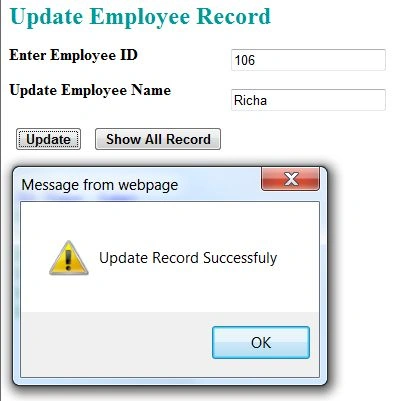
Output 3
After updating the record, click on the "Show All Record" button. You will see a record updated successfully.
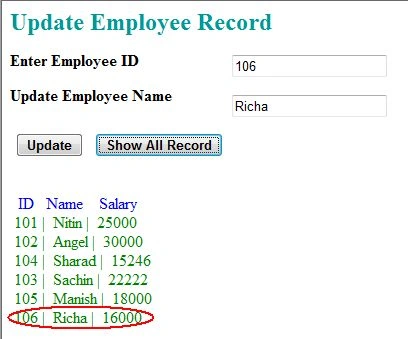
Output 4
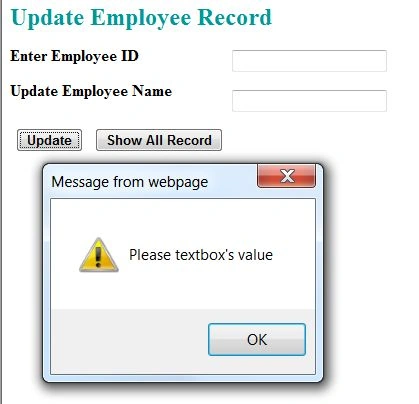
If you will click on the Update button without entering a value into the TextBox then it will show the error:
For more information, download the attached sample application.
Nitin BhardwajPosted May 20, 2013, 5:49 AM
Becoz I am working with HTML page.
Ravikumar GPosted May 20, 2013, 4:57 AM
i didn't try this , but when i do view page source, i think the connection string will be visible know?