

First create a table with the following two fields:
- id int (auto increment)
- name nvarchar(100)
Save as Test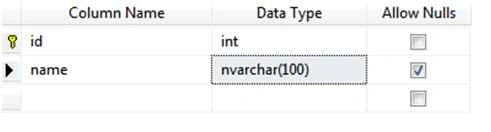
Insert some values into this new table.
The table will looks as in this: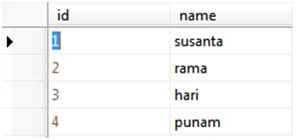
Then go to Visual Studio then go to New > Website then choose Empty Website.
Provide your website a name, if you want to change the location of your website then you can change your location.
The next step is to add a webform with the following code.
Defult.aspx
- <!DOCTYPE html>
- <html xmlns="http://www.w3.org/1999/xhtml">
- <head runat="server">
- <title></title>
- </head>
- <body>
- <form id="form1" runat="server">
- <div>
- <asp:GridView ID="GridView1" runat="server" AutoGenerateColumns="False" DataKeyNames="id" OnRowCancelingEdit="GridView1_RowCancelingEdit" OnRowDeleting="GridView1_RowDeleting" OnRowEditing="GridView1_RowEditing" OnRowUpdating="GridView1_RowUpdating">
- <Columns>
- <asp:TemplateField>
- <HeaderTemplate>
- ID
- </HeaderTemplate>
- <ItemTemplate>
- <%# Eval("id") %>
- </ItemTemplate>
- <EditItemTemplate>
- <asp:TextBox ID="TextBox1" runat="server" Text='<%# Eval("id") %>' ReadOnly="true"></asp:TextBox>
- </EditItemTemplate>
- </asp:TemplateField>
- <asp:TemplateField>
- <HeaderTemplate>
- Name
- </HeaderTemplate>
- <ItemTemplate>
- <%# Eval("name") %>
- </ItemTemplate>
- <EditItemTemplate>
- <asp:TextBox ID="TextBox2" runat="server" Text='<%# Eval("name") %>' ></asp:TextBox>
- </EditItemTemplate>
- </asp:TemplateField>
- <asp:TemplateField>
- <HeaderTemplate>
- Edit
- </HeaderTemplate>
- <ItemTemplate>
- <asp:Button ID="edit" runat="server" CommandName="Edit" formnovalidate Height="28" Text="Edit" />
- </ItemTemplate>
- <EditItemTemplate>
- <asp:Button ID="update" runat="server" CommandName="Update" formnovalidate Text="Update" />
- <asp:Button ID="cancel" runat="server" CommandName="Cancel" formnovalidate Text="Cancel"/>
- </EditItemTemplate>
- </asp:TemplateField>
- <asp:TemplateField>
- <HeaderTemplate>
- Delete
- </HeaderTemplate>
- <ItemTemplate>
- <asp:Button ID="delete" runat="server" CommandName="Delete" formnovalidate Text="Delete"/>
- </ItemTemplate>
- </asp:TemplateField>
- </Columns>
- </asp:GridView>
- <asp:Label ID="Label1" runat="server"></asp:Label>
- </div>
- </form>
- </body>
- </html>
- using System;
- using System.Collections.Generic;
- using System.Linq;
- using System.Web;
- using System.Web.UI;
- using System.Web.UI.WebControls;
- using System.Data.SqlClient;
- using System.Data;
- public partial class _Default : System.Web.UI.Page
- {
- protected void Page_Load(object sender, EventArgs e)
- {
- if(!IsPostBack)
- {
- ShowTest();
- }
- }
- protected void GridView1_RowUpdating(object sender, GridViewUpdateEventArgs e)
- {
- string index = GridView1.DataKeys[e.RowIndex].Value.ToString();
- int id = int.Parse(index);
- TextBox name = (TextBox)GridView1.Rows[e.RowIndex].FindControl("TextBox2");
- SqlConnection con = new SqlConnection(connection());
- SqlCommand cmd = new SqlCommand("update Test set name='"+name.Text+"' where id=" + id + "", con);
- con.Open();
- int i = cmd.ExecuteNonQuery();
- con.Close();
- if (i > 0)
- {
- Label1.Text = "data updated sucessfully";
- }
- else
- {
- Label1.Text = "data not updated";
- }
- GridView1.EditIndex = -1;
- ShowTest();
- }
- protected void GridView1_RowEditing(object sender, GridViewEditEventArgs e)
- {
- GridView1.EditIndex = e.NewEditIndex;
- ShowTest();
- }
- protected void GridView1_RowDeleting(object sender, GridViewDeleteEventArgs e)
- {
- string index = GridView1.DataKeys[e.RowIndex].Value.ToString();
- int id=int.Parse(index);
- SqlConnection con = new SqlConnection(connection());
- SqlCommand cmd = new SqlCommand("delete from Test where id="+id+"",con);
- con.Open();
- int i=cmd.ExecuteNonQuery();
- con.Close();
- if(i>0)
- {
- Label1.Text = "data deleted sucessfully";
- }
- else
- {
- Label1.Text = "data not deleted";
- }
- GridView1.EditIndex = -1;
- ShowTest();
- }
- protected void GridView1_RowCancelingEdit(object sender, GridViewCancelEditEventArgs e)
- {
- GridView1.EditIndex = -1;
- ShowTest();
- }
- public void ShowTest()
- {
- SqlConnection con = new SqlConnection(connection());
- SqlDataAdapter da = new SqlDataAdapter("select * from Test", con);
- DataTable dt = new DataTable();
- da.Fill(dt);
- GridView1.DataSource = dt;
- GridView1.DataBind();
- }
- public string connection()
- {
- string con = "Data Source=localhost;Initial Catalog=UsersDB;Integrated Security=True;";
- return con;
- }
- }
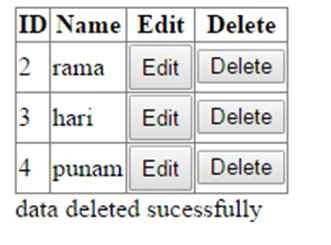
The final way it looks in the browser:
Yashwanth MuthineniPosted Aug 19, 2015, 6:21 AM
Nice Share
Santhakumar MunuswamyPosted Aug 18, 2015, 2:30 PM
Good one
Chervine BhiwooPosted Aug 18, 2015, 11:21 AM
Good work! Keep it up!
Susanta RoutPosted Aug 18, 2015, 9:01 AM
i am still a student of last year thanks for your comments friends
Sibeesh VenuPosted Aug 18, 2015, 8:16 AM
Nice Share
Rahul PrajapatPosted Aug 18, 2015, 7:30 AM
Nice one sir
RakeshPosted Aug 18, 2015, 3:21 AM
Good one
Gowtham KPosted Aug 18, 2015, 3:12 AM
Good one
Vaikesh K PPosted Aug 18, 2015, 2:08 AM
Nice share
Susanta RoutPosted Aug 18, 2015, 1:45 AM
i am a fresher in asp.net.i have done it using my simple knowledge.thanks for you valuable comments buddies
Rajeesh MenothPosted Aug 18, 2015, 12:35 AM
Good One
Mohammed IbrahimPosted Aug 18, 2015, 12:28 AM
nice