

In this article, we will look at how to update or delete a record in a database table using a GridView control.
The GridView control is a tabular databound control but sometimes it is used like a spreadsheet control. It came with ASP.NET 2.0 and is an improved version of the DataGrid control. It displays a set of data items in an HTML table. We can use this to display data from a database and edit, sort and select the data.
Database Table Structure
We are using an "EMPLOYEE" table so the "EMPLOYEE" table design is: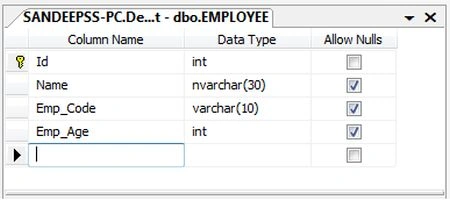
Design of GridView
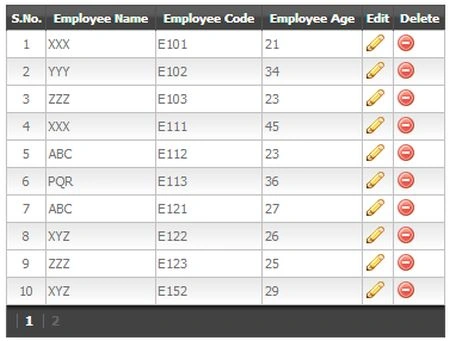
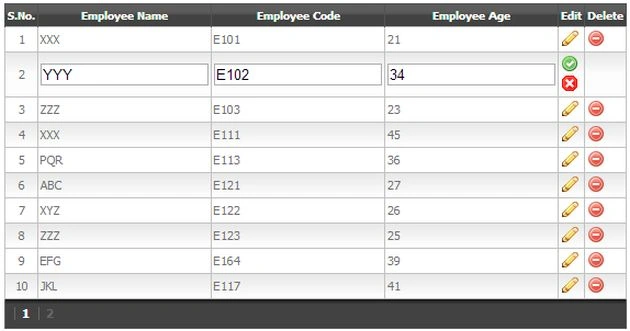
We design a GridView with which we can perform update and delete operations. Here we can update Name, Emp_Code and Emp_Age fields depending on the Id field of the "EMPLOYEE" table.
- <asp:GridView ID="gvEmployee" runat="server"
- AutoGenerateColumns="False"
- DataKeyNames="Id"
- onrowcancelingedit="gvEmployee_RowCancelingEdit"
- onrowediting="gvEmployee_RowEditing"
- onrowdeleting="gvEmployee_RowDeleting"
- onrowupdating="gvEmployee_RowUpdating"
- GridLines="None"
- AllowPaging="true"
- CssClass="mGrid"
- PagerStyle-CssClass="pgr"
- AlternatingRowStyle-CssClass="alt"
- Width=40%>
- <Columns>
- <asp:TemplateField HeaderText="S.No." ItemStyle-HorizontalAlign="Center">
- <ItemTemplate>
- <%#Container.DataItemIndex+1%>
- </ItemTemplate>
- </asp:TemplateField>
- <asp:TemplateField HeaderText="Employee Name">
- <ItemTemplate>
- <%#Eval("Name")%>
- </ItemTemplate>
- <EditItemTemplate>
- <asp:TextBox ID="txtempname" runat="server" Text='<%#Eval("Name") %>'></asp:TextBox>
- </EditItemTemplate>
- </asp:TemplateField>
- <asp:TemplateField HeaderText="Employee Code">
- <ItemTemplate>
- <%#Eval("Emp_Code")%>
- </ItemTemplate>
- <EditItemTemplate>
- <asp:TextBox ID="txtempcode" runat="server" Text='<%#Eval("Emp_Code") %>'></asp:TextBox>
- </EditItemTemplate>
- </asp:TemplateField>
- <asp:TemplateField HeaderText="Employee Age">
- <ItemTemplate>
- <%#Eval("Emp_Age")%>
- </ItemTemplate>
- <EditItemTemplate>
- <asp:TextBox ID="txtempage" runat="server" Text='<%#Eval("Emp_Age") %>'></asp:TextBox>
- </EditItemTemplate>
- </asp:TemplateField>
- <asp:CommandField ShowEditButton="true" ButtonType ="Image" EditImageUrl="Image/edit.png" UpdateImageUrl="Image/accept.png"
- CancelImageUrl="Image/cancel.png" HeaderText="Edit" />
- <asp:CommandField ShowDeleteButton="true" ButtonType="Image" DeleteImageUrl="Image/delete.png" HeaderText="Delete" />
- </Columns>
- </asp:GridView>
-
AutoGenerateColumns: This property accepts only a Boolean value. The default value is true. When we set it to False, the BoundField objects are not created automatically; we will create the fields manually. When we set it to True then all table fields are retrieved by the SQL query or Stored Procedure and also bound the with GridView and we get all field columns in the GridView with their records as well as manual records.
-
DataKeyNames: This property associates a value with each row in the GridView. Here we can assign the name of a single database column or more than one column. When we assign more than one database column then they are specified separated by commas. It represents datakey values. By this we uniquely identifiy records in GridView rows. Here we are using the "Id" field of the EMPLOYEE table; that field does not display in the GridView but this field value is used to access the table by row and can perform updates/deletes depending on this field value because it is the EMPLOYEE table's primary key field. Mostly it is a primary key field or unique field.
-
<Columns>: It is a collection of columns that the GridView contains. By this we can control what GridView columns are displayed, which means we can change the order of the appearance of the columns.
-
<asp:TemplateField>: Is used to add ASP.Net controls in GridView rows. One TemplateField represents one column in the GridView. It customizes the appearance of the UI in the GridView. It is useful when we are using a GridView to edit a database record.
-
<ItemTemplate>: It specifies the contents that are displayed in a TemplateField object. It displays a layout for the TemplateField.
-
<EditItemTemplate>: It also specifies contents that are displayed in a TemplateField but in EditMode.
-
Eval: It is a method that is used to display data. In this method we pass a database field name as an argument and that database field is displayed by this. This method is used when we will edit a row record otherwise we can use the Bind method.
-
<asp:CommandField>: It is a special field that displays command buttons to perform selecting, editing, inserting and deleting. Here we define the image type button so it can display an icon of the operation instead of their name.
Create SQL Connection
We need a connection with a Microsoft SQL Server database so we can access data and perform an operation on it. We define a connection in the web.config file and give a name to the connection string.
- <connectionStrings>
- <add name="connStr" connectionString="Data Source= sandeepss-PC;database=Development;user=sa;password=knowdev"/>
- </connectionStrings>
Now we access this connection string on the .cs page so we can open a connection with the relation database. We need to use two namespaces. The first one accesses the connection string and the other is for the SQL connection.
- using System.Configuration;
- using System.Data.SqlClient;
Now we define a method for opening a connection with the relation database and returns a SQL connection object depending on the connection string that is passed as a parameter of the SqlConnection class constructor.
- private SqlConnection GetConnection()
- {
- string connStr = ConfigurationManager.ConnectionStrings["connStr"].ConnectionString;
- SqlConnection con = new SqlConnection(connStr);
- con.Open();
- return con;
- }
jinto babuPosted Jan 11, 2018, 9:06 PM
Protected void GridView1_RowUpdating(object sender, GridViewUpdateEventArgs e) { int res = 0; Students objupdate = new Students(); GridViewRow row = (GridViewRow)GridView1.Rows[e.RowIndex]; TextBox txtrollno = (TextBox)row.Cells[1].Controls[0]; objupdate.Rollno = Convert.ToInt32(txtrollno.Text); objupdate.Fname = ((TextBox)GridView1.Rows[e.RowIndex].Cells[2].Controls[0]).Text; objupdate.Lname = ((TextBox)GridView1.Rows[e.RowIndex].Cells[3].Controls[0]).Text; TextBox txtclass = (TextBox)row.Cells[4].Controls[0]; objupdate.Class = Convert.ToInt32(txtclass.Text); objupdate.Address = ((TextBox)GridView1.Rows[e.RowIndex].Cells[5].Controls[0]).Text; objupdate.Div = (GridView1.Rows[e.RowIndex].FindControl("ddDiv") as DropDownList).SelectedItem.Value; RadioButtonList rbl = (RadioButtonList)GridView1.Rows[e.RowIndex].FindControl("rdoPriceRange"); objupdate.Gender = Convert.ToString( rbl.Text); res = objupdate.UpdateStudent(); if(res > 0) { GridView1.EditIndex = -1; BindData(); } }
jinto babuPosted Jan 11, 2018, 9:06 PM
Protected void GridView1_RowDeleting(object sender, GridViewDeleteEventArgs e) { int res = 0; Students objdel = new Students(); objdel.Rollno = Convert.ToInt32(GridView1.Rows[e.RowIndex].Cells[1].Text); res = objdel.DeleteStudent(); if(res > 0) { Response.Write("delete"); BindData(); } }
Rohan ChavdaPosted Dec 16, 2016, 1:26 PM
Hey Sandeep ! , i'm getting error while updating a row , it says : Index was out of range. Must be non-negative and less than the size of the collection.Parameter name: index ,at this line :int id = Convert.ToInt32(gvEmployee.DataKeys[e.RowIndex].Value.ToString()); , help me out pls .
Krishnendu ChakrabortyPosted Sep 10, 2014, 10:48 AM
how i will find gridview rowdetail in modalpopup using rowcommand
Krishnendu ChakrabortyPosted Sep 10, 2014, 10:47 AM
how i will get the gridview roedetail in modalpopup
sheshdhar mishraPosted Aug 30, 2014, 12:41 PM
i m getting following error: Object reference not set to an instance of an object.,how to solve it
Sandeep Singh ShekhawatPosted Nov 18, 2013, 8:08 PM
Welcome dear sogand gh
sogand ghPosted Nov 18, 2013, 1:49 AM
thanks :)
Sandeep Singh ShekhawatPosted Sep 25, 2013, 11:13 AM
Thanks Dear @Anurag and @Ketan...
ketan italiyaPosted Sep 25, 2013, 9:29 AM
nice work thanks.
Anurag SarkarPosted Sep 10, 2013, 2:54 AM
Great Sir.
Sandeep Singh ShekhawatPosted Sep 9, 2013, 11:20 AM
Thanks @Joxin, When we start stored procedure name with prefix sp then it checks in system database first after that checks in user defined database so I used _sp_ for performance improvement.
Joxin StanlyPosted Sep 9, 2013, 10:57 AM
Hi Sandeep , overall a nice article but the naming convention for stored proc's starts with _sp_ ...i think it is better to avoid such names..
RAGHUNANDAN YADAVPosted Sep 9, 2013, 8:52 AM
sir please may i have download link of this all attached programs i am beginner !i found all use full commands here .
DarpanPosted Feb 17, 2013, 11:46 AM
how to update using dropdownlist with loading value from sql server database pls!