

Introduction
Many of you must have come across the issue “An update conflict has occurred and you must re-try this action” and it is suggested to remove the file system cache on the front-end servers. There are many articles to show how to do this manually. But here I will show you how to resolve it using a PowerShell script.
Cause for this issue
This issue occurs if the contents of the file system cache on the front-end servers are newer than the contents of the configuration database.
Resolution
To resolve this issue, clear the file system cache on all servers in the server Farm on which the Windows SharePoint Services Timer service is running. This can be done manually, but consider a large Farm where the administrator needs to login to each of the servers to perform the activity manually. It is time-consuming and people can make mistakes. PowerShell becomes handy here.
The following procedure can resolve the issue:
- Stop the SharePoint timer service
- Take a backup of the system cache files before deleting it
- Delete the XML files from the cache folder
- Reset the cache.ini file to the value 1
- Start the SharePoint timer service
Now I will explain how to perform the preceding tasks using a PowerShell script.
Stop SharePoint timer service
The following piece of code stops the SharePoint timer service:
- Function StopSPTimerServicesInFarm([Microsoft.SharePoint.Administration.SPFarm]$farm)
- {
- Write-Host ""
- foreach($server in $farm.Servers)
- {
- foreach($instance in $server.ServiceInstances)
- {
- # If the server has the timer service then stop the service
- if($instance.TypeName -eq $timerServiceInstanceName)
- {
- [string]$serverName = $server.Name
- Write-Host "Stop " $timerServiceName " service on server: " $serverName -fore yellow
- $service = Get-WmiObject -ComputerName $serverName Win32_Service -Filter "DisplayName='$timerServiceName'"
- $serviceInternalName = $service.Name
- sc.exe \\$serverName stop $serviceInternalName > $null
- # Wait until this service has actually stopped
- write-host "Waiting for '$timerServiceName' service on server: " $serverName " to be stopped" -fore yellow
- do
- {
- Start-Sleep 1
- Write-Host -foregroundcolor DarkGray -NoNewLine "."
- $service = Get-WmiObject -ComputerName $serverName Win32_Service -Filter "DisplayName='$timerServiceName'"
- }
- while ($service.State -ne "Stopped")
- write-host " '$timerServiceName' service on server: " $serverName " stopped successfully" -fore green
- break;
- }
- }
- }
- Write-Host ""
- }
The following piece of code backs up the config cache files before deleting it:
- Function BackupSPConfigFiles([Microsoft.SharePoint.Administration.SPFarm]$farm)
- {
- write-host ""
- write-host "Backup SP config cache files" -fore yellow
- foreach($server in $farm.servers)
- {
- foreach($instance in $server.ServiceInstances)
- {
- if($instance.TypeName -eq $timerServiceInstanceName)
- {
- $ServerName = $server.name
- $FolderName = $servername + "SPConfigCacheBackup"
- write-host "Creating a folder to hold the backup files" -fore magenta
- write-host "Checking whether the folder aleady exist"
- if(Test-path $scriptbase\$FolderName)
- {
- write-host "Folder already exists and the script is deleting it......"
- remove-item $scriptbase\$FolderName -recurse -confirm:$false
- write-host "Existing folder deleted" -fore green
- }
- else
- {
- write-host "Folder does not exist"
- }
- New-Item $scriptbase\$FolderName -type directory
- write-host "New folder created to hold the backup files" -fore magenta
- write-host "Backup of SP config files for the server " $serverName " started ...... " -fore yellow
- $path = "\\" + $serverName + "\c$\ProgramData\Microsoft\SharePoint\Config"
- Copy-Item $path -Destination $scriptbase\$FolderName -recurse
- write-host "SP config cache files backed up for the server " $serverName " Sucessfully..." -fore green
- }
- }
- }
- write-host "SP config caches files are backed up" -fore green
- write-host ""
- }
The following piece of code deletes the XML files:
- Function DeletingXMLFiles([Microsoft.SharePoint.Administration.SPFarm]$farm)
- {
- Write-host ""
- write-host "Deleting SP config cache XML files from each server in the farm" -fore yellow
- $path = ""
- foreach($server in $farm.servers)
- {
- foreach($instance in $server.ServiceInstances)
- {
- if($instance.TypeName -eq $timerServiceInstanceName)
- {
- $serverName = $server.Name
- write-host "Deleting SP config cache files from the server " $servername -fore magenta
- $path = "\\" + $serverName + "\c$\ProgramData\Microsoft\SharePoint\Config\*-*\*.xml"
- remove-item -path $path -force
- write-host "SP config cache files deleted on the server " $servername -fore magenta
- break
- }
- }
- }
- write-host "SP config cache XML files from each server in the farm is deleted successfully......" -fore green
- write-host ""
- }
The following piece of code resets the timer cache:
- Function ResetTimerCache([Microsoft.SharePoint.Administration.SPFarm]$farm)
- {
- write-host ""
- write-host "Reseting the value of timer cache to 1" -fore yellow
- $path = ""
- foreach($server in $farm.servers)
- {
- foreach($instance in $server.ServiceInstances)
- {
- if($instance.TypeName -eq $timerServiceInstanceName)
- {
- $serverName = $server.Name
- write-host "Reseting the value of timer cache file in server " $serverName -fore magenta
- $path = "\\" + $serverName + "\c$\ProgramData\Microsoft\SharePoint\Config\*-*\cache.ini"
- Set-Content -path $path -Value "1"
- write-host "Value of timer cache file in server " $serverName " is resetted to 1" -fore magenta
- break
- }
- }
- }
- write-host "The value of timer cache is resetted to 1 in all the SP servers in the farm" -fore green
- write-host ""
- }
- Function StartSPTimerServicesInFarm([Microsoft.SharePoint.Administration.SPFarm]$farm)
- {
- Write-Host ""
- foreach($server in $farm.Servers)
- {
- foreach($instance in $server.ServiceInstances)
- {
- # If the server has the timer service then stop the service
- if($instance.TypeName -eq $timerServiceInstanceName)
- {
- [string]$serverName = $server.Name
- Write-Host "Start " $timerServiceName " service on server: " $serverName -fore yellow
- $service = Get-WmiObject -ComputerName $serverName Win32_Service -Filter "DisplayName='$timerServiceName'"
- $serviceInternalName = $service.Name
- sc.exe \\$serverName start $serviceInternalName > $null
- # Wait until this service starts running
- write-host "Waiting for " $timerServiceName " service on server: " $serverName " to be started" -fore yellow
- do
- {
- Start-Sleep 1
- Write-Host -foregroundcolor DarkGray -NoNewLine "."
- $service = Get-WmiObject -ComputerName $serverName Win32_Service -Filter "DisplayName='$timerServiceName'"
- }
- while ($service.State -ne "Running")
- write-host $timerServiceName " service on server: " $serverName " started successfully" -fore green
- break;
- }
- }
- }
- Write-Host ""
- }
- $LogTime = Get-Date -Format yyyy-MM-dd_hh-mm
- $LogFile = ".\ClearSPConfigCachePatch-$LogTime.rtf"
- # Add SharePoint PowerShell Snapin
- if ( (Get-PSSnapin -Name Microsoft.SharePoint.PowerShell -ErrorAction SilentlyContinue) -eq $null ) {
- Add-PSSnapin Microsoft.SharePoint.Powershell
- }
- $scriptBase = split-path $SCRIPT:MyInvocation.MyCommand.Path -parent
- Set-Location $scriptBase
- #Deleting any .rtf files in the scriptbase location
- $FindRTFFile = Get-ChildItem $scriptBase\*.* -include *.rtf
- if($FindRTFFile)
- {
- foreach($file in $FindRTFFile)
- {
- remove-item $file
- }
- }
- start-transcript $logfile
- Write-host "##############Following steps will be involved################" -fore green
- write-host "Step 1 - Stop the timerservice" -fore cyan
- write-host "Step 2 - Take the backup of config cache file" -fore cyan
- write-host "Step 3 - Delete the XML files" -fore cyan
- write-host "Step 4 - Reset the cache.ini file" -fore cyan
- write-host "Step 5 - Start the SP timerservice" -fore cyan
- Write-host "##############Above steps will be involved##################" -fore green
- $global:timerServiceName = "SharePoint 2010 Timer"
- $global:timerServiceInstanceName = "Microsoft SharePoint Foundation Timer"
- # Get the local farm instance
- [Microsoft.SharePoint.Administration.SPFarm]$farm = [Microsoft.SharePoint.Administration.SPFarm]::get_Local()
- Function StopSPTimerServicesInFarm([Microsoft.SharePoint.Administration.SPFarm]$farm)
- {
- Write-Host ""
- foreach($server in $farm.Servers)
- {
- foreach($instance in $server.ServiceInstances)
- {
- # If the server has the timer service then stop the service
- if($instance.TypeName -eq $timerServiceInstanceName)
- {
- [string]$serverName = $server.Name
- Write-Host "Stop " $timerServiceName " service on server: " $serverName -fore yellow
- $service = Get-WmiObject -ComputerName $serverName Win32_Service -Filter "DisplayName='$timerServiceName'"
- $serviceInternalName = $service.Name
- sc.exe \\$serverName stop $serviceInternalName > $null
- # Wait until this service has actually stopped
- write-host "Waiting for '$timerServiceName' service on server: " $serverName " to be stopped" -fore yellow
- do
- {
- Start-Sleep 1
- Write-Host -foregroundcolor DarkGray -NoNewLine "."
- $service = Get-WmiObject -ComputerName $serverName Win32_Service -Filter "DisplayName='$timerServiceName'"
- }
- while ($service.State -ne "Stopped")
- write-host " '$timerServiceName' service on server: " $serverName " stopped successfully" -fore green
- break;
- }
- }
- }
- Write-Host ""
- }
- Function BackupSPConfigFiles([Microsoft.SharePoint.Administration.SPFarm]$farm)
- {
- write-host ""
- write-host "Backup SP config cache files" -fore yellow
- foreach($server in $farm.servers)
- {
- foreach($instance in $server.ServiceInstances)
- {
- if($instance.TypeName -eq $timerServiceInstanceName)
- {
- $ServerName = $server.name
- $FolderName = $servername + "SPConfigCacheBackup"
- write-host "Creating a folder to hold the backup files" -fore magenta
- write-host "Checking whether the folder aleady exist"
- if(Test-path $scriptbase\$FolderName)
- {
- write-host "Folder already exists and the script is deleting it......"
- remove-item $scriptbase\$FolderName -recurse -confirm:$false
- write-host "Existing folder deleted" -fore green
- }
- else
- {
- write-host "Folder does not exist"
- }
- New-Item $scriptbase\$FolderName -type directory
- write-host "New folder created to hold the backup files" -fore magenta
- write-host "Backup of SP config files for the server " $serverName " started ...... " -fore yellow
- $path = "\\" + $serverName + "\c$\ProgramData\Microsoft\SharePoint\Config"
- Copy-Item $path -Destination $scriptbase\$FolderName -recurse
- write-host "SP config cache files backed up for the server " $serverName " Sucessfully..." -fore green
- }
- }
- }
- write-host "SP config caches files are backed up" -fore green
- write-host ""
- }
- Function DeletingXMLFiles([Microsoft.SharePoint.Administration.SPFarm]$farm)
- {
- Write-host ""
- write-host "Deleting SP config cache XML files from each server in the farm" -fore yellow
- $path = ""
- foreach($server in $farm.servers)
- {
- foreach($instance in $server.ServiceInstances)
- {
- if($instance.TypeName -eq $timerServiceInstanceName)
- {
- $serverName = $server.Name
- write-host "Deleting SP config cache files from the server " $servername -fore magenta
- $path = "\\" + $serverName + "\c$\ProgramData\Microsoft\SharePoint\Config\*-*\*.xml"
- remove-item -path $path -force
- write-host "SP config cache files deleted on the server " $servername -fore magenta
- break
- }
- }
- }
- write-host "SP config cache XML files from each server in the farm is deleted successfully......" -fore green
- write-host ""
- }
- Function ResetTimerCache([Microsoft.SharePoint.Administration.SPFarm]$farm)
- {
- write-host ""
- write-host "Reseting the value of timer cache to 1" -fore yellow
- $path = ""
- foreach($server in $farm.servers)
- {
- foreach($instance in $server.ServiceInstances)
- {
- if($instance.TypeName -eq $timerServiceInstanceName)
- {
- $serverName = $server.Name
- write-host "Reseting the value of timer cache file in server " $serverName -fore magenta
- $path = "\\" + $serverName + "\c$\ProgramData\Microsoft\SharePoint\Config\*-*\cache.ini"
- Set-Content -path $path -Value "1"
- write-host "Value of timer cache file in server " $serverName " is resetted to 1" -fore magenta
- break
- }
- }
- }
- write-host "The value of timer cache is resetted to 1 in all the SP servers in the farm" -fore green
- write-host ""
- }
- Function StartSPTimerServicesInFarm([Microsoft.SharePoint.Administration.SPFarm]$farm)
- {
- Write-Host ""
- foreach($server in $farm.Servers)
- {
- foreach($instance in $server.ServiceInstances)
- {
- # If the server has the timer service then stop the service
- if($instance.TypeName -eq $timerServiceInstanceName)
- {
- [string]$serverName = $server.Name
- Write-Host "Start " $timerServiceName " service on server: " $serverName -fore yellow
- $service = Get-WmiObject -ComputerName $serverName Win32_Service -Filter "DisplayName='$timerServiceName'"
- $serviceInternalName = $service.Name
- sc.exe \\$serverName start $serviceInternalName > $null
- # Wait until this service starts running
- write-host "Waiting for " $timerServiceName " service on server: " $serverName " to be started" -fore yellow
- do
- {
- Start-Sleep 1
- Write-Host -foregroundcolor DarkGray -NoNewLine "."
- $service = Get-WmiObject -ComputerName $serverName Win32_Service -Filter "DisplayName='$timerServiceName'"
- }
- while ($service.State -ne "Running")
- write-host $timerServiceName " service on server: " $serverName " started successfully" -fore green
- break;
- }
- }
- }
- Write-Host ""
- }
- #############Calling functions################
- StopSPTimerServicesInFarm $farm
- BackupSPConfigFiles $farm
- DeletingXMLFiles $farm
- ResetTimerCache $farm
- StartSPTimerServicesInFarm $farm
- ##########################################
- write-host "SCRIPT COMPLETED" -fore cyan
- stop-transcript
Step 1: Download the script and copy it to the SharePoint server.
Step 2: Navigate to the script path.
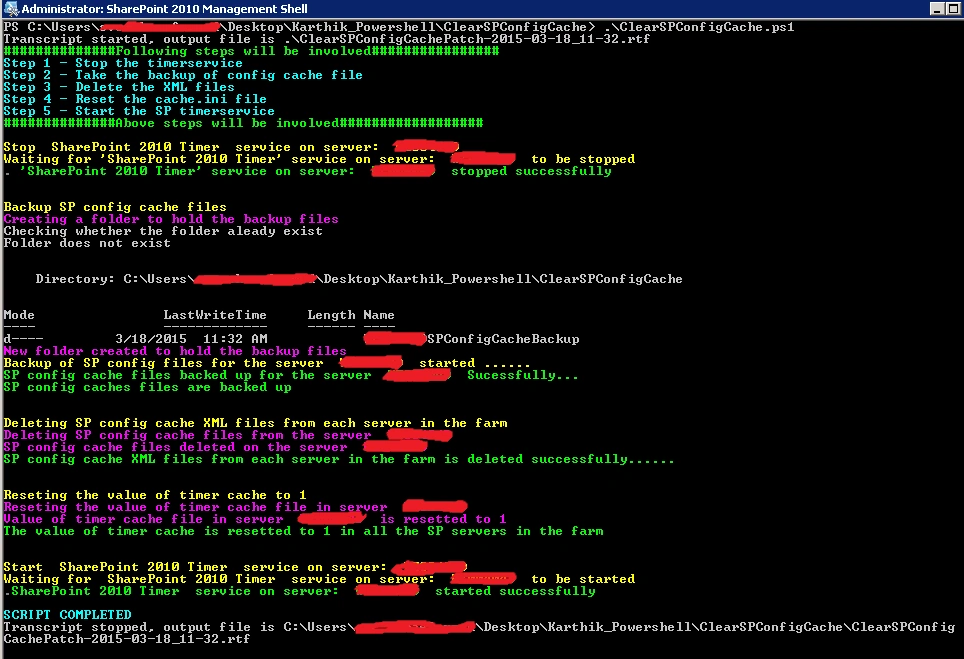
Step 3: Execute the script.
Conclusion
Thus this article explained how to troubleshoot the “Update conflict” error in SharePoint using a PowerShell script.
Pradeep SahooPosted May 18, 2016, 12:58 PM
getting some issues when runnig the script ....
Vijay SPosted Apr 30, 2015, 3:41 AM
Nice
Karthik Muthu KaruppanPosted Mar 30, 2015, 10:25 AM
Thanks Gowtham
Gowtham RajamanickamPosted Mar 27, 2015, 2:51 PM
good one...
Karthik Muthu KaruppanPosted Mar 24, 2015, 10:55 AM
Thanks Tom
Tom MohanPosted Mar 21, 2015, 12:44 PM
useful
Karthik Muthu KaruppanPosted Mar 20, 2015, 11:00 AM
Thank you Veena
Veena SardaPosted Mar 20, 2015, 12:51 AM
Indeed very useful
Karthik Muthu KaruppanPosted Mar 19, 2015, 4:23 PM
Thank you Vithal
Vithal WadjePosted Mar 19, 2015, 2:43 PM
nice one keep it up