

Security management is a prime concern in SharePoint, as the right content has to be served to the right people with the adequate permissions. SharePoint recommends assigning role-based permissions. All the permissions are managed through the roles. Roles are classified into two sections:
- Role Definition and
- Role Assignment
Role definition, also known as a permission level, is the list of permissions, associated with the role. Full control, contribute, read, design, and limited access are some of the role definitions available. Role assignment is the relationship established between users/groups and the role definition. Hence, when we assign a role programmatically, it is a two-step process: instantiation of the role definition and an implementation of the role assignment to the user/group. You can check out, how to create a new role definition in this article.
Through this article, let’s see how we can add a role to user using JavaScript object model.
Internal Implementation
- Add the reference to jQuery file.
- <script language="javascript" type="text/javascript" src="//ajax.googleapis.com/ajax/libs/jquery/1.8.1/jquery.min.js"></script>
- <script language="javascript" type="text/javascript">
- Within the document ready function, call SP.SOD.executeFunc, so as to load the on demand script SP.js . Call the main starting point function, say: addRoleToUser.
- SP.SOD.executeFunc('sp.js', 'SP.ClientContext', addRoleToUser);
- Instantiate the client context and get the Web instance.
- var clientContext = new SP.ClientContext.get_current();
- var oWeb = clientContext.get_web();
- Once the Web object is retrieved, get the group to assign the role.
- //Get current user and role definition object
- var oUser = oWeb.get_currentUser();
- Get the role definition and role definition binding collection.
- var roleDef = oWeb.get_roleDefinitions().getByName("Custom Role Definition");
- var collRoleDefinitionBinding = SP.RoleDefinitionBindingCollection.newObject(clientContext);
- Get the role assignment collection for the target Web and assign the user; the new role definition binding collection.
- collRoleDefinitionBinding.add(roleDef);
- oWeb.get_roleAssignments().add(oUser, collRoleDefinitionBinding);
- Load the client context and execute the batch, which will send the request to the Server and perform the entire JavaScript object model operation as a batch.
- clientContext.executeQueryAsync(Succeeded,Failure);
Full Code: The full code to update the role definition is shown below:
- <script language="javascript" type="text/javascript" src="//ajax.googleapis.com/ajax/libs/jquery/1.8.1/jquery.min.js"></script>
- <script language="javascript" type="text/javascript">
- $(document).ready(function() {
- SP.SOD.executeFunc('sp.js', 'SP.ClientContext', addRoleToUser);
- });
- function addRoleToUser() {
- //Get client context and web object
- var clientContext = new SP.ClientContext.get_current();
- var oWeb = clientContext.get_web();
- //Get current user and role definition object
- var oUser = oWeb.get_currentUser();
- var roleDef = oWeb.get_roleDefinitions().getByName("Custom Role Definition");
- var collRoleDefinitionBinding = SP.RoleDefinitionBindingCollection.newObject(clientContext);
- //Add the role definition to the user's role definition collection
- collRoleDefinitionBinding.add(roleDef);
- oWeb.get_roleAssignments().add(oUser, collRoleDefinitionBinding);
- //Execute the batch
- clientContext.executeQueryAsync(Succeeded, Failure);
- }
- function Succeeded() {
- console.log('The role definition has been added to the user.');
- }
- function Failure(sender, args) {
- console.log('Request failed' + args.get_message());
- }
- </script>
SharePoint Implementation
- Save the above code to a text file and save it into one of the SharePoint Libraries, say: Site Assets.
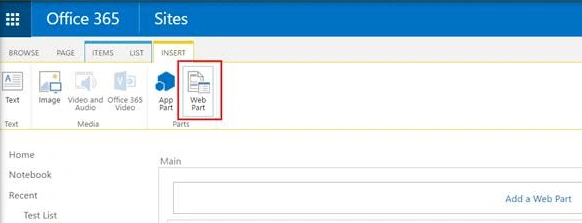
- Go to the edit settings of the SharePoint page and click on Web part from the Insert tab,
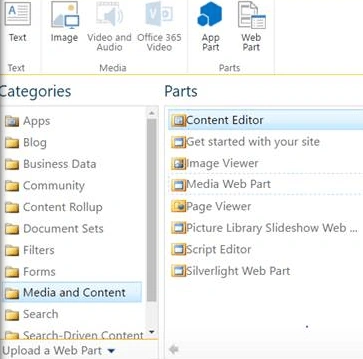
- Add Content Editor Web part.
- Click Edit Web art from Content Edit Web part. Assign the URL of the script text file and click Apply.
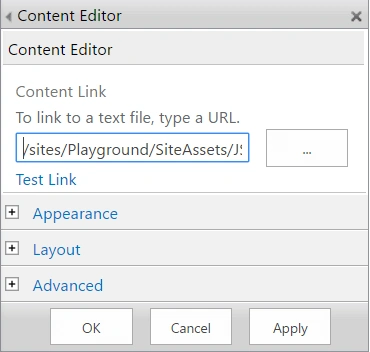
- Click Apply. This will add the new role definition to the user.
Output: Before running JSOM code in the client side Browser, the screen will look, as shown below:
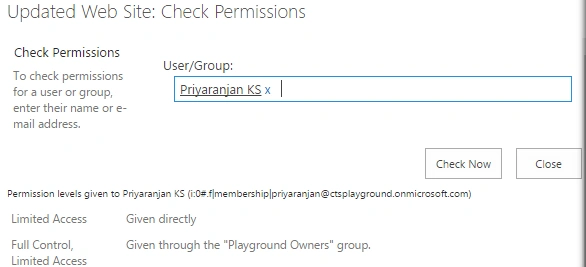
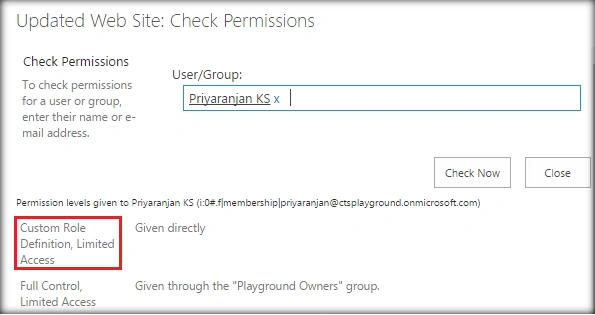
After running JSOM code in the client side browser, Custom Role Definition has been added to the user.
Summary
Thus, we have seen, how to add the new role definition to SharePoint Users. This has been tested in both SharePoint 2016 and Office 365.
Pradip RathodPosted Jul 20, 2017, 12:06 PM
Thanks for the information. What could be the possible solution to read the permission string of logged in user?
Tarun DPosted Aug 27, 2016, 11:05 AM
Nice one.. Thanks for sharing..