

Here are the steps,
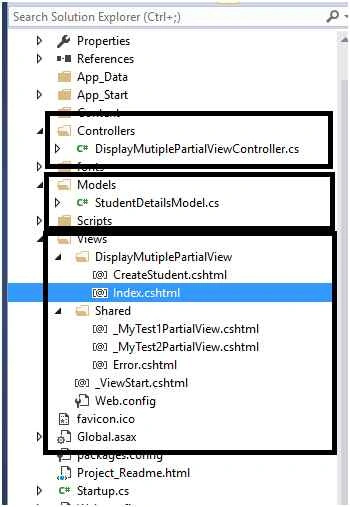
Step 1: Create the basic structure of your project, View and View Model.
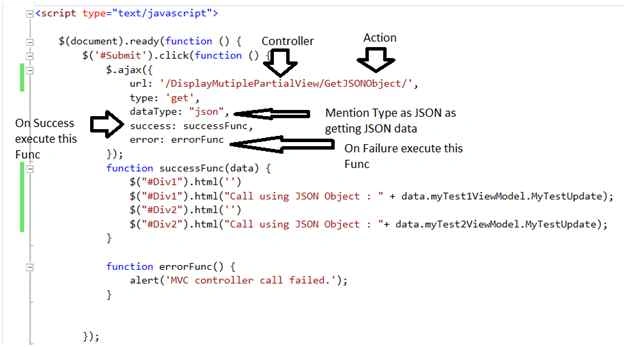
Step 2: Create Controller add Action which will return the JSON result, My Controller is as below. Note I have added action which return the JSON result.
Step 2: Create Controller add Action which will return the JSON result, My Controller is as below. Note I have added action which return the JSON result.
- using DropdownGrid.Models;
- using System;
- using System.Web.Mvc;
- namespace DropdownGrid.Controllers
- {
- public class JSONANDAJAXDemoController: Controller
- {
- public ActionResult Index()
- {
- MyMultipleUpdateViewModel obj = new MyMultipleUpdateViewModel();
- obj.myTest1ViewModel = new MyTest1ViewModel();
- obj.myTest1ViewModel.MyTestUpdate = "Test1";
- obj.myTest2ViewModel = new MyTest2ViewModel();
- obj.myTest2ViewModel.MyTestUpdate = "Test2";
- return View(obj);
- }
- public JsonResult GetJSONObject()
- {
- MyMultipleUpdateViewModel obj = new MyMultipleUpdateViewModel();
- obj.myTest1ViewModel = new MyTest1ViewModel();
- obj.myTest1ViewModel.MyTestUpdate = "Test1" + DateTime.Now.ToString();
- obj.myTest2ViewModel = new MyTest2ViewModel();
- obj.myTest2ViewModel.MyTestUpdate = "Test2" + DateTime.Now.ToString();
- return Json(obj, JsonRequestBehavior.AllowGet);
- }
- }
- }

Malleswari GPosted Dec 26, 2017, 6:21 AM
Thanks for sharing.. Helpful for beginners..
Santhakumar MunuswamyPosted Dec 23, 2015, 3:56 PM
Thanks for nice sharing
kalu singh raoPosted Dec 17, 2015, 11:51 AM
Good one
Sanjay SabariyaPosted Dec 17, 2015, 6:20 AM
nice one.
Ankur MistryPosted Dec 16, 2015, 2:16 PM
good stuff, thanks for sharing