

Introduction
This article shall describe an approach that may be used to upload any sort of a file through a web service from a Windows Forms application. The approach demonstrated does not rely on the ASP.NET file uploader control and allows the developer the opportunity to upload files programmatically and without user intervention. Such an approach may be useful for doing something like processing out the contents of a local message queue when internet service is available (if the user base were mobile and had only intermittent connectivity). The article also addresses the use of a file size check as a precursor to allowing a file to upload through the service.
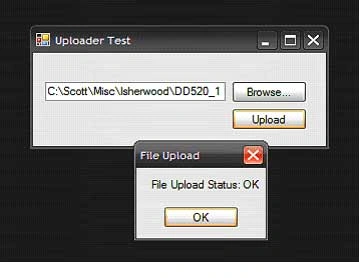
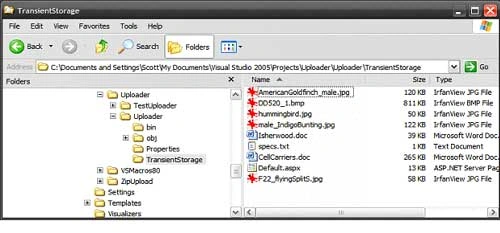
Getting Started
The solution contains two projects; one is an ASP.NET Web Service project (Uploader) and the other is a Win Forms test application (TestUploader) used to demonstrate uploading files through the web method provided in the web service project.
The web service project contains only a single web service (FileUploader) which in turn contains only a single Web Method (UploadFile). The Win Forms application contains only a single form which contains the controls (one textbox and two buttons used in conjunction with an OpenFileDialog control) and code necessary to select and upload files through the web service.
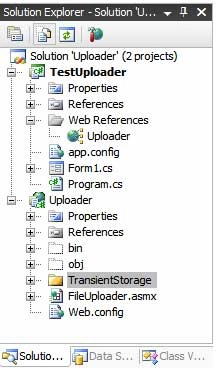
Code: Uploader Web Service Project
The Uploader web service project is an ASP.NET web service project containing a single web service called, "FileUploader"; this web service exposes a single web method called, "UploadFile".
The code for this web service begins with the following:
- using System;
- using System.Data;
- using System.Web;
- using System.Collections;
- using System.Web.Services;
- using System.Web.Services.Protocols;
- using System.ComponentModel;
- using System.IO;
- namespace Uploader
- {
- /// <summary>
- /// This web method will provide an web method to load any
- /// file onto the server; the UploadFile web method
- /// will accept the report and store it in the local file system.
- /// </summary>
- [WebService(Namespace = "http://tempuri.org/")]
- [WebServiceBinding(ConformsTo = WsiProfiles.BasicProfile1_1)]
- [ToolboxItem(false)]
- public class FileUploader : System.Web.Services.WebService
- {
The remainder of the code supplied in this class is used to define the web method used to upload the file; the code is annotated. The essential process is that, files converted to byte arrays are passed along with the full name of the file (not the path) including the extension as arguments to the UploadFile web method. The byte array is passed to a memory stream, and a file stream is opened pointing to a newly created file (named the name of the original file) within the target folder used to store the files. Once the file stream has been created, the memory stream is written into the file stream and then the memory stream and file stream are disposed of.
The web method is setup to return a string; if all goes well, the string returned will read, "OK", if not, the error message encountered will be returned to the caller.
- [WebMethod]
- public string UploadFile(byte[] f, string fileName)
- {
- // the byte array argument contains the content of the file
- // the string argument contains the name and extension
- // of the file passed in the byte array
- try
- {
- // instance a memory stream and pass the
- // byte array to its constructor
- MemoryStream ms = new MemoryStream(f);
- // instance a filestream pointing to the
- // storage folder, use the original file name
- // to name the resulting file
- FileStream fs = new FileStream(System.Web.Hosting.HostingEnvironment.MapPath
- ("~/TransientStorage/") +fileName, FileMode.Create);
- // write the memory stream containing the original
- // file as a byte array to the filestream
- ms.WriteTo(fs);
- // clean up
- ms.Close();
- fs.Close();
- fs.Dispose();
- // return OK if we made it this far
- return "OK";
- }
- catch (Exception ex)
- {
- // return the error message if the operation fails
- return ex.Message.ToString();
- }
- }
The test application contains a single Windows Form class; this form contains a text box used to display the name of the file selected for upload, a browse button used to launch an open file dialog box which is used to navigate to and select a file for upload, and an upload button which is used to pass the file to web service so that the selected file may be stored on the server.
The code for this class begins with the following:
shahab zaheerPosted Apr 12, 2021, 8:21 AM
Lots of thanks... very useful code .. .and working successfully .... thanks again...
Mark SzePosted Jul 22, 2020, 8:19 PM
Thanks, very useful and well written. Only note would be write permission required for IIS user to the TransientStorage folder (or whatever folder you want to save the file to)
pillino mallinoPosted Sep 20, 2019, 9:42 AM
Very useful, clear and completely functional, thank you so much Scott
Palak PanchalPosted Jun 15, 2018, 4:54 AM
How can i uload a file to webserver which is coming from android as multipart data?
yusra mansoorPosted Feb 18, 2016, 10:24 AM
How can we upload from android to this service?
Ashok KeshriPosted Jun 30, 2015, 7:55 AM
how uplaod csv file with handler in asp.net jquery
mehdi dehghaniPosted Jun 28, 2014, 10:11 AM
Thank you for great practice, but I get this error.-----> File Upload Status: Access to the path 'd:\HostingSpaces\online.com\test.online.com\wwwroot\TransientStorage\piaf.gif' is denied.
David KittellPosted Mar 6, 2013, 11:32 AM
Scott, this is a great article and source. Thank you for providing this resource
edge jiskraPosted Oct 4, 2012, 11:44 AM
Hi Scott - Great article and very useful. Exactly what I was looking for to upload PDF files from an XBAP application. Thank You!
ryancsharpcornerPosted May 17, 2012, 11:31 PM
Great example! Very clean and precise. Thank you for putting this together!
srini dudePosted Jul 21, 2010, 3:35 AM
donload is not working....
Michael OrteditedPosted Aug 31, 2009, 2:40 AMEdited Aug 31, 2009, 2:47 AM
I am new to the .NET. It's a very useful application. But is there a way to have on the WEB server itself an event handler OnFileUploaded, where I could process the uploaded data files? <?xml:namespace prefix = o ns = "urn:schemas-microsoft-com:office:office" /><o:p> </o:p> Thank you in advance, Best Regards, Mihael
Molivia saPosted Aug 27, 2009, 6:22 PM
Dear Scott, I was wondering is there any idea how to add more parameters in the upload file, Yes I am able to do that but the problems is, the parameters getting is from the win forms application and I seem unable to edit the window form, everytime I add textboxes it just display the same one as original. can you please help me how to chang it please thank you
overule goodyPosted Aug 21, 2009, 10:00 AM
Hi Scott, I encountered a proxy authentication error. How should i solve this ? Need this asap. Thanks
kishore krishnaPosted Jul 8, 2009, 2:23 AM
what windows doing for upload interface. same thing is possible in web service. if it is possible give me small example
kadambari baaluPosted Jul 7, 2009, 6:54 AM
This article is good to read and Practice..
omid jalaliPosted Jun 27, 2009, 3:51 AM
aa
VinPosted May 14, 2009, 4:59 PM
What if there are multiple files being uploaded? Do I have to pass a byte array for each file? Thanks.
GnanavelPosted Mar 28, 2009, 8:34 AM
Hi, While calling the Uploader from the Client PC, It says UPLOAD ERROR. NOT IMPLEMENTED 501. Can you let me know how to overcome this error. But It is running fine if I use the Same PC for Client and Server. regards, VEL
Sai GiridharPosted Dec 10, 2008, 10:03 AM
Hi Scott, I have developed the service using WCF. The upload method is marked as [OperationContract]. But when I invoke the method using a windows consumer it throws "Bad Request". Here is my trace. 08:12:02 3549 Creating the proxy to service... 08:12:02 7612 Getting the file information... 08:12:02 7612 Name of the file: Baby laugh.mp3 08:12:02 7612 Size of the file: 240745 08:12:02 7612 Opening the file... 08:12:02 7612 Size of the binary array: 240745 08:12:02 7612 Starting the upload... 08:12:03 0424 EXCEPTION: The remote server returned an unexpected response: (400) Bad Request. Can you help?
pawan bansaleditedPosted Jan 20, 2008, 10:57 AMEdited Jan 20, 2008, 11:13 AM
First of all Thank you very much for submitting such a great example for uploading files without any user intervention. I had been looking something like this thru'out the last week. I only have the problem that even if I increase the executionTimeout and maxRequestLength at both ends i.e. the Web service and the Client consuming the web service did not helped at all. In fact this is allowing only couple of hundreds of KBs data quite less than even 1MB.. Can you please help me further. Thanks a lot in advance.. Best Regards
michelPosted Jun 4, 2007, 4:15 AM
You could also use WSE which implements MTOM (Message Transmission Optimization Mechanism) that is designed to upload raw data outside the SOAP message body. This avoids converting your byte[] to a base64 encoded string on the client, and decode it on the server : this reduce both client and server loads. The only problem is that WSE required the wse runtime on both the client and the server. But, if I remember well, WSE is also able to work with a client that doesn't speak MTOM. I used it a time ago to transfer sound and images files (upload and download) throw web services. For more info : http://msdn2.microsoft.com/en-us/webservices/aa740663.aspx and http://www.w3.org/TR/soap12-mtom/
SriniPosted May 29, 2007, 2:26 PM
Scott, I am new to .net. I am testing this code in my development box I replaced the tempuri.org with localhost, but I am getting unable to connect to the server error while calling the UploadFile as listed below: string sTmp = srv.UploadFile(data, strFile); Do you have any suggestion?