It is rather a common scenario, where we might have a requirement to upload a file to a SharePoint List as an attachment. SharePoint provides the flexibility to upload multiple attachments to a specific list item, contrary to the library functionality of a single document upload per item. We can add an attachment to the list item out of the box, if the list settings permits the user to do so.

If enabled, we can attach the multiple attachments to a particular list item.
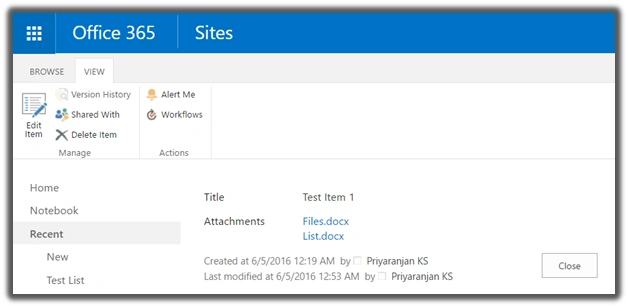
Whenever an attachment is added, internally, SharePoint creates an attachment folder for each item it is attached to. If there is no attachment for a list item, it won’t have an attachment folder. The attachment folder for a particular item will be located at the URL given below:
https://SiteURL/sites/Playground/Lists/ListName/Attachments/1
ListName is the name of the list. ‘1’ is the folder name that is created with the name as List item ID.
Let’s see how we can implement uploading of the attachments to the list item, using JavaScript Object Model,
- Add reference to jQuery file.
- <script language="javascript" type="text/javascript" src="//ajax.googleapis.com/ajax/libs/jquery/1.8.1/jquery.min.js"></script>
- <script language="javascript" type="text/javascript">
- Within the document, call ready function SP.SOD.executeFunc, so as to load the on demand script SP.js . Since we are trying to upload a file from the local machine, we will use HTML 5 input control to read the file contents and upload it as an attachment.
Call the main starting point function say: registerClick.
- SP.SOD.executeFunc('sp.js', 'SP.ClientContext', registerClick);
- Instantiate FileReader object and read the contents of the local file.
- var reader = new FileReader();
- reader.onload = function(e)
- {
- uploadFile(e.target.result, fileName);
- }
- reader.onerror = function(e)
- {
- alert(e.target.error);
- }
- reader.readAsArrayBuffer(file);
- Instantiate the client context and get the list instance.
- clientContext = new SP.ClientContext();
- var oWeb = clientContext.get_web();
-
- var oList = oWeb.get_lists().getByTitle('NewList');
- var attachmentFolder=oWeb.getFolderByServerRelativeUrl('Lists/NewList/Attachments/1');
- Convert the file contents into base64 data,
- var bytes = new Uint8Array(arrayBuffer);
- var i, length, out = '';
- for (i = 0, length = bytes.length; i < length; i += 1)
- {
- out += String.fromCharCode(bytes[i]);
- }
- var base64 = btoa(out);
- Create FileCreationInformation object, using the read file data,
- createInfo = new SP.FileCreationInformation();
- createInfo.set_content(base64);
- createInfo.set_url(fileName);
-
- attachmentFiles = attachmentFolder.get_files().add(createInfo);
- Load the client context and execute the batch, which will send the request to the Server and perform the entire JavaScript object model operations as a batch.
- clientContext.load(oList);
- clientContext.load(attachmentFiles);
- clientContext.executeQueryAsync(QuerySuccess, QueryFailure);
We can test this in SharePoint by adding it to the Content Editor Web part.
- Save the code given below to a text file and save it into one of the SharePoint libraries say: Site Assets
- <html>
- <head>
- <script language="javascript" type="text/javascript" src="//ajax.googleapis.com/ajax/libs/jquery/1.8.1/jquery.min.js"></script>
- <script language="javascript" type="text/javascript">
- var fileInput;
- $(document).ready(function()
- {
- fileInput = $("#getFile");
- SP.SOD.executeFunc('sp.js', 'SP.ClientContext', registerClick);
- });
-
- function registerClick()
- {
- //Register File Upload Click Event
- $("#addFileButton").click(readFile);
- }
- var arrayBuffer;
-
- function readFile()
- {
- //Get File Input Control and read th file name
- var element = document.getElementById("getFile");
- var file = element.files[0];
- var parts = element.value.split("\\");
- var fileName = parts[parts.length - 1];
- //Read File contents using file reader
- var reader = new FileReader();
- reader.onload = function(e) {
- uploadFile(e.target.result, fileName);
- }
- reader.onerror = function(e)
- {
- alert(e.target.error);
- }
- reader.readAsArrayBuffer(file);
- }
- var attachmentFiles, clientContext, createInfo;
-
- function uploadFile(arrayBuffer, fileName)
- {
- //Get Client Context and Web object.
- clientContext = new SP.ClientContext();
- var oWeb = clientContext.get_web();
-
- //Get list and Attachment folder where the attachment of a particular list item is stored.
- var oList = oWeb.get_lists().getByTitle('NewList');
- var attachmentFolder = oWeb.getFolderByServerRelativeUrl('Lists/NewList/Attachments/1');
-
- //Convert the file contents into base64 data
- var bytes = new Uint8Array(arrayBuffer);
- var i, length, out = '';
- for (i = 0, length = bytes.length; i < length; i += 1) {
- out += String.fromCharCode(bytes[i]);
- }
- var base64 = btoa(out);
- //Create FileCreationInformation object using the read file data
- createInfo = new SP.FileCreationInformation();
- createInfo.set_content(base64);
- createInfo.set_url(fileName);
-
- //Add the file to the list item
- attachmentFiles = attachmentFolder.get_files().add(createInfo);
-
- //Load client context and execute the batch
- clientContext.load(oList);
- clientContext.load(attachmentFiles);
- clientContext.executeQueryAsync(QuerySuccess, QueryFailure);
- }
-
- function QuerySuccess()
- {
- console.log("Attachment added successfuly ");
- }
-
- function QueryFailure(sender, args)
- {
- console.log('Request failed with error message - ' + args.get_message() + ' . Stack Trace - ' + args.get_stackTrace());
- }
- </script>
- </head>
-
- <body>
- <input id="getFile" type="file" /><br />
- <input id="addFileButton" type="button" value="Upload" />
- </body>
- <html>
- Go to the edit settings of the SharePoint page and click Web part from the Insert tab.
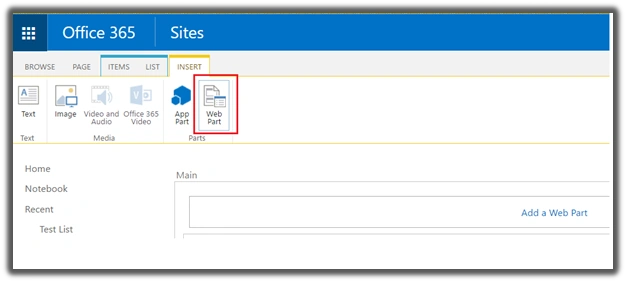
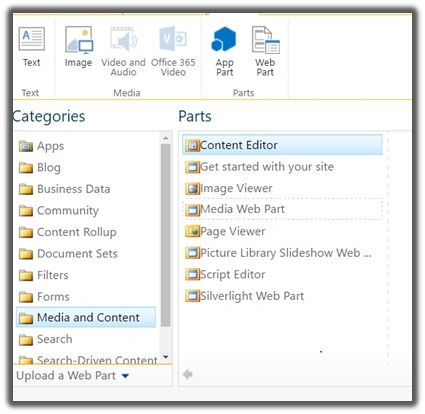
- Add Content Editor Web part.
- Click Edit Web art from Content Edit Web part. Assign the URL of the script text file and click Apply.
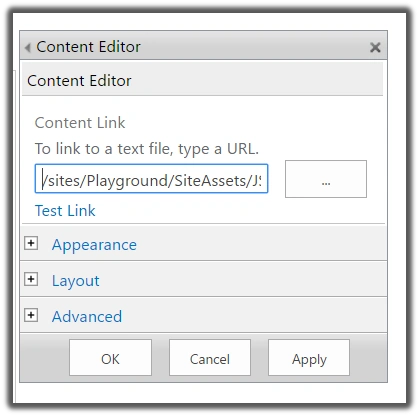
- Now Click Apply. It gives us a UI from where we can upload the file as an attachment to SharePoint Llst item.
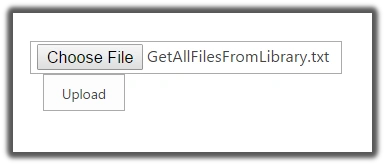
Once we browse and click on upload it will upload the attachment file to the specified List Item.
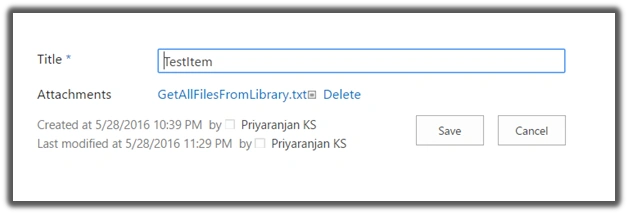
Thus, we have seen how we can upload a list item as an attachment to a SharePoint list Item.
Pitfall
However, there is a limitation for this method. JavaScript object model allows only the upload of the files, which are less than or equal to 5 MB in size. Any file above the file limit cannot be uploaded using JSOM. Instead, we will have to use REST to perform the upload, which will be covered in an upcoming article.


Bhargava ChPosted Sep 18, 2020, 10:51 AM
Filereader is not supported in few browser, could you please share the alternate code for that
sneha sutarPosted Apr 3, 2019, 3:57 AM
I'm getting this error while submitting items to the list. "Request failed with error message - File Not Found. . Stack Trace - undefined."
Luloshini SrinivasanPosted Aug 23, 2018, 8:00 AM
Tried following the same steps as in this tutorial.But,am getting an error that "SP.FileCreationInformation() is not a constructor."Kindly advice on why am getting this error?
Meester UnnonePosted Apr 18, 2018, 5:16 PM
This is not going to work on-prem in SP 2013 as Akhilesh and I have found out. We receive the same error. You need to use the REST method to directly add and attachment file without using JSOM. There is an advantage to this: you can upload far larger files this way. Just don't forget to show your users some sort of progress indicator while the file is uploading :) Use Ajax or $http in Angular and use these parameters: url: "yoursite/_api/web/lists/getbytitle('list title here')/items(12345)/AttachmentFiles/add('filename.ext') data:file data array method:POST headers: ...etc.
Akhilesh chandaliaPosted Nov 17, 2017, 5:39 AM
I have implemented exactly same way as mentioned here. Everything working fine ,I am also getting file content, but at last, control moving into "QueryFailure" with error "File Not found"
Debasis SahaPosted Jun 30, 2016, 7:24 AM
Nice one..
Santhakumar MunuswamyPosted Jun 30, 2016, 12:54 AM
Thank you for nice article
RajaPosted Jun 30, 2016, 12:29 AM
Nice...
kalu singh raoPosted Jun 29, 2016, 1:34 AM
Nice...
Kuppurasu NagarajPosted Jun 28, 2016, 2:12 PM
Nice Sharing..
Prasanna MuraliPosted Jun 28, 2016, 11:26 AM
Nice one...