

Introduction
This article explains how to upload files in the database and download files from the database in the ASP.NET Web API. This file can be a text file or an image file.
The procedure for creating the application is as in the following.
Step 1
First we create a database in SQL.
- Open SQL Server 2012.
- Select "New Query" and create the database and table.
The following commands are used for creating the database and table:
- create database Demo
- use Demo
- create table Datafile(ID int IDENTITY NOT NULL,Filerecord image NOT NULL ,Filetype varchar(50) NOT NULL,Name varchar(50) NOT NULL)
Step 2
Create the Web API application:
-
Start Visual Studio 2012.
-
From the start window select "New Project".
-
In the Template window select "Installed" -> "Visual C#" -> "Web".
-
Select "ASP.NET MVC4 Web Application" and click the "OK" button.
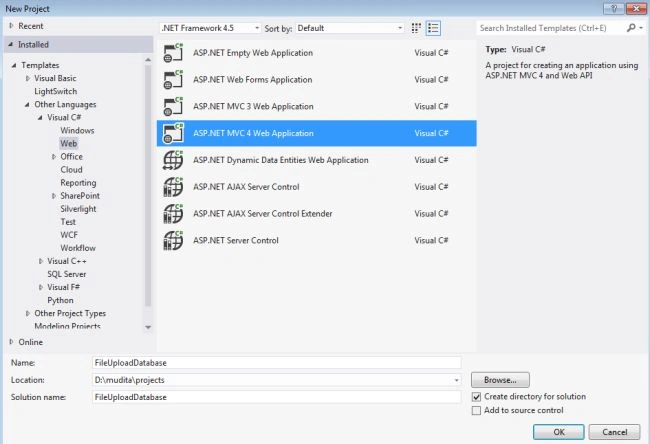
-
From the "MVC4 Project" window select "Web API".
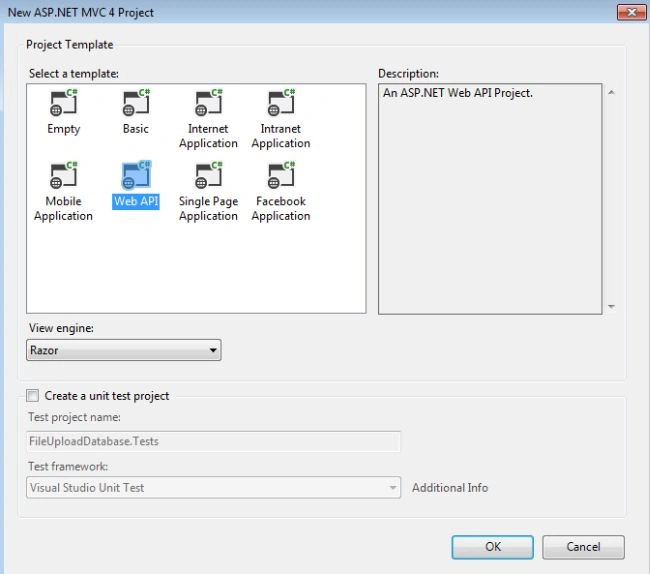
-
Click the "OK" button.
Step 3
Open the "HomeController" file and write the code for uploading the file in the database. This file exists:
-
In the "Solution Explorer".
-
Select "Controller" -> "HomeController".
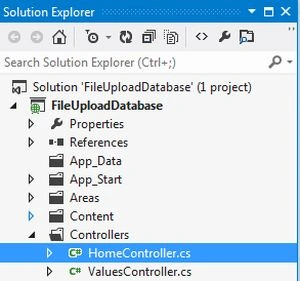
Add the following code:
- using System;
- using System.Collections.Generic;
- using System.Data.SqlClient;
- using System.IO;
- using System.Linq;
- using System.Web;
- using System.Web.Mvc;
- namespace FileUploadDatabase.Controllers
- {
- public class HomeController : Controller
- {
- public bool Infile(HttpPostedFileBase imgfile)
- {
- return (imgfile != null && imgfile.ContentLength > 0) ? true : false;
- }
- public ActionResult Index()
- {
- foreach (string Save in Request.Files)
- {
- if (!Infile(Request.Files[Save])) continue;
- string fileType = Request.Files[Save].ContentType;
- Stream file_Strm = Request.Files[Save].InputStream;
- string file_Name = Path.GetFileName(Request.Files[Save].FileName);
- int fileSize = Request.Files[Save].ContentLength;
- byte[] fileRcrd = new byte[fileSize];
- file_Strm.Read(fileRcrd, 0, fileSize);
- const string connect = @"Server=.;Database=Demo; User Id=sa; password=wintellect;";
- using (var conn = new SqlConnection(connect))
- {
- var qry = "INSERT INTO Datafile (Filerecord, Filetype, Name)VALUES (@Filerecord, @Filetype, @Name)";
- var cmd = new SqlCommand(qry, conn);
- cmd.Parameters.AddWithValue("@Filerecord", fileRcrd);
- cmd.Parameters.AddWithValue("@Filetype", fileType);
- cmd.Parameters.AddWithValue("@Name", file_Name);
- conn.Open();
- cmd.ExecuteNonQuery();
- }
- }
- return View();
- }
- public ActionResult DownloadImage()
- {
- const string connect = @"Server=.;Database=Demo;User id=sa;password=wintellect;";
- List<string> fileList = new List<string>();
- using (var con = new SqlConnection(connect))
- {
- var query = "SELECT Filerecord, Filetype,Name FROM Datafile";
- var cmd = new SqlCommand(query, con);
- con.Open();
- SqlDataReader rdr = cmd.ExecuteReader();
- while (rdr.Read())
- {
- fileList.Add(rdr["Name"].ToString());
- }
- }
- ViewBag.Images = fileList;
- return View();
- }
- public FileContentResult GetFile(int id)
- {
- SqlDataReader rdr;
- byte[] fileContent = null;
- string fileType = "";
- string file_Name = "";
- const string connect = @"Server=.;Database=Demo;User id=sa;password=wintellect;";
- using (var con = new SqlConnection(connect))
- {
- var query = "SELECT Filerecord, Filetype, Name FROM Datafile WHERE ID = @ID";
- var cmd = new SqlCommand(query, con);
- cmd.Parameters.AddWithValue("@ID", id);
- con.Open();
- rdr = cmd.ExecuteReader();
- if (rdr.HasRows)
- {
- rdr.Read();
- fileContent = (byte[])rdr["Filerecord"];
- fileType = rdr["Filetype"].ToString();
- file_Name = rdr["Name"].ToString();
- }
- }
- return File(fileContent, fileType, file_Name);
- }
- }
- }
Mohammed AsmariPosted Jul 6, 2023, 4:29 AM
Thank you so much
Rachel SmithPosted Apr 23, 2021, 3:09 PM
Can you please provide zip of this code?
MPosted Aug 14, 2019, 5:32 AM
Great Article, any chance of updating it for MVC 5 and razor pages?
Jim AloyePosted Jan 27, 2019, 5:05 PM
I get an error of Object Not Set to Instance of an Object at the point in the code -- using (Html.BeginForm("", "Home", FormMethod.Post, new { enctype = "multipart/form-data" })) -- any ideas how to fix this?
العوام العوامPosted Dec 5, 2017, 6:06 AM
Thank you vrey mutch
jeya prakashPosted Jan 13, 2016, 1:15 AM
where is Web API is coming into picture.