If you are new to the Azure Media Service Account, I strongly recommend you read my previous post related to the media service account. In my previous article, we saw how we can upload the images to Azure Media Service from the client side. Here, we will see how we can do the same process from the Server side. We will also see how we can create the thumbnails for the image you upload. Once we generate it, we will upload it to the Media Service Account. I hope you will like this.
Download the source code
You can always download the source code here: Upload Files To Azure Media Service
Background
For the past few weeks, I have been working in Azure . Recently, I got a requirement of storing the images in Azure. Thus, I decided to create a Media Service Account for this requirement. I hope you have already seen my previous articles related to Media Services.
Now, I assume that you have a little background of the items, given below:
- Azure Media Service Account.
- Assets in Media Service Account.
- Blobs in Media Service Account.
Shall we start now?
Prerequisites
- Visual Studio.
- Azure account with active subscription
- Active media service, associated storage account and its keys
- ImageResizer DLL to generate the resized stream
If you are a start up company or you are thinking to start one, you can always go for BizSpark (Software and services made for the start ups), to join. You can create a free account here.
The following are the tasks we are going to do.
- Creating a MVC Application.
- Create an Asset in Media Service Account
- Upload the file to asset created dynamically
- Resize the stream with the help of ImageResizer and upload
- Retrieves the uploaded items
Now, we will go and create an MVC Application.
Create a MVC application
Click on the File->New->Project and name your project. In the upcoming Window, please select MVC and create your project. Once your project is loaded, you can create a MVC controller as follows:
- public class HomeController: Controller {
- public ActionResult Index() {
- return View();
- }
- }
Create a view as follows.
- @{
- ViewBag.Title = "Home Page";
- }
-
- <div class="jumbotron">
- <h1>Sibeesh Venu</h1>
- <p class="lead">Welcome to Sibeesh Passion's Azure Media Service Library</p>
- <p>
- <a href="http://sibeeshpassion.com" class="btn btn-primary btn-lg">Learn more »</a>
- </p>
- </div>
Now, we need to create another action in the controller and view for upload.
- public ActionResult Upload() {
- return View();
- }
Create a view as follows:
- @ {
- ViewBag.Title = "Upload";
- } < h2 > Upload < /h2> < style > table, td, tr {
- border: 1 px solid# ccc;
- border - radius: 5 px;
- padding: 10 px;
- margin: 10 px;
- }
- span {
- padding: 10 px;
- margin: 10 px;
- } < /style> < input name = "myFile"
- id = "myFile"
- type = "file"
- multiple / > < br / > < input type = "button"
- value = "Submit"
- id = "btnSubmit"
- class = "btn btn-info" / > < div id = "fiesInfo" > < /div> < div id = "divOutput" > < /div> < script src = "~/Scripts/jquery-1.10.2.min.js" > < /script> < script src = "~/Scripts/Upload.js" > < /script>
Here Upload.js is the file on which our client side codes relies. We need to create the client side functions related to the upload process.
- $('#btnSubmit').click(function() {
- $('#fiesInfo').html('');
- $('#divOutput').html('');
- startDateTime = new Date();
- $('#fiesInfo').append('<br/><br/><span><b>Uploading starts at</b></span>' + startDateTime);
- var data = new FormData();
- var files = $("#myFile").get(0).files;
- if (files.length > 0) {
- for (var i = 0; i < files.length; i++) {
- data.append("UploadedImage_" + i, files[i]);
- }
- var ajaxRequest = $.ajax({
- type: "POST",
- url: "http://localhost:5022/Home/UploadFile",
- contentType: false,
- processData: false,
- data: data,
- cache: false,
- success: function(data, status) {
- debugger;
- var totSize = 0;
- $('#divOutput').hide();
- $('#fiesInfo').append('<table></table>');
- for (var i = 0; i < data.length; i++) {
- totSize = totSize + parseFloat(data[i].ImageSize);
- $('#divOutput').append('<img style="float: left;padding:10px;margin:5px;" src=https://' + mediaServiceAccount + '.blob.core.windows.net/' + data[i].AssetID + '/' + data[i].Title + ' />');
- }
- $('#fiesInfo table').append('<tr><td><b>No of files uploaded: </b></td><td>' + data.length + '</td></tr>');
- $('#fiesInfo table').append('<tr><td><b>Total size uploaded: </b></td><td>' + formatSizeUnits(totSize) + '</td></tr>');
- var endDateTime = new Date();
- $('#fiesInfo table').append('<tr><td><b>Uploading ends at </b></td><td>' + endDateTime + '</td></tr>');
- $('#fiesInfo table').append('<tr><td><b>The time taken is </b></td><td>' + findDateDiff(startDateTime, endDateTime) + ' </td></tr>');
- $('#divOutput').show();
- },
- error: function(xhr, desc, err) {
- $('#divOutput').html('Error: ' + err);
- }
- });
- }
- });
findDateDiff(date1, date2),
- function findDateDiff(date1, date2)
- {
-
- var one_day = 1000 * 60 * 60 * 24;
-
- var date1_ms = date1.getTime();
- var date2_ms = date2.getTime();
-
- var difference_ms = date2_ms - date1_ms;
-
- difference_ms = difference_ms / 1000;
- var seconds = Math.floor(difference_ms % 60);
- difference_ms = difference_ms / 60;
- var minutes = Math.floor(difference_ms % 60);
- difference_ms = difference_ms / 60;
-
-
- return minutes + ' minute (s), and ' + seconds + ' second (s)';
- };
formatSizeUnits(bytes),
- function formatSizeUnits(bytes)
- {
- if (bytes >= 1000000000) {
- bytes = (bytes / 1000000000).toFixed(2) + ' GB';
- } else if (bytes >= 1000000) {
- bytes = (bytes / 1000000).toFixed(2) + ' MB';
- } else if (bytes >= 1000) {
- bytes = (bytes / 1000).toFixed(2) + ' KB';
- } else if (bytes > 1) {
- bytes = bytes + ' bytes';
- } else if (bytes == 1) {
- bytes = bytes + ' byte';
- } else {
- bytes = '0 byte';
- }
- return bytes;
- }
As you can see in the AJAX call, we have set URL as http://localhost:5022/Home/UploadFile and we need to create a JsonResult/ActionResult in our Home controller. I will create an asynchronous JsonResult action there.
- #region UploadImages
- ///
- <summary>
- /// Upload images to the cloud and database. User can upload a single image or a collection of images.
- /// </summary>
- [HttpPost]
- public async Task
- <JsonResult> UploadFile()
- {
- try
- {
- List
- <ImageLists> prcssdImgLists = null;
- if (HttpContext.Request.Files.AllKeys.Any())
- {
- var httpPostedFile = HttpContext.Request.Files;
- if (httpPostedFile != null)
- {
- string result = string.Empty;
- string returnJson = string.Empty;
- using (var ah = new AzureHelper())
- {
- List
- <Stream> strmLists = new List
- <Stream>();
- List
- <string> lstContntTypes = new List
- <string>();
- for (int i = 0; i < httpPostedFile.Count; i++)
- {
- strmLists.Add(httpPostedFile[i].InputStream);
- lstContntTypes.Add(httpPostedFile[i].ContentType);
- }
- prcssdImgLists = await ah.UploadImages(strmLists, lstContntTypes);
- }
- }
- }
- return Json(prcssdImgLists, JsonRequestBehavior.AllowGet);
- }
- catch (Exception)
- {
- throw;
- }
- }
- #endregion
Thus, we are getting the uploaded files from HttpContext.Request.Files. Did you notice, that we are returning the data as a collection of the class ImageLists? Where is our ImageLists class then?
- using System;
- using System.IO;
- namespace WorkingWithImagesAndAzure.Models {
- /// <summary>
- /// Image Collection, describes the properties of the image uploaded
- /// </summary>
- public class ImageLists {#region Private Collections
- private Guid _imageID = Guid.Empty;
- private string _imageTitle = string.Empty;
- private string _imageData = string.Empty;
- private string _assetID = string.Empty;
- private long _imageSize = 0;#endregion
- #region Public Properties
- /// <summary>
- /// The GUID of image
- /// </summary>
- public Guid ImageID {
- get {
- return _imageID;
- }
- set {
- if (value != Guid.Empty && value != _imageID) {
- _imageID = value;
- }
- }
- }
- /// <summary>
- /// The name of the image, a string value
- /// </summary>
- public string Title {
- get {
- return _imageTitle;
- }
- set {
- if (value != string.Empty && value != _imageTitle) _imageTitle = value;
- }
- }
- /// <summary>
- /// AssetID
- /// </summary>
- public string AssetID {
- get {
- return _assetID;
- }
- set {
- if (value != string.Empty && value != _assetID) _assetID = value;
- }
- }
- /// <summary>
- /// The filesteam of the single image uploaded
- /// </summary>
- public string ImageData {
- get {
- return _imageData;
- }
- set {
- if (value != null && value != _imageData) _imageData = value;
- }
- }
- /// <summary>
- /// ImageSize
- /// </summary>
- public long ImageSize {
- get {
- return _imageSize;
- }
- set {
- if (value != 0 && value != _imageSize) _imageSize = value;
- }
- }#endregion
- }
- }
Yes you are right, we need to create another class too, AzureHelper.
- public class AzureHelper: IDisposable {
- void IDisposable.Dispose() {}
- }
Here we will start all of our codes related to the Media Service Account. Before going further, please installMicrosoft.WindowsAzure.Storage from NuGet Package Manager. Add the following references:
- using ImageResizer;
- using Microsoft.WindowsAzure.MediaServices.Client;
- using Microsoft.WindowsAzure.Storage;
- using Microsoft.WindowsAzure.Storage.Blob;
- using System;
- using System.Collections.Generic;
- using System.Configuration;
- using System.IO;
- using System.Threading.Tasks;
You must add ImageResizer.dll to your references, before you start using ImageResizer. You can get the DLL file from the attached source code.
Next, we will configure our Web.config with the keys and connection strings we need. When I say the keys, it includes your Media Service Account keys too. If you don’t know your Media Service Account keys, please login to your Azure portal and get it by selecting your Media Service account. We will be adding the following keys:
- <appSettings>
- <add key="webpages:Version" value="3.0.0.0" />
- <add key="webpages:Enabled" value="false" />
- <add key="ClientValidationEnabled" value="true" />
- <add key="UnobtrusiveJavaScriptEnabled" value="true" />
- <add key="imgRszeWdth" value="120" />
- <add key="imgRszeHgth" value="120" />
- <add key="myAzureStorageCon" value="UseDevelopmentStorage=true;" />
- <add key="MediaServicesAccountName" value="" />
- <add key="MediaServicesAccountKey" value="" />
- <add key="myAzureStorageConSetting" value="" />
- </appSettings>
Now, we can set our connection strings of both the storage account and the media service account.
- <add name="myAzureStorageCon" connectionString="DefaultEndpointsProtocol=https;AccountName=youraccountname;AccountKey=youraccountkey" />
- <add name="MediaStorage" connectionString="DefaultEndpointsProtocol=https;AccountName=youraccountname;AccountKey=youraccountkey" />
I hope you have set everything. Now, we can create the functions and the constants we require in our AzureHelper class. Are you ready?
- #region Constants
- private static readonly string imgRszeWdth = ConfigurationManager.AppSettings["imgRszeWdth"];
- private static readonly string imgRszeHgth = ConfigurationManager.AppSettings["imgRszeHgth"];
- private static readonly string mediaServicesAccountName = ConfigurationManager.AppSettings["MediaServicesAccountName"];
- private static readonly string mediaServicesAccountKey = ConfigurationManager.AppSettings["MediaServicesAccountKey"];
- private static readonly string myAzureStorageConSetting = ConfigurationManager.AppSettings["myAzureStorageConSetting"];
- private static readonly string myAzureCon = ConfigurationManager.ConnectionStrings["MediaStorage"].ConnectionString;
- #endregion
We need to create a function named UploadImages. This is the one way to call from our controller.
- #region Public Methods
- public async Task < List < ImageLists >> UploadImages(List < Stream > strmLists, List < string > lstContntTypes) {
- string myContainerName = "Test007";
- string assetID = CreateBLOBContainer(myContainerName);
- assetIDassetID = assetID.Replace("nb:cid:UUID:", "asset-");
- List < ImageLists > retCollection = new List < ImageLists > ();
- CloudStorageAccount storageAccount = CloudStorageAccount.Parse(myAzureStorageConSetting);
- CloudBlobClient blobClient = storageAccount.CreateCloudBlobClient();
- CloudBlobContainer container = blobClient.GetContainerReference(assetID);
- container.SetPermissions(new BlobContainerPermissions {
- PublicAccess = BlobContainerPublicAccessType.Blob
- });
- if (strmLists != null) {
- for (int i = 0; i < strmLists.Count; i++) {
- string strExtension = string.Empty;
- if (lstContntTypes[i] == "image/gif") {
- strExtension = ".gif";
- } else if (lstContntTypes[i] == "image/jpeg") {
- strExtension = ".jpeg";
- } else if (lstContntTypes[i] == "image/jpg") {
- strExtension = ".jpg";
- } else if (lstContntTypes[i] == "image/png") {
- strExtension = ".png";
- }
- ImageLists img = new ImageLists();
- string imgGUID = Guid.NewGuid().ToString();
- CloudBlockBlob blockBlob = container.GetBlockBlobReference(string.Concat(imgGUID, strExtension));
- await blockBlob.UploadFromStreamAsync(strmLists[i]);
- img.ImageID = new Guid(imgGUID);
- img.Title = string.Concat(imgGUID, strExtension);
- img.ImageSize = strmLists[i].Length;
- img.AssetID = assetID;
- retCollection.Add(img);
- CloudBlockBlob blockblobthumb = container.GetBlockBlobReference(string.Concat(imgGUID, "_thumb", strExtension));
- Stream strmThumb = ResizeImage(strmLists[i]);
- using(strmThumb) {
- await blockblobthumb.UploadFromStreamAsync(strmThumb);
- img = new ImageLists();
- img.ImageID = new Guid(imgGUID);
- img.Title = string.Concat(imgGUID, "_thumb", strExtension);
- img.ImageSize = strmThumb.Length;
- img.AssetID = assetID;
- retCollection.Add(img);
- }
- }
- }
- return retCollection;
- }#endregion
As you can see, we are creating the asset as CreateBLOBContainer(myContainerName). We see the function now:
- private string CreateBLOBContainer(string containerName) {
- try {
- string result = string.Empty;
- CloudMediaContext mediaContext;
- mediaContext = new CloudMediaContext(mediaServicesAccountName, mediaServicesAccountKey);
- IAsset asset = mediaContext.Assets.Create(containerName, AssetCreationOptions.None);
- return asset.Id;
- } catch (Exception) {
- throw;
- }
- }
That’s fantastic. We just created an asset in our media service account. This is the code awaiting blockBlob.UploadFromStreamAsync(strmLists[i]); which helps in the uploading. Once the actual image is uploaded, we are passing the stream to a function ResizeImage(strmLists[i]), which will return the converted stream.
- private static MemoryStream ResizeImage(Stream downloaded)
- {
- var memoryStream = new MemoryStream();
- var settings = string.Format("mode=crop&width={0}&height={1}", Convert.ToInt32(imgRszeWdth), Convert.ToInt32(imgRszeHgth));
- downloaded.Seek(0, SeekOrigin.Begin);
- var i = new ImageJob(downloaded, memoryStream, new Instructions(settings));
- i.Build();
- memoryStream.Position = 0;
- return memoryStream;
- }
Once, we finish the uploading, we are creating an output as follows:
- ImageLists img = new ImageLists();
- img.ImageID = new Guid(imgGUID);
- img.Title = string.Concat(imgGUID, strExtension);
- img.ImageSize = strmLists[i].Length;
- img.AssetID = assetID;
- retCollection.Add(img);
All good? Build your Application and run!. Can you see the outputs, given below?

Upload Images To Azure Media Service Home Page
Click the link Upload Images and you can see the Upload view now.
 Upload Images To Azure Media Service Upload View
Now, select the files and click Submit.
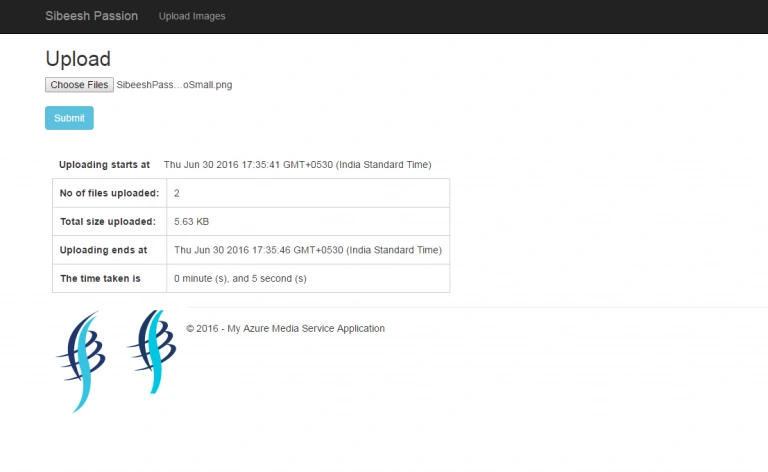 Upload Images To Azure Media Service Output
You can select as many files as you wish.
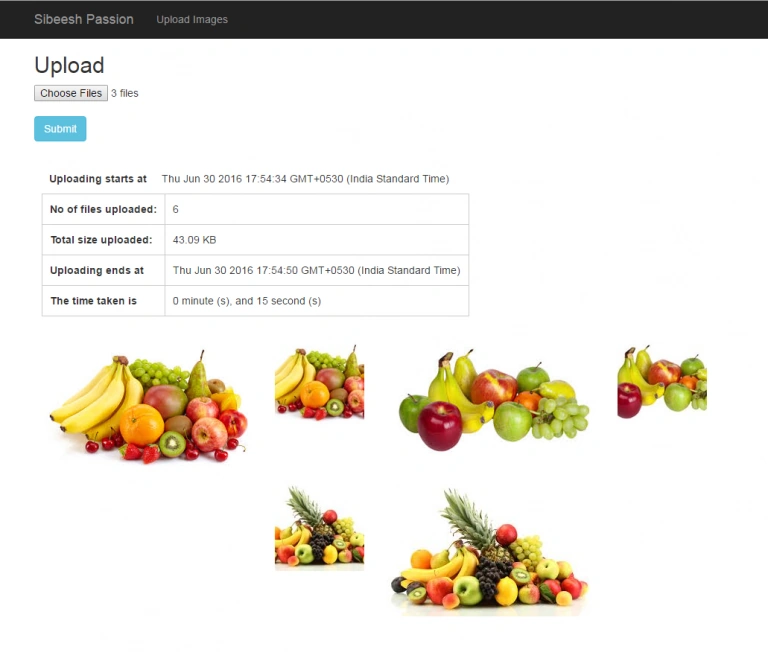 Upload Images To Azure Media Service Output Multiple
Thus, we have uploaded both the thumbnail and the actual image. That’s cool. I guess, we have finished. Happy coding!.
Conclusion
Did I miss anything, that you may think is required? Have you ever tried Azure Media Service Account? Did you find this post useful? I hope you liked this article. Please share with me your valuable suggestions and feedback.
Your turn. What do you think?
A blog isn’t a blog without the comments, but do try to stay on topic. If you have a question, unrelated to this post, you’re better off, posting it on C# Corner, Code Project, Stack Overflow, ASP.NET Forum instead of commenting here. Tweet or email me a link of your question there and I’ll definitely try to help, if I can.
Please see this article in my blog here.


Sibeesh VenuPosted Nov 24, 2016, 6:58 AM
Delpin Susai Raj Thanks much for your feedback.
Delpin Susai RajPosted Aug 28, 2016, 3:58 AM
Nice article
Sibeesh VenuPosted Jul 21, 2016, 2:55 AM
Vignesh Mani Thanks
Vignesh ManiPosted Jul 20, 2016, 9:47 AM
Good one
Sibeesh VenuPosted Jul 20, 2016, 8:43 AM
Ehsan Sajjad Thanks
Ehsan SajjadPosted Jul 20, 2016, 7:34 AM
Good topic, will surely read
Sibeesh VenuPosted Jul 20, 2016, 3:49 AM
Ravi Kandel Thanks
Ravi KandelPosted Jul 8, 2016, 4:04 AM
Good thanks
Sibeesh VenuPosted Jul 7, 2016, 12:31 PM
Sr Karthiga Thanks
Sr KarthigaPosted Jul 7, 2016, 8:04 AM
Good one
Sibeesh VenuPosted Jul 7, 2016, 3:36 AM
kalu singh rao Thanks
Sibeesh VenuPosted Jul 7, 2016, 3:36 AM
Raja Ganapathy Thanks
Sibeesh VenuPosted Jul 7, 2016, 3:36 AM
Vignesh Mani Thanks
kalu singh raoPosted Jul 7, 2016, 1:27 AM
Nice...
RajaPosted Jul 7, 2016, 12:13 AM
Nice Share...
Vignesh ManiPosted Jul 6, 2016, 4:14 PM
Good one