

What is "URL rewriting"?
Most sites include variables in their URLs that tell the site what information to be shown to the user. It is something like telling the code to load particular details of item number 7 from a shopping site.
For example, the site may look as in the following:
http://www.cshopping.com/showitem.aspx?itemid=7
The problem with the preceding URL is it cannot be remembered. It is even difficult to read on your mobile. Even the search engines like Google cannot get any information about the content of a page from the URL. What if you wanted to convey that itemid = 7 means a laptop with brand as "DELL"? This is not saying what it should say.
So, what we expect from the preceding URL is it should be easily understandood. Will it not be good if the URL is as below?
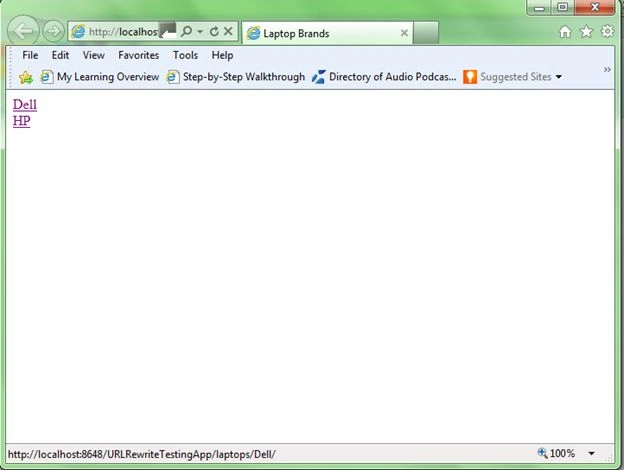
http://www.cshopping.com/laptops/Dell/
Now looking at the preceding URL you can easily tell that it is related to laptops and the brand is DELL. So, there is a need to rewrite the URL to be somewhat meaningful and easily conveyable.
How to rewrite URL in ASP.NET?
To rewrite URLs in ASP.NET we are going to use HTTP Modules. HTTP Modules are called before and after the HTTP handler executes. HTTP modules help us to intercept, participate in, or modify each individual request. HTTP Modules implement an IHttpModule interface, which is located in the System.Web namespace. Modules are the ones which handles authentication and authorization of the ASP.NET applications. If you want to implement encryption of the URL string or any custom changes to the application, it can be done by writing our HTTP Module.
Straight to the point, let us create a class in your app_Code directory called "URLRewriter.cs" and add the following code:
1. Create a web site using Visual Studio and name it as "URLRewriteTestingApp" and add a class file "URLRewriter.cs".
2. Visual Studio will ask whether to create a directory called "App_Code" and place the class file in the folder. Select "OK" to proceed.
Your solution structure should look something like this:
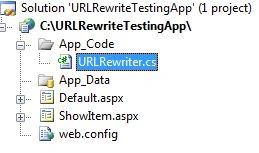
3. Now open the file "URLRewriter.cs" and add the code for HTTP Module as below.
Basically your class must implement the IHttpModule interface to implement its methods. You will see these 2 methods created for you once you implement the interface.
- Dispose
- Init
The Init method takes HttpApplication as a parameter. So, you need to create an event handler for the first request of the HttpApplication to handle the request.
Here is your code for the Module:
using System;
using System.Web;
/// <summary>
/// Summary description for URLRewriter
/// </summary>
public class URLRewriter : IHttpModule
{
    #region IHttpModule Members
    /// <summary>
    /// Dispose method for the class
    /// If you have any unmanaged resources to be disposed
    /// free them or release them in this method
    /// </summary>
    public void Dispose()
    {
        //not implementing this method
        //for this example
    }
    /// <summary>
    /// Initialization of the http application instance
    /// </summary>
    /// <param name="context"></param>
    public void Init(HttpApplication context)
    {
        context.BeginRequest += new EventHandler(context_BeginRequest);
    }
    /// <summary>
    /// Event handler of instance begin request
    /// </summary>
    /// <param name="sender"></param>
    /// <param name="e"></param>
    void context_BeginRequest(object sender, EventArgs e)
    {
        //Create an instance of the application that has raised the event
        HttpApplication httpApplication = sender as HttpApplication;
        //Safety check for the variable httpApplication if it is not null
         if (httpApplication != null)
         {
             //get the request path - request path is    something you get in
             //the URL
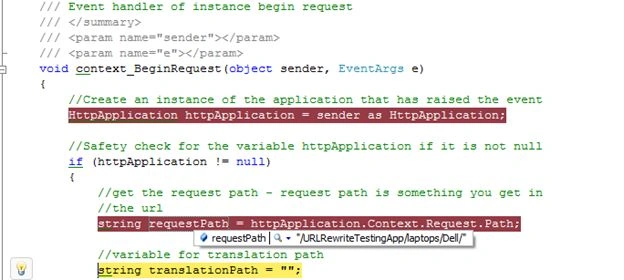
             string requestPath = httpApplication.Context.Request.Path;
             //variable for translation path
             string translationPath = "";
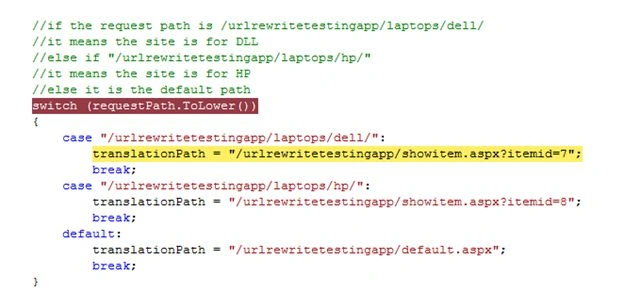
             //if the request path is /urlrewritetestingapp/laptops/dell/
            //it means the site is for DLL
            //else if "/urlrewritetestingapp/laptops/hp/"
            //it means the site is for HP
            //else it is the default path
            switch (requestPath.ToLower())
            {
                case "/urlrewritetestingapp/laptops/dell/":
                    translationPath = "/urlrewritetestingapp/showitem.aspx?itemid=7";
                    break;
                case "/urlrewritetestingapp/laptops/hp/":
                    translationPath = "/urlrewritetestingapp/showitem.aspx?itemid=8";
                    break;
                default:
                    translationPath = "/urlrewritetestingapp/default.aspx";
                    break;
            }
            //use server transfer to transfer the request to the actual translated path
            httpApplication.Context.Server.Transfer(translationPath);
        }
    }
    #endregion
}
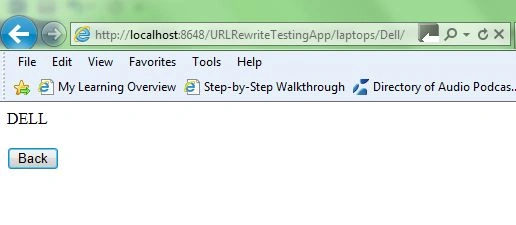
Sujit WarrierPosted Sep 21, 2015, 7:22 AM
An ASP.NET setting has been detected that does not apply in Integrated managed pipeline mode. i am getting this error for iis 8
sachin patilPosted Nov 24, 2014, 4:04 AM
for above errors, add namespace.classname instead of simple classname. <add name="UrlRewriter" type="WebApplication1.UrlRewriter"/>
dinesh baskaranPosted May 22, 2014, 2:54 AM
Source Error: Line 15: <system.web> Line 16: <httpModules> Line 17: <add name="URLRewriter" type="URLRewriter"/>
dinesh baskaranPosted May 22, 2014, 2:53 AM
could not load type Rewriter Source Error: Line 15: <system.web> Line 16: <httpModules> Line 17: <add name="URLRewriter" type="URLRewriter"/>
dinesh baskaranPosted May 22, 2014, 2:53 AM
i am getting error
PankajPosted Mar 21, 2014, 8:31 AM
How can I pass dynamically page name with dynamic Id....Its nice article but please explain with dynamic concept with database values...
manuPosted Aug 23, 2013, 1:51 AM
I can't handle session in destination page.ERROR LINE Code : HttpContext.Current.Session[USERADMIN] == null ERROR Message: System.NullReferenceException: Object reference not set to an instance of an object. Please help me
Mark EblingPosted Feb 13, 2013, 12:31 AM
Thanks for the great article. Anyone working on large dynamic sites is going to want to do it this way. I have many URL's and the paths are created dynamically so hard coding them into a case statement isn't practical or possible. I don't worry about the paths until later in the code when I interpret them and it’s wonderful that I don’t have to set up rules, use regular expressions, install another tool, or any of that other stuff I read about. However, here is a note that may help someone if they experience a similar problem. I don’t use a lot of images so I didn’t notice it at first but every time while I’m developing this site I noticed that page_load in default.aspx.cs was firing twice creating two records in my log. I found that the page was called once for the page itself and for anything else that required a request like css files, javascript and in my case it was the favorites icon. It’s important to note that this code will fire for everything needed on the page. As a workaround here’s what I did to make sure page load only fires when I want it to: string requestType = httpApplication.Context.Request.CurrentExecutionFilePathExtension.ToString();. if (requestType == ".aspx"). { string translationPath = "/Default.aspx";. httpApplication.Context.Server.Transfer(translationPath); } And our course everything else like css files, images, etc. doesn’t need path translation. If there is a better solution please post. Thanks! Hope this helps anyone having a similar problem.
Akkiraju IvaturiPosted Oct 14, 2012, 1:01 PM
Hi Shivanand, Look at the link by a IIS team member http://ruslany.net/2008/09/aspnet-routing-request-filtering-url-rewriting/ I will respond to you in my own words when I get time... Thanks..
Akkiraju IvaturiPosted Oct 14, 2012, 12:57 PM
Hi Arti, what is the error you are getting? Send me the error message. And sorry for being late in answering... I was busy with some other stuff since 2 months.. Thanks
arti guptaPosted Oct 11, 2012, 6:56 AM
<add name="URLRewriter" type="URLRewriter"/> is showing error when i m using above code. Please help
Shivanand ArurPosted Oct 5, 2012, 10:36 AM
Akki Sir, I have heard that Microsoft has given "URL Routing" which is much better than "URL Re-writing". Though earlier they introduced this technique only for MVC projects and apps, but now that they have also incorporated it in a normal ASP.Net project, So sir can you please explain the difference between the 2. Though I know some information like for "URL Rewriting" the rewriting process is done first and then the ASP.NET engine points as to who is going to process the request. This is the opposite in URL Routing... Please correct me if I am wrong!!! And if possible, so can you explain some more differences between the 2 and also how to do "URL Routing". Btw thanks for this article. You have explained it quite nicely. Cheers!!!
Akkiraju IvaturiPosted Sep 5, 2012, 12:19 PM
Let me add it again and will let you know.
Venkatesh KumarPosted Sep 4, 2012, 3:20 AM
Attachment file is not working, Please check it.