

Introduction
In this article, I will explain how to access the
Administrator Tools and access PowerShell. Windows has provided easy access to
the Administrator Tools. Windows 8 hides the Administrator Tools and Computer
Management features in the OS. Windows PowerShell is a task-based command-line
shell. It is a scripting language designed especially for system administration.
Show and Access Administrator Tools
To open the Administrator Tools, you press the
mouse on the right bottom and click on Setting. Windows 8 provides the Remote
Server Administrator Tools for Windows 8 Consumer Preview. Remote Server
Administration Tools for Windows 8 Consumer Preview includes a Server Manager,
Microsoft Management Console (MMC) snap-ins, consoles, Windows PowerShell
cmdlets and providers, and command-line tools for managing roles and features
that run on Windows Server "8" Beta. The Remote Server Administration Tools for
Windows 8 Consumer Preview runs on both x86- and x64-based editions of Windows 8
Consumer Preview.
You need to remove all the older versions of the
Administrator Tools Pack including earlier versions and release the tools of
various languages or locales from the computer before you install Remote Server
Administration Tools for Windows 8 Consumer Preview. Only one copy of the Remote
Server Administration Tools can be installed on a computer at a time. The Server The manager includes the Administrator Tools for Windows 8. Administrator Tools for
Windows 8 is GUI based Tools that can also be opened using commands on the
Tools menu of the Server Manager console.
Some users use the Administrator Tools such as
Computer Management and Firewalls. You can show the Administrator Tools with the help of the Metro Charms Menu. The Metro Charms Menu shows the next images. You
can show the Administrator Tools as follows:
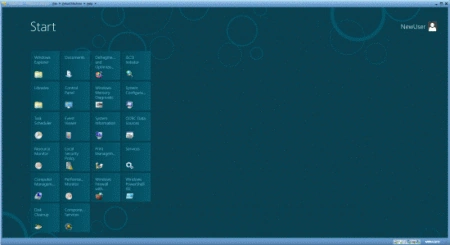
From Metro Charms Menu
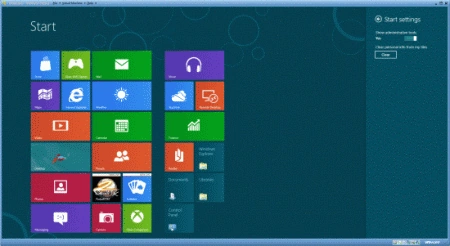
To display the Charms Bar while on the Metro UI,
move the cursor on the right bottom and show the thumbnails and click the
Setting button and press yes to show the Administrator Tools. Turn on "Show the
Administrator Tools".
Join the conversation! Your thoughts help the community grow.