

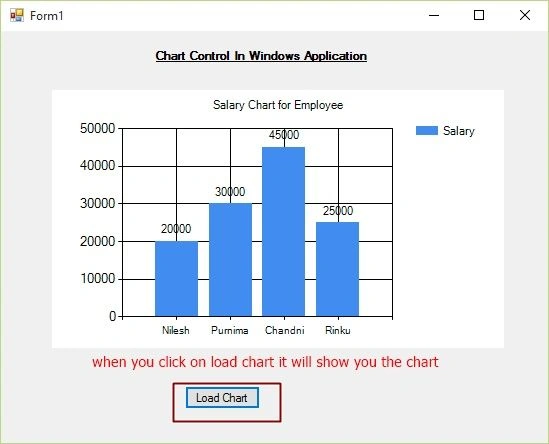
We will make name vs salary chart, where we bind all the data related to salary and name from the database and show it on the chart.
Initial chamber
Step 1: Open Visual Studio 2010, Go to File, New, then Projects and under Visual C# select Windows.
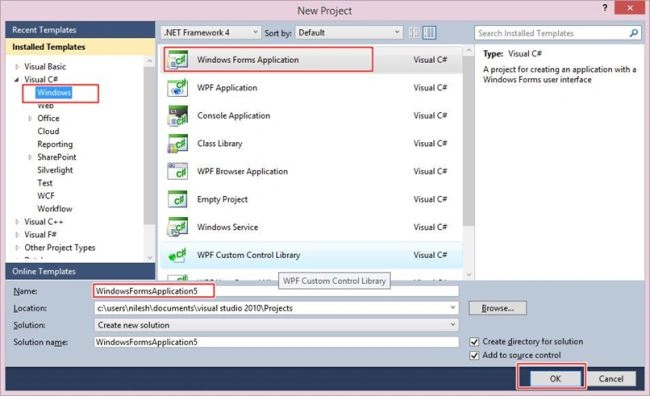
You can change the name of the project and you can browse your project to different location too. And then press – OK.
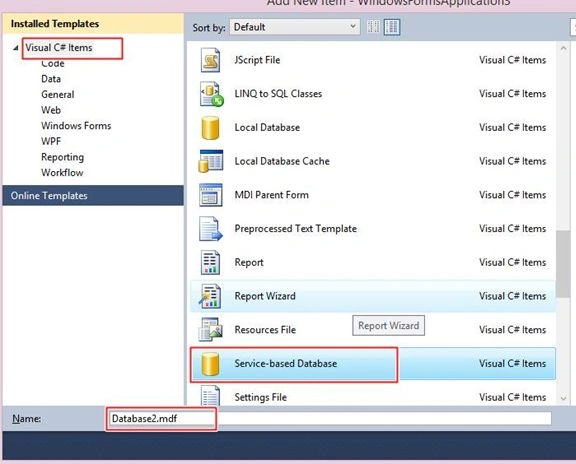
Step 2: In Solution Explorer you get your Project, Add Service Based Database. By going to your Project right click and Add New Item, then select Service-based database.
Database chamber
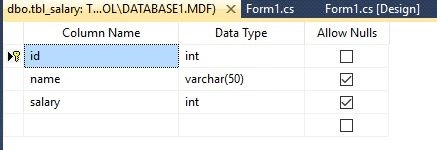
Step 3: Go to your Database [Database.mdf], we will create a table tbl_login. Go to the database.mdf, Table, then Add New table and design your table like the following screenshot:
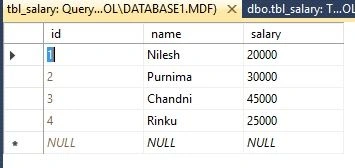
Show table data:
Design chamber
Step 4: Now open your Form1.cs[Design] file, where we create our design for Chart Control Application.
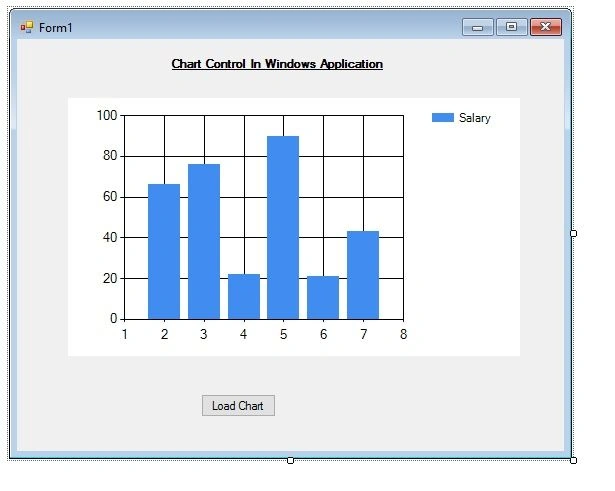
We will drag Chart Control and a button from the toolbox and place it on the form. Your design looks like the following image.
Code chamber
Right click on the blank part of Form1.cs, then View Code. You will see you are entered in the code part of the form. Write the following code and then Press F5 to run the project.
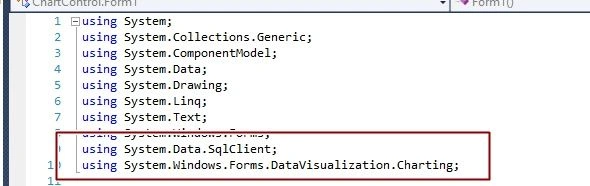
Namespace for Chart Control
- using System;
- using System.Collections.Generic;
- using System.ComponentModel;
- using System.Data;
- using System.Drawing;
- using System.Linq;
- using System.Text;
- using System.Windows.Forms;
- using System.Data.SqlClient;
- using System.Windows.Forms.DataVisualization.Charting;
- namespace ChartControl
- {
- public partial class Form1 : Form
- {
- public Form1()
- {
- InitializeComponent();
- }
- private void button1_Click(object sender, EventArgs e)
- {
- SqlConnection con = new SqlConnection(@"Data Source=.\SQLEXPRESS;AttachDbFilename=|DataDirectory|\Database1.mdf;Integrated Security=True;User Instance=True");
- con.Open();
- SqlCommand cmd = new SqlCommand("select * from tbl_salary", con);
- SqlDataAdapter sda = new SqlDataAdapter(cmd);
- DataSet st = new DataSet();
- sda.Fill(st, "salary");
- chart1.DataSource = st.Tables["salary"];
- chart1.Series["Salary"].XValueMember = "name";
- chart1.Series["Salary"].YValueMembers = "salary";
- this.chart1.Titles.Add("Salary Chart for Employee");
- chart1.Series["Salary"].ChartType = SeriesChartType.Bar;
- chart1.Series["Salary"].IsValueShownAsLabel = true;
- con.Close();
- }
- }
- }
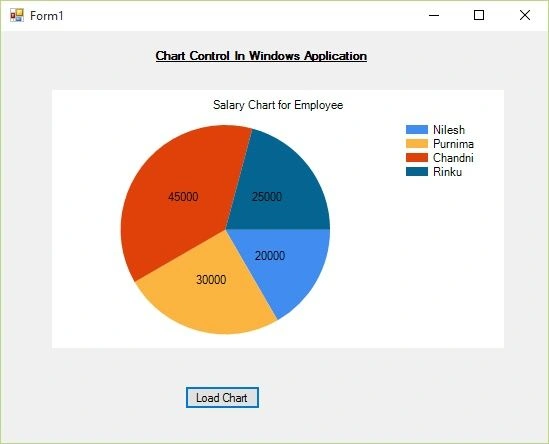
For Pie Chart
- chart1.Series["Salary"].ChartType = SeriesChartType.Pie;
For Line
- chart1.Series["Salary"].ChartType = SeriesChartType.Line;
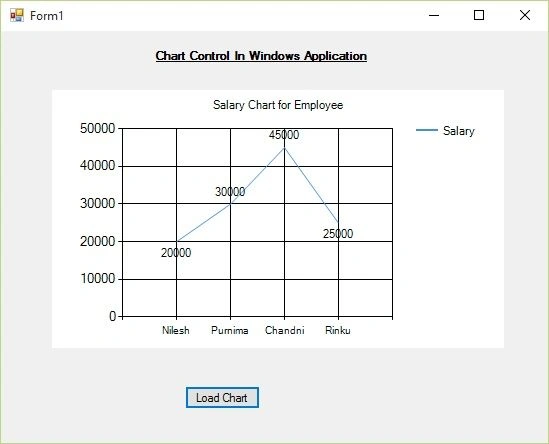
Similar way you can change in any format you want by changing the one line code. Hope you liked it.
Mark LopezPosted Feb 15, 2021, 1:27 PM
Why didn't display my pie chart when I run my program?
jaser cambio08Posted Dec 16, 2018, 2:23 AM
But why I cannot use this in the user control ?? hoping for you respond sir . .
Sankeerth MaragantiPosted Jul 1, 2018, 7:44 PM
Thank you I want to implement in wpf. Hope this will help me.
Hai SkyseaPosted May 21, 2018, 4:35 AM
Thank you very much
DivyaPosted Oct 28, 2015, 6:41 AM
Thank you good one... :-)
Arul RPosted Oct 28, 2015, 5:32 AM
Good one !!!
Rupali ShindePosted Oct 15, 2015, 12:29 AM
good, i want to implement in same in SharePoint App Model. hope so this will help me lot
Santhakumar MunuswamyPosted Oct 6, 2015, 12:02 AM
Nice Share
Pankaj Kumar ChoudharyPosted Oct 3, 2015, 8:32 PM
Nice Explain Sir..........
Sumit JoshiPosted Oct 3, 2015, 4:20 PM
nice.
Neeraj KumarPosted Oct 3, 2015, 3:14 PM
Good One