
What is use-cursor-in-sql?
Cursor is a database object to retrieve data from a result set one row at a time, instead of the T-SQL commands that operate on all the rows in the result set at one time. We use use-cursor-in-sql when we need to update records in a database table in singleton fashion means row by row.
Cursor work same as looping concept. A use-cursor-in-sql is a set of rows together with a pointer that identifies a current row.
Why and when to use Cursor?
There are some conditions when we want to get record from one table and need to insert into another with performing some logic or some conditions basically use-cursor-in-sql works as for/while loop.
Advantages
Cursor work same as looping concept. A use-cursor-in-sql is a set of rows together with a pointer that identifies a current row.
Why and when to use Cursor?
There are some conditions when we want to get record from one table and need to insert into another with performing some logic or some conditions basically use-cursor-in-sql works as for/while loop.
Advantages
- Cursors can be faster than a while loop but they do have more overhead.
- It is we can do RowWise validation or in other way you can perform operation on each Row. It is a Data Type which is used to define multi-value variable.
- Cursors can be faster than a while loop but at the cost of more overhead.
Disadvantages
- It consumes more resources because use-cursor-in-sql occupies memory from system that may be available for other processes.
- Each time when a row is fetched from the use-cursor-in-sql and it may result in a network round trip. This uses much more network bandwidth than the execution of a single SQL statement like SELECT or DELETE, etc that makes only one round trip.
Syntax for use-cursor-in-sql
- DECLARE @fName varchar(50), @lName varchar(50)
- DECLARE use-cursor-in-sqlName CURSOR--Declare use-cursor-in-sql
- LOCAL SCROLL STATIC
- FOR
- Select columnname1, columnname2 FROM myTable
- OPEN use-cursor-in-sqlName--open the use-cursor-in-sql
- FETCH NEXT FROM use-cursor-in-sqlName
- INTO @columnname1, @columnname2
- WHILE @ @FETCH_STATUS = 0
- BEGIN
- --here your code or logic like(insert / update / delete)
- FETCH NEXT FROM use-cursor-in-sqlName
- INTO @columnname1, @columnname2
- END
- CLOSE use-cursor-in-sqlName--close the use-cursor-in-sql
- DEALLOCATE use-cursor-in-sqlName--Deallocate the use-cursor-in-sql
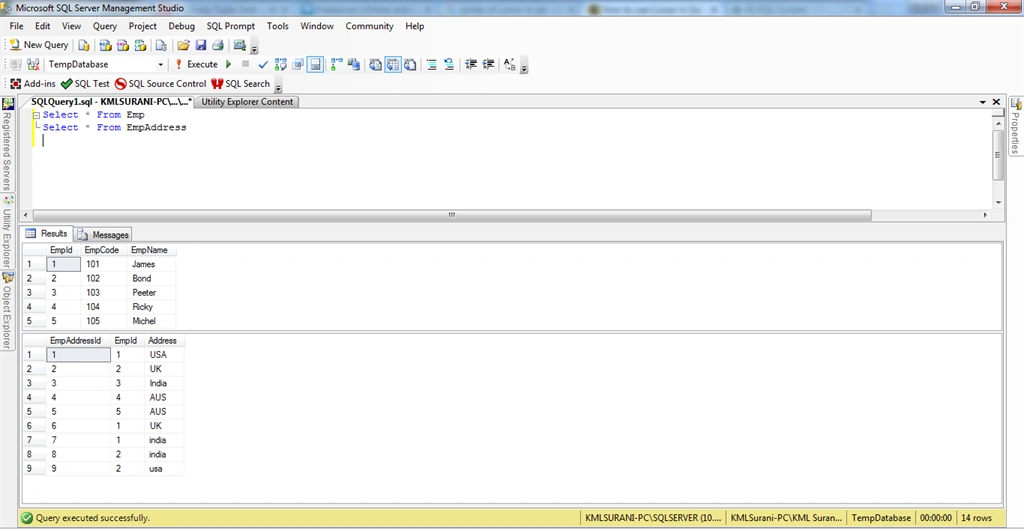
Step 1: Create Table and View Table
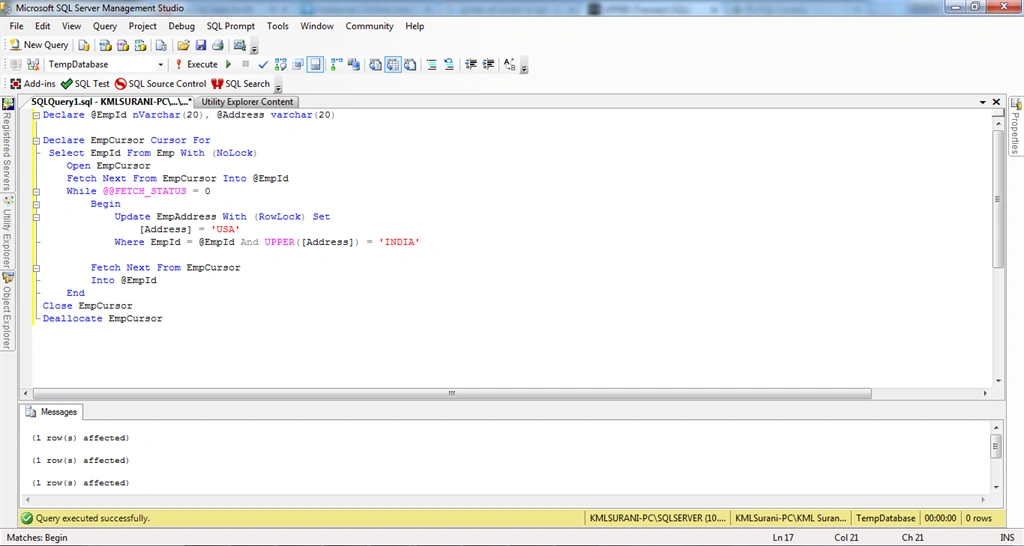
Step 2: Using Cursor
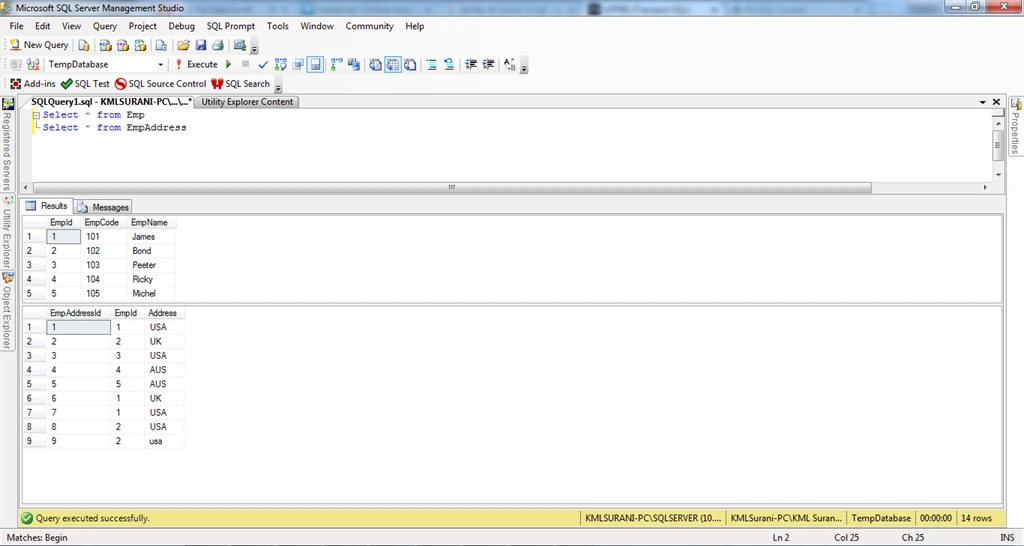
Step 3: See Update Table Data
Note: If you face any difficulty of use-cursor-in-sql please comment.
Abhilash J APosted Apr 14, 2016, 11:14 AM
Thank you Sir!!!
Santhakumar MunuswamyPosted Jan 5, 2016, 11:30 PM
Thanks for nice article
Former memberPosted Jan 5, 2016, 7:50 AM
Thank's
Muhammad Aqib ShehzadPosted Jan 5, 2016, 7:40 AM
Good Share
ROHAN THAKURPosted Jan 4, 2016, 11:26 AM
nice article
Raja TPosted Jan 3, 2016, 11:52 PM
Nice, Thanks for sharing
Yashwant VishwakarmaPosted Jan 3, 2016, 11:48 PM
Thanks for sharing !!
Pankaj Kumar ChoudharyPosted Jan 3, 2016, 10:43 AM
Nice Explain.........
Sridhar SharmaPosted Jan 3, 2016, 10:37 AM
Nice Share