

Initial chamber
Step 1: Open Visual Studio 2010 and create an empty website. Give it a suitable name [Checkbox_demo].
Step 2: In Solution Explorer you will get your empty website, then add a Web Form. Follow the below given steps:
For Web Form:
Checkbox_demo (Your Empty Website) - Right Click, Add New Item, then Web Form. Name it chekbox_demo.aspx.
Design chamber
Step 3: Now open Checkbox_demo.aspx file and make some design code to build up your application like the following:
Checkbox_demo.aspx
- <%@ Page Language="C#" AutoEventWireup="true" CodeFile="Default.aspx.cs" Inherits="_Default" %>
- <%@ Register Assembly="AjaxControlToolkit" Namespace="AjaxControlToolkit" TagPrefix="asp" %>
- <!DOCTYPE html PUBLIC "-//W3C//DTD XHTML 1.0 Transitional//EN" "http://www.w3.org/TR/xhtml1/DTD/xhtml1-transitional.dtd">
- <html xmlns="http://www.w3.org/1999/xhtml">
- <head runat="server">
- <title></title>
- <style type="text/css">
- .style1 {
- width: 141px;
- }
- .style2 {
- width: 159px;
- }
- .style3 {
- width: 158px;
- }
- .style4 {
- width: 188px;
- }
- .style5 {
- width: 188px;
- font-weight: bold;
- text-align: center;
- color: #FFCCCC;
- background-color: #0000FF;
- }
- .style6 {
- width: 158px;
- font-weight: bold;
- text-align: center;
- color: #FFCCCC;
- background-color: #0000FF;
- }
- .style7 {
- width: 159px;
- font-weight: bold;
- text-align: center;
- color: #FFCCCC;
- background-color: #0000FF;
- }
- .style8 {
- width: 141px;
- font-weight: bold;
- text-align: center;
- color: #FFCCCC;
- background-color: #0000FF;
- }
- .style9 {
- font-weight: bold;
- text-align: center;
- color: #FFCCCC;
- background-color: #0000FF;
- }
- </style>
- </head>
- <body>
- <form id="form1" runat="server">
- <asp:ToolkitScriptManager ID="ToolkitScriptManager1" runat="server">
- </asp:ToolkitScriptManager>
- <div>
- <table style="width:100%;">
- <tr>
- <td class="style8">
- <strong>Favourite Sport</strong></td>
- <td class="style7">
- Favourite Color</td>
- <td class="style6">
- Favourite Actor</td>
- <td class="style5">
- Favourtie Movie</td>
- <td class="style9">
- Favourite Programming Languages</td>
- </tr>
- <tr>
- <td class="style1">
- </td>
- <td class="style2">
- </td>
- <td class="style3">
- </td>
- <td class="style4">
- </td>
- <td>
- </td>
- </tr>
- <tr>
- <td class="style1">
- <asp:CheckBox ID="CheckBox1" runat="server" Text="Hockey" />
- <asp:MutuallyExclusiveCheckBoxExtender ID="CheckBox1_MutuallyExclusiveCheckBoxExtender" runat="server" Enabled="True" Key="Favourite Sport" TargetControlID="CheckBox1">
- </asp:MutuallyExclusiveCheckBoxExtender>
- </td>
- <td class="style2">
- <asp:CheckBox ID="CheckBox5" runat="server" Text="Red" />
- <asp:MutuallyExclusiveCheckBoxExtender ID="CheckBox5_MutuallyExclusiveCheckBoxExtender" runat="server" Enabled="True" Key="Favourite Color" TargetControlID="CheckBox5">
- </asp:MutuallyExclusiveCheckBoxExtender>
- </td>
- <td class="style3">
- <asp:CheckBox ID="CheckBox9" runat="server" Text="Bruce Wills" />
- <asp:MutuallyExclusiveCheckBoxExtender ID="CheckBox9_MutuallyExclusiveCheckBoxExtender" runat="server" Enabled="True" Key="Favourite Actor" TargetControlID="CheckBox9">
- </asp:MutuallyExclusiveCheckBoxExtender>
- </td>
- <td class="style4">
- <asp:CheckBox ID="CheckBox13" runat="server" Text="ZombieLand" />
- <asp:MutuallyExclusiveCheckBoxExtender ID="CheckBox13_MutuallyExclusiveCheckBoxExtender" runat="server" Enabled="True" Key="Favourtie Movie" TargetControlID="CheckBox13">
- </asp:MutuallyExclusiveCheckBoxExtender>
- </td>
- <td>
- <asp:CheckBox ID="CheckBox17" runat="server" Text="Asp.Net" />
- <asp:MutuallyExclusiveCheckBoxExtender ID="CheckBox17_MutuallyExclusiveCheckBoxExtender" runat="server" Enabled="True" Key="Favourite Programming Languages" TargetControlID="CheckBox17">
- </asp:MutuallyExclusiveCheckBoxExtender>
- </td>
- </tr>
- <tr>
- <td class="style1">
- <asp:CheckBox ID="CheckBox2" runat="server" Text="Cricket" />
- <asp:MutuallyExclusiveCheckBoxExtender ID="CheckBox2_MutuallyExclusiveCheckBoxExtender" runat="server" Enabled="True" Key="Favourite Sport" TargetControlID="CheckBox2">
- </asp:MutuallyExclusiveCheckBoxExtender>
- </td>
- <td class="style2">
- <asp:CheckBox ID="CheckBox6" runat="server" Text="Yellow" />
- <asp:MutuallyExclusiveCheckBoxExtender ID="CheckBox6_MutuallyExclusiveCheckBoxExtender" runat="server" Enabled="True" Key="Favourite Color" TargetControlID="CheckBox6">
- </asp:MutuallyExclusiveCheckBoxExtender>
- </td>
- <td class="style3">
- <asp:CheckBox ID="CheckBox10" runat="server" Text="Will Smith" />
- <asp:MutuallyExclusiveCheckBoxExtender ID="CheckBox10_MutuallyExclusiveCheckBoxExtender" runat="server" Enabled="True" Key="Favourite Actor" TargetControlID="CheckBox10">
- </asp:MutuallyExclusiveCheckBoxExtender>
- </td>
- <td class="style4">
- <asp:CheckBox ID="CheckBox14" runat="server" Text="Up" />
- <asp:MutuallyExclusiveCheckBoxExtender ID="CheckBox14_MutuallyExclusiveCheckBoxExtender" runat="server" Enabled="True" Key="Favourtie Movie" TargetControlID="CheckBox14">
- </asp:MutuallyExclusiveCheckBoxExtender>
- </td>
- <td>
- <asp:CheckBox ID="CheckBox18" runat="server" Text="Java" />
- <asp:MutuallyExclusiveCheckBoxExtender ID="CheckBox18_MutuallyExclusiveCheckBoxExtender" runat="server" Enabled="True" Key="Favourite Programming Languages" TargetControlID="CheckBox18">
- </asp:MutuallyExclusiveCheckBoxExtender>
- </td>
- </tr>
- <tr>
- <td class="style1">
- <asp:CheckBox ID="CheckBox3" runat="server" Text="Basketball" />
- <asp:MutuallyExclusiveCheckBoxExtender ID="CheckBox3_MutuallyExclusiveCheckBoxExtender" runat="server" Enabled="True" Key="Favourite Sport" TargetControlID="CheckBox3">
- </asp:MutuallyExclusiveCheckBoxExtender>
- </td>
- <td class="style2">
- <asp:CheckBox ID="CheckBox7" runat="server" Text="Pink" />
- <asp:MutuallyExclusiveCheckBoxExtender ID="CheckBox7_MutuallyExclusiveCheckBoxExtender" runat="server" Enabled="True" Key="Favourite Color" TargetControlID="CheckBox7">
- </asp:MutuallyExclusiveCheckBoxExtender>
- </td>
- <td class="style3">
- <asp:CheckBox ID="CheckBox11" runat="server" Text="Tom Cruise" />
- <asp:MutuallyExclusiveCheckBoxExtender ID="CheckBox11_MutuallyExclusiveCheckBoxExtender" runat="server" Enabled="True" Key="Favourite Actor" TargetControlID="CheckBox11">
- </asp:MutuallyExclusiveCheckBoxExtender>
- </td>
- <td class="style4">
- <asp:CheckBox ID="CheckBox15" runat="server" Text="Wolf of the Wall Street" />
- <asp:MutuallyExclusiveCheckBoxExtender ID="CheckBox15_MutuallyExclusiveCheckBoxExtender" runat="server" Enabled="True" Key="Favourtie Movie" TargetControlID="CheckBox15">
- </asp:MutuallyExclusiveCheckBoxExtender>
- </td>
- <td>
- <asp:CheckBox ID="CheckBox19" runat="server" Text="PHP" />
- <asp:MutuallyExclusiveCheckBoxExtender ID="CheckBox19_MutuallyExclusiveCheckBoxExtender" runat="server" Enabled="True" Key="Favourite Programming Languages" TargetControlID="CheckBox19">
- </asp:MutuallyExclusiveCheckBoxExtender>
- </td>
- </tr>
- <tr>
- <td class="style1">
- <asp:CheckBox ID="CheckBox4" runat="server" Text="Tennis" />
- <asp:MutuallyExclusiveCheckBoxExtender ID="CheckBox4_MutuallyExclusiveCheckBoxExtender" runat="server" Enabled="True" Key="Favourite Sport" TargetControlID="CheckBox4">
- </asp:MutuallyExclusiveCheckBoxExtender>
- </td>
- <td class="style2">
- <asp:CheckBox ID="CheckBox8" runat="server" Text="Green" />
- <asp:MutuallyExclusiveCheckBoxExtender ID="CheckBox8_MutuallyExclusiveCheckBoxExtender" runat="server" Enabled="True" Key="Favourite Color" TargetControlID="CheckBox8">
- </asp:MutuallyExclusiveCheckBoxExtender>
- </td>
- <td class="style3">
- <asp:CheckBox ID="CheckBox12" runat="server" Text="Brad Pitt" />
- <asp:MutuallyExclusiveCheckBoxExtender ID="CheckBox12_MutuallyExclusiveCheckBoxExtender" runat="server" Enabled="True" Key="Favourite Actor" TargetControlID="CheckBox12">
- </asp:MutuallyExclusiveCheckBoxExtender>
- </td>
- <td class="style4">
- <asp:CheckBox ID="CheckBox16" runat="server" Text="Dragon Ballz" />
- <asp:MutuallyExclusiveCheckBoxExtender ID="CheckBox16_MutuallyExclusiveCheckBoxExtender" runat="server" Enabled="True" Key="Favourtie Movie" TargetControlID="CheckBox16">
- </asp:MutuallyExclusiveCheckBoxExtender>
- </td>
- <td>
- <asp:CheckBox ID="CheckBox20" runat="server" Text="Python" />
- <asp:MutuallyExclusiveCheckBoxExtender ID="CheckBox20_MutuallyExclusiveCheckBoxExtender" runat="server" Enabled="True" Key="Favourite Programming Languages" TargetControlID="CheckBox20">
- </asp:MutuallyExclusiveCheckBoxExtender>
- </td>
- </tr>
- <tr>
- <td class="style1">
- </td>
- <td class="style2">
- </td>
- <td class="style3">
- </td>
- <td class="style4">
- </td>
- <td>
- </td>
- </tr>
- <tr>
- <td class="style1">
- </td>
- <td class="style2">
- </td>
- <td class="style3">
- </td>
- <td class="style4">
- </td>
- <td>
- </td>
- </tr>
- </table>
- </div>
- </form>
- </body>
- </html>
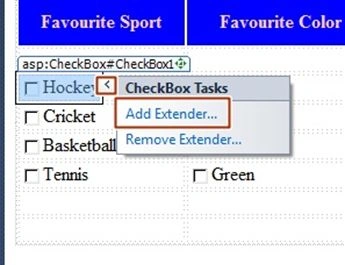
It will open the Extender that you want to include for the respective control.
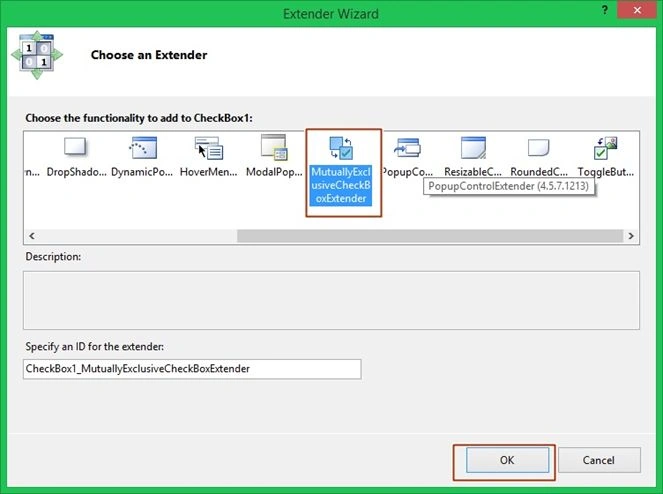
Than you have to provide “Key” for each Checkbox Extender, if you don’t provide key, the checkbox extender will not work. To specify the key you have to give the heading name for which checkbox is used like in our case - Favourite Color, Favourite Movies.

Output chamber
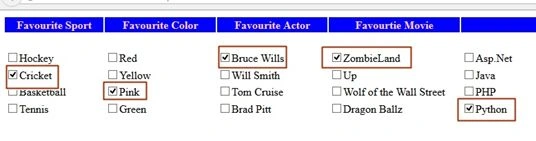
Thank you for reading.
Arul RPosted Oct 28, 2015, 5:27 AM
Good one !!!
Santhakumar MunuswamyPosted Oct 25, 2015, 11:51 AM
Good one
Sibeesh VenuPosted Oct 21, 2015, 1:11 AM
Nice Share
Mohammed IbrahimPosted Oct 20, 2015, 11:02 PM
nice
Priyaranjan K SPosted Oct 20, 2015, 12:28 PM
Nice Share
Harshad PansuriyaPosted Oct 20, 2015, 9:06 AM
Nice one