

Using the following line a new stopwatch object will be created.
System.Diagnostics.Stopwatch myStopWatch = new System.Diagnostics.Stopwatch();
The "Start" method will start the stopwatch.
myStopWatch.Start();
The "Stop" method will stop the stopwatch.
myStopWatch.Stop();
To display the value of the stopwatch then use the code shown below.
/// <summary>
/// To get the value of Hours..
/// </summary>

myStopWatch.Elapsed.Hours.ToString();

/// <summary>
/// To get the value of Minutes..
/// </summary>

myStopWatch.Elapsed.Minutes.ToString();

/// <summary>
/// To get the value of Seconds..

/// </summary>

myStopWatch.Elapsed.Seconds.ToString();


/// <summary>
/// To get the value of Milliseconds..
/// </summary>
MyStopWatch.Elapsed.Milliseconds.ToString();
Main Code
using System;
using System.Collections.Generic;
using System.ComponentModel;
using System.Data;
using System.Drawing;
using System.Linq;
using System.Text;
using System.Windows.Forms;
using System.Data.SqlClient;

namespace MyBlog
{
    public partial class Form1 : Form
    {
        public Form1()
        {
            InitializeComponent();
        }
        private void button1_Click(object sender, EventArgs e)
        {
            System.Diagnostics.Stopwatch myStopWatch = new System.Diagnostics.Stopwatch();

            //Start StopWatch...
            myStopWatch.Start();

            SqlConnection conn = new SqlConnection(@"Data Source=.\SQLEXPRESS;AttachDbFilename=|DataDirectory|\myDatabase.mdf;Integrated Security=True;User Instance=True");
            SqlDataReader dr;
            try
            {
                conn.Open();
                SqlCommand cmd = new SqlCommand("SELECT StudName FROM Student WHERE StudId=1", conn);
                dr = cmd.ExecuteReader();
                while (dr.Read())
                {
                    //it will display Name of Student whose Id is "1"...
                    mytxtName.Text = dr.GetValue(0).ToString();
                }
                //Stop StopWatch...
                myStopWatch.Stop();

                //Display time which taken to load resulted data in textbox in messagebox...
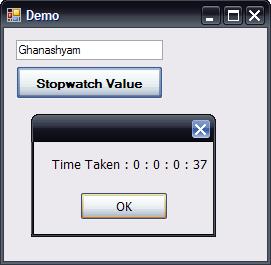
                MessageBox.Show("Time Taken : " + myStopWatch.Elapsed.Hours.ToString() + " : " + myStopWatch.Elapsed.Minutes.ToString() + " : " + myStopWatch.Elapsed.Seconds.ToString() + " : " + myStopWatch.Elapsed.Milliseconds.ToString());
                dr.Close();
            }
            catch (Exception ex)
            {
                MessageBox.Show(ex.ToString());
            }
            finally
            {
                conn.Close();
            }
        }
    }
}
Output
Pavel VladovPosted Jul 2, 2012, 8:55 AM
You can also use stopwatches to compare the performance of 2 algorithms in C#. But note that in order to get accurate times it is best to execute the tests and measure the times multiple times and then remove the lowest and the highest times. For more information take a look at: http://www.pvladov.com/2012/06/measure-code-performance.html
Krishna GaradPosted Apr 22, 2011, 5:17 AM
It's very nice in some cases I need to count the time on web page surfing for that I used TimeSpan with timer but now onward I'll use StopWatch class. Thank's again.