

C# Params
A method in C# defines a number of arguments and their types in the method declaration. When a method is called, it expects the same number and types of the arguments passed by the caller code, unless there are optional parameters. If you're not familiar with optional parameters, try Named and Optional Parameters In C#.
What if you're not sure of the number of arguments? This is where "params" keyword is useful.
The "params" keyword in C# allows a method to accept a variable number of arguments. C# params works as an array of objects. By using params keyword in a method argument definition, we can pass a number of arguments.
Note: There can't be anymore parameters after a params.
What does "Params" do?
Using "Params", the arguments passed to a method are changed by the compiler to elements in a temporary array, and this array is then used to retrieve the method parameters by the caller code. What if the creator of a class does not know how many number of parameters a caller will use?
For example, a Student class with a method, TotalMarks that returns the sum of all marks. Each grade may have a different number of subjects and their respective marks. The 3rd grade may have 3 subjects only. The 8th grade may have 4 subjects while a 9th grade may have 5 subjects. We can use params in this case and pass 3, 4, and 5 comma separated values.
Why we use "Params" in C#?
As I said earlier, params keyword in C# can be used to declare method that does not know the number of parameters. Parmas are also useful to write "clean code". Instead of using various overloaded methods to pass multiple values, we can simply create an array and pass it as an arugment or a comma separated list of values.
Let's say, we have a class, Student. It has two methods, TotalMarks and AllSubjects. Each of these methods take a parameter of type params. As you can see from the below code, params is an array.
public class Students
{
    public static int TotalMarks(params int[] list)
    {
        int total = 0;
        for (int i = 0; i < list.Length; i++)
            total += list[i];
        return total;
    }

    public static string AllSubjects(params string[] subjects)
    {
        System.Text.StringBuilder builder = new System.Text.StringBuilder();
        for (int i = 0; i < subjects.Length; i++)
        {
            builder.Append(subjects[i]);
            builder.Append(" ");
        }
        return builder.ToString();
    }
}
Now, to call these methods, we can create an array of objects and pass it as a params parameter. Alternatively, we can also pass a comma separated values for params. The following code snippet shows both of these examples.
// Total for 3rd grade. Pass 3 comma separate values as params
Console.WriteLine("Params with 3 parameters");
int total3 = Students.TotalMarks(8, 9, 8);
// Print result
Console.WriteLine(total3);
// Create an array of strings
string[] subs = {"English", "Reading", "Writing"};
// Pass array of strings as a params and print result
Console.WriteLine(Students.AllSubjects(subs));
C# Params Code Example
Here is a complete code example written in C# that shows how to pass different numbers of variables in a method as a params argument and read these values back in the caller code.
using System;

namespace ParamsSample
{

    public class Students
    {
        public static int TotalMarks(params int[] list)
        {
            int total = 0;
            for (int i = 0; i < list.Length; i++)
                total += list[i];
            return total;
        }

        public static string AllSubjects(params string[] subjects)
        {
            System.Text.StringBuilder builder = new System.Text.StringBuilder();
            for (int i = 0; i < subjects.Length; i++)
            {
                builder.Append(subjects[i]);
                builder.Append(" ");
            }
            return builder.ToString();
        }
    }

    class Program
    {

        static void Main(string[] args)
        {
            // Total for 3rd grade. Pass 3 comma separate values as params
            Console.WriteLine("Params with 3 parameters");
            int total3 = Students.TotalMarks(8, 9, 8);
            // Print result
            Console.WriteLine(total3);
            // Create an array of strings
            string[] subs = {"English", "Reading", "Writing"};
            // Pass array of strings as a params and print result
            Console.WriteLine(Students.AllSubjects(subs));

            // Total for 8th grade
            Console.WriteLine("Params with 4 parameters");
            int[] marks = { 24, 22, 25, 21 };
            int total4 = Students.TotalMarks(marks);
            string str4 = Students.AllSubjects("Math", "English", "Art", "Social Science");
            Console.WriteLine(total4);
            Console.WriteLine(str4.ToString());

            // Total for 10th grade
            Console.WriteLine("Params with 5 parameters");
            int total5 = Students.TotalMarks(92, 90, 95, 91, 98);
            string str5 = Students.AllSubjects(new string[]{ "Math", "English", "Art", "Social Science", "Gym"});
            Console.WriteLine(total5);
            Console.WriteLine(str5.ToString());

            Console.ReadKey();
        }

    }
}
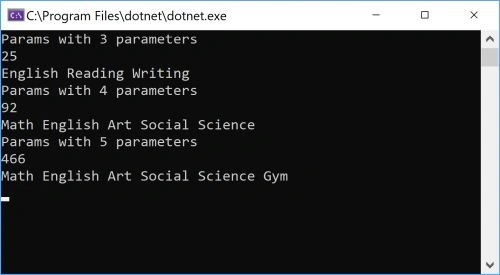
C# Params Output
The output of the above code looks like the following:
Artyom TimeyevPosted Jul 1, 2022, 4:50 PM
Thank you, the explanation is clear and to the point. Oops, this is the second time I've read this explanation.
Artyom TimeyevPosted Oct 26, 2019, 1:45 PM
Thank you, now I understand!
Gantasala VenkatanarayanamurthPosted Feb 10, 2016, 1:31 PM
tqqq,easily understandable..nice work..
Gurunatha DogiPosted Jun 8, 2014, 3:42 AM
Nice example Thanks for sharing...
Ravikumar GPosted May 29, 2013, 12:47 AM
Interview Question, Too good , well explained...Thanks