

Introduction
In this article I will use the "Superscribe.Owin" package in the ASP.NET Web API. We use the package for determine what the web framework contributes. Superscribe is a module for the router handler. It is a way to map between the media types and serialiser.
Now for an example.
Step 1
Create an application as in the following:
- Start Visual Studio 2012.
- From the Start window Select "New Project".
- Then select "Installed" -> "Visual C#" -> "Web".

- Select "ASP.NET Empty Web Application".
Step 2
Install a package as in the following:
- Go to the "Tools" menu then select "Library Package Manager" -> "Package Manager Console".
- Now install the following packages:
Install-Package Owin
Install-Package Microsoft.Owin.Host.SystemWeb
Install-Package Owin.Types
Install-Package Owin.Extensions
Step 3
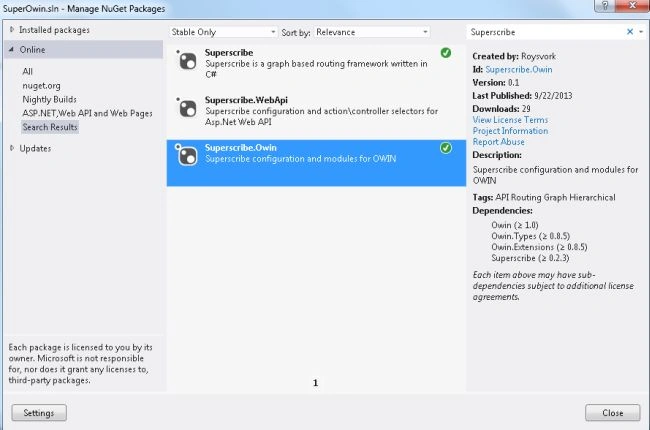
Now install the Superscribe.Owin Package through Nuget Manager.
- Go to the "Tools" menu then select "Library Package Manager" -> "Manage NuGet Package for Solutions".
- In the search box type "Superscribe".
- Then select "Superscribe.Owin" and instal it.
Step 4
There is a class named "Startup.cs".
Add the following code to it:
- using Owin;
- using Superscribe.Owin;
- using System;
- using System.Collections.Generic;
- using System.Linq;
- using System.Web;
- namespace SuperOwin
- {
- public class Startup
- {
- public void Configuration(IAppBuilder ibuild)
- {
- var Con = new SuperscribeOwinConfig();
- Con.MediaTypeHandlers.Add(
- "text/html",
- new MediaTypeHandler { Write = (rslt, o) => rslt.WriteAsync(o.ToString()) });
- ibuild.UseSuperscribeModules(Con);
- }
- }
- }

Join the conversation! Your thoughts help the community grow.