

Phase 01 — System Design Foundation | Topic 07
Before designing APIs, database tables, or application architecture, there is one important question every developer should ask:
Who is actually going to use the system?
A system can have hundreds of features, but every feature exists because a particular user or business role needs to perform some action.
For example, an e-commerce application may have customers, administrators, sellers, and delivery partners. Each of them uses the same system for a different purpose.
A customer wants to place an order.
An administrator wants to manage the system.
A seller wants to manage products and inventory.
A delivery partner wants to update delivery status.
Understanding these users and their responsibilities is an important part of System Design.
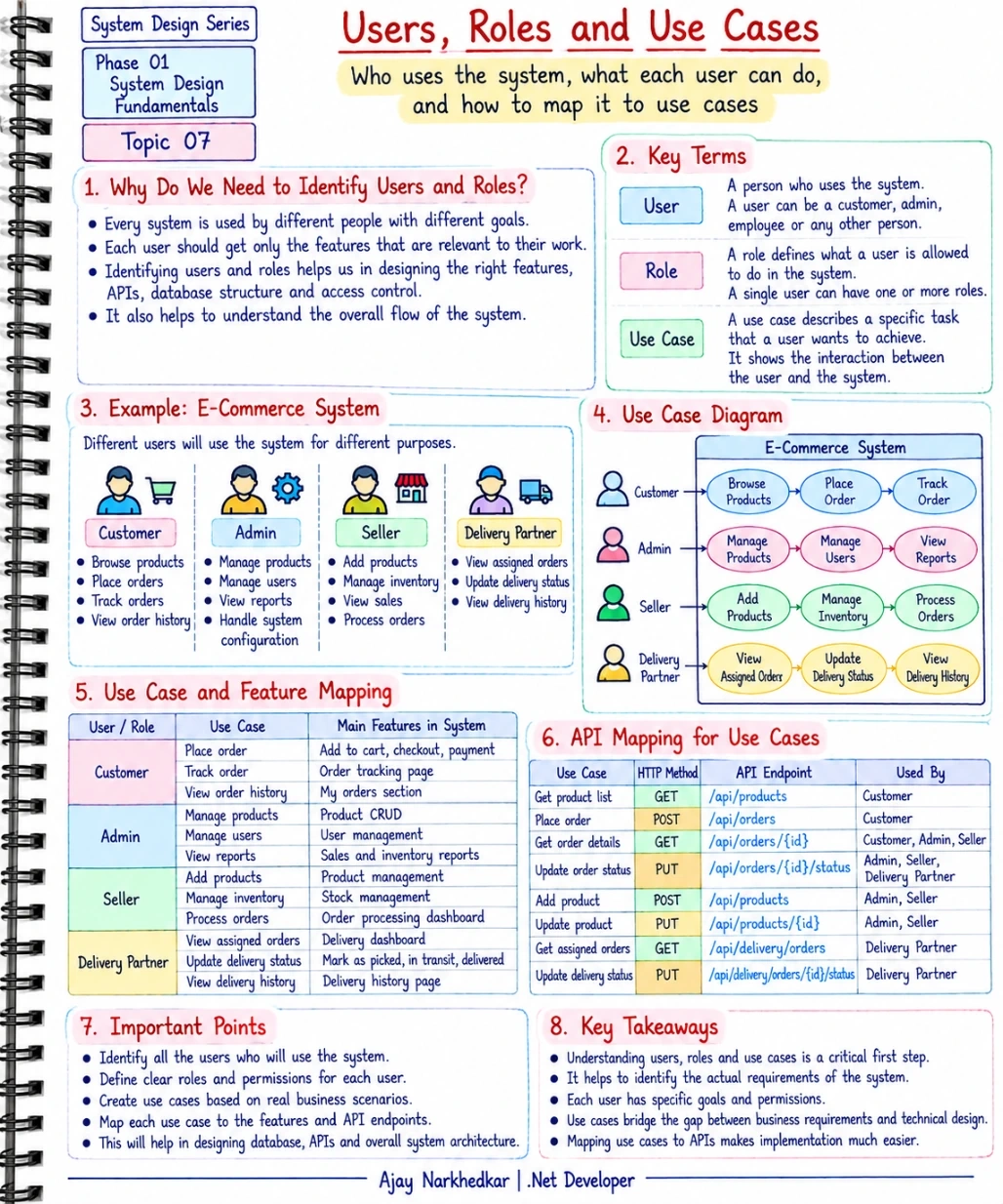
What Is a User?
A user is someone who interacts with the system to achieve a specific goal.
For example, in an e-commerce application, a user could be:
A customer who purchases products.
An administrator who manages the platform.
A seller who manages products and inventory.
A delivery partner who handles deliveries.
Different users have different requirements.
A customer does not need access to the same features as an administrator.
This is why identifying users should happen before designing the system.
What Is a Role?
A role defines what a user is allowed to do inside the system.
For example:
Customer
→ Place orders
→ View own orders
→ Track delivery

Admin
→ Manage users
→ Manage products
→ View reports

Seller
→ Add products
→ Manage inventory
→ Process orders
A user and a role are not always the same thing.
A single user can have one role or, depending on the application, multiple roles.
For example, an employee in an internal business application might have both:
Employee + Manager
The system can then provide permissions based on those roles.
This becomes particularly important when we design authentication and authorization.
What Is a Use Case?
A use case describes a specific goal or task that a user wants to accomplish using the system.
For example:
Customer wants to place an order.
That is a use case.
Other examples include:
Customer wants to track an order.
Admin wants to manage users.
Seller wants to add a product.
Delivery partner wants to update delivery status.
A use case focuses on the interaction between the user and the system.
It helps us understand what the system actually needs to provide.
Let's Take an E-Commerce Example
Suppose we are designing an e-commerce application.
Before thinking about ASP.NET Core, SQL Server, Redis, or microservices, let's identify the users.
Customer
The customer uses the system to browse products, place orders, track deliveries, and view previous orders.
Admin
The administrator manages users, products, orders, reports, and system configuration.
Seller
The seller adds products, manages inventory, and processes orders.
Delivery Partner
The delivery partner views assigned orders and updates delivery status.
Now we can start mapping these users to their use cases.
User to Use Case Mapping
The mapping might look like this:
User / Role | Use Case |
|---|---|
Customer | Browse Products |
Customer | Place Order |
Customer | Track Order |
Customer | View Order History |
Admin | Manage Products |
Admin | Manage Users |
Admin | View Reports |
Seller | Add Products |
Seller | Manage Inventory |
Seller | Process Orders |
Delivery Partner | View Assigned Orders |
Delivery Partner | Update Delivery Status |
This simple table gives us a much clearer understanding of the system.
Instead of looking at one large business requirement, we now have clearly defined responsibilities.
From Use Cases to Features
A use case can then be connected to an actual feature in the application.
For example:
Customer → Place Order
This may require:
Product selection
Shopping cart
Checkout
Payment
Order creation
Order confirmation
Similarly:
Seller → Manage Inventory
may require:
Add inventory
Update inventory
View stock
Track stock changes
This is where business requirements start becoming technical requirements.
From Use Cases to APIs
Once we understand the use cases, we can start thinking about APIs.
For example:
Use Case | HTTP Method | API Endpoint |
|---|---|---|
Get Products | GET |
|
Place Order | POST |
|
Get Order | GET |
|
Update Order Status | PUT |
|
Add Product | POST |
|
Update Product | PUT |
|
Notice the sequence.
We didn't randomly create API endpoints.
We first understood:
User → Role → Use Case → Feature → API
This is a much more structured way to approach API design.
Simple ASP.NET Core API Example
Let's take the Place Order use case.
A simple ASP.NET Core controller might look like this:
[ApiController]
[Route("api/orders")]
public class OrdersController : ControllerBase
{
    [Authorize(Roles = "Customer")]
    [HttpPost]
    public async Task<IActionResult> PlaceOrder(
        CreateOrderRequest request)
    {
        // Validate the request.
        // Apply business rules.
        // Create the order.
        // Save the order in the database.

        return Ok(new
        {
            Message = "Order placed successfully."
        });
    }
}
There are two important things to notice.
First, the API represents a business use case:
Customer places an order.
Second, authorization can restrict this operation to the appropriate role.
[Authorize(Roles = "Customer")]This means understanding users and roles directly helps us design secure APIs.
Why Should We Identify Users Before Designing APIs?
Imagine you start creating APIs without understanding users.
You might create:
GET /api/orders
PUT /api/orders/{id}
DELETE /api/orders/{id}
But then an important question appears:
Who is allowed to perform each operation?
Can a customer view every order?
Can a seller modify another seller's order?
Can a delivery partner cancel an order?
Can an administrator access everything?
These questions cannot be answered properly until we understand the users, roles, and business rules.
That's why user identification is not just documentation.
It directly influences:
API design
Authorization
Database design
Business logic
UI design
System architecture
Users, Roles and Permissions Are Different
These concepts are related but should not be confused.
User
The person or account interacting with the system.
Role
The responsibility or category assigned to the user.
Permission
The specific operation that the user is allowed to perform.
For example:
User: Ajay

Role: Customer

Permissions:
→ Browse Products
→ Place Order
→ View Own Orders
→ Track Order
Another user might have:
User: Admin User

Role: Admin

Permissions:
→ Manage Products
→ Manage Users
→ View All Orders
→ View Reports
This distinction becomes very useful when implementing authorization in real applications.
Use Cases Help Control Scope
Use cases also help us understand what is actually required.
Suppose the business says:
“Build an e-commerce application.”
That is too broad.
But when we break it down:
Customer
→ Browse products
→ Place order
→ Track order
Admin
→ Manage products
→ Manage users
→ View reports
Seller
→ Add products
→ Manage inventory
Now the scope becomes much clearer.
The team can discuss each use case separately and determine:
What functionality is required?
What APIs are needed?
What data is required?
What business rules apply?
Which user can access it?
This reduces ambiguity before development begins.
Use Cases Also Help With Authorization
Consider this requirement:
Admin can update any order status.
That immediately tells us something about authorization.
A customer should not automatically have the same permission.
The API could therefore use role-based authorization:
[Authorize(Roles = "Admin")]
[HttpPut("{id}/status")]
public IActionResult UpdateOrderStatus(
    int id,
    UpdateOrderStatusRequest request)
{
    // Update order status.

    return Ok();
}
The use case helped us identify the required permission.
This is one reason requirements analysis and security design are closely connected.
A Simple Design Process
When starting a new system, you can follow this approach:
Business Requirement
        ↓
Identify Users
        ↓
Identify Roles
        ↓
Define Use Cases
        ↓
Map Use Cases to Features
        ↓
Design APIs
        ↓
Design Data
        ↓
Design Architecture
You don't need to create a complicated diagram for every small feature.
The goal is simply to understand who needs what from the system before implementation begins.
Common Mistake Developers Make
A common mistake is to start with technical components:
“I'll create the controller first.”
Then:
“I'll create the service.”
Then:
“I'll create the repository.”
But the more important question is:
“Which business operation is this code actually supporting?”
For example:
OrderController
      ↓
PlaceOrder
The important thing is not the controller itself.
The important thing is the business use case:
Customer wants to place an order.
Once the use case is clear, the technical implementation becomes easier to reason about.
IMPORTANT Takeaway
Before designing APIs or database tables, understand:
Who uses the system?
What role does each user have?
What is each user trying to achieve?
What is each user allowed to do?
Then connect those use cases to features and APIs.
A simple way to remember the concept is:
Users define who interacts with the system.
Roles define what they are allowed to do.
Use cases define what they want to accomplish.
APIs provide the technical way to perform those operations.
This is one of the simplest but most important steps in System Design.
Final Thoughts
System Design does not begin with microservices, databases, or cloud services.
It begins by understanding the people and business processes that the system is being built for.
If you clearly understand:
Users → Roles → Use Cases → Features → APIs
you already have a much stronger foundation for designing the rest of the system.
And as the system becomes larger, this understanding becomes even more important for authorization, scalability, database design, and architecture.
What's Next?
Now that we understand who uses the system and what they need to do, the next question is:
How much traffic will the system receive?
Phase 01 — System Design Foundation | Topic 08 — Traffic: How Many Requests Will Your System Get?
We will learn how to think about users, requests, peak traffic, and why traffic estimation matters before designing a scalable system.
Join the conversation! Your thoughts help the community grow.