

It’s always nice to be using the latest and greatest of things, however not everyone really enjoys “change” (especially with regard to their development environments).
So this quick article will cover how to go about creating and using ASP.NET MVC 5 applications within Visual Studio 2012 for those out there that want to keep up with the newest version of their favorite development technology but may not have the courage (or the cash) to upgrade to Visual Studio 2013.
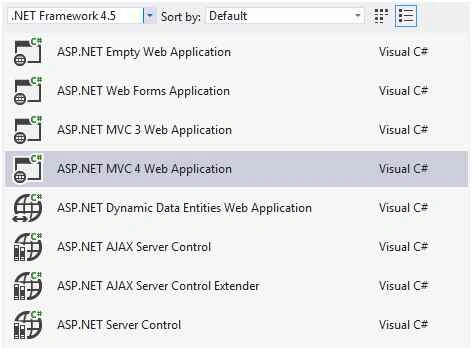
In November of this year, the .NET team released the ASP.NET and Web Tools 2013.1 Update for Visual Studio 2012. I wish I could say the steps necessary to integrate MVC 5 into Visual Studio 2012 were more complicated than simply downloading this, but they aren’t.
You can download the update itself from the link provided below:
You’ll find that after installing the update and restarting Visual Studio 2012 that you’ll be able to create a new ASP.NET MVC 5 application through Visual Studio 2012:
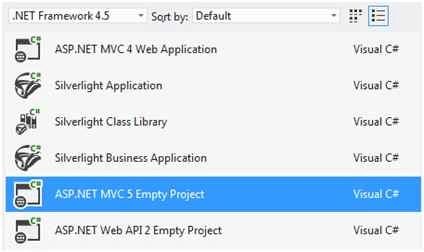
After installing the update, you’ll see that MVC 5 is now available in Visual Studio 2012.
Great! What else?
The update not only provides the necessary foundation for creating MVC 5 applications, but it features the following additional improvements as well:
- Bootstrap Integration - All MVC 5 applications and application templates by default will have their markup “bootstrap-ified” using Twitter Bootstrap (which is integrated into the applications by default).
- Web API 2 Templates - The latest version of Web API template isn’t going to be left out either. You’ll be able to create new Web API services just like MVC 5 applications.
- Entity Framework 6 - Entity Framework 6 will be installed and included within this update and will be used for all of the scaffolding operations in Web API or MVC 5.
- Improved Scaffolding - This improved scaffolding functions as a code generation framework for ASP.NET Web applications. It makes it easy to add boilerplate code to your project that interacts with a data model and will ensure that any items added through scaffolding will have all of the necessary dependencies (packages, references, etc.).
- Razor Editor Improvements - You’ll find that the toolkit has a variety of improvements and supports the Razor 3 engine.
- New NuGet - This update also includes the latest version of NuGet 2.7, which removes some of the need for manually restoring packages that go missing and also ensuring that all of your packages are up to date.
So if you are a bit hesitant to give Visual Studio 2013 a try, but you want to play around with some of the newer features and development templates that it provides, I would recommend downloading and checking out this update.
Santhakumar MunuswamyPosted Nov 20, 2015, 9:36 AM
Good One
Rajeesh MenothPosted Nov 19, 2015, 4:55 AM
Thanks for sharing!
Raja TPosted Nov 19, 2015, 12:40 AM
Nice Sir, Thanks for sharing
Harshad PansuriyaPosted Nov 18, 2015, 11:12 PM
Nice one
Former memberPosted Nov 18, 2015, 1:35 PM
Wow. good article
Banketeshvar NarayanPosted Nov 18, 2015, 11:09 AM
Nice..