
Overview
This article shows how to develop a simple ASP.NET-based application for the purpose of providing non-IT management staff (in other words a marketing team leader) the ability to reset a delegate's Windows domain account password. The purpose of such an application is to reduce the number of service desk tickets relating to account password resets and enhance the productivity of an end user by forestalling the superfluous and prolonged delays that often occur during the traditional password reset process.
Logging
You will notice that I do not specify the logging of the password reset information in this article. Whereas it is incredibly important to log who is resetting what, or who is attempting to reset what, I believe that explaining the logging process in this article would have only served to distract the reader from the actual password reset task. Since logging is relatively simple and due to the fact that many businesses log information in various ways, I chose to omit that procedure from the article.
Language guide
When I refer to the delegate, I am referring to the user that requires their password to be reset. When I refer to the manager, I am referring to the manager that is listed against the delegates account in the Active Directory. When I refer to the user, I am referring to the user that is attempting to reset the delegate's password via the web form.
Setup guide
Our first step is to edit our Web.config file to utilize Windows authentication.
- <authentication mode ="Windows" />
- lt;authorization>
- <deny users="?"/> <!--Prevent Anonymous Authorization-->
- lt;/authorization
Once the Web.config file has been edited, we will need to add some components, three text boxes and two buttons, to our web form. The following image details how I have chosen to name these components on my form.
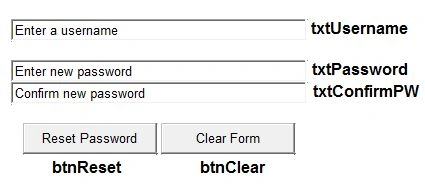
Now that the proper components have been added to our form, we will need to add a reference to the System.DirectoryServices.dll. We do this by adding a reference via Visual Studio's Reference Manager and by adding the following using statement to our code:
- using System.DirectoryServices;
We are now ready to start work on the password reset (btnReset) itself. Since we will need to compare the Delegate's Manager's username against the name of the User who is requesting the password reset, it is essential that we capture the username of the User requesting the password reset. We are able to do this with the following lines of code:
- //Get User's Username
- string strRawUser = HttpContext.Current.User.Identity.Name;
- //Remove Domain Name From User's Username ('TEST\bgates' will become 'bgates')
- string[] strSplitUser = strRawUser.Split(new char[] { '\\' });
- string strUsername = strSplitUser[1];
Once this username has been captured, we need to have something to compare it to. To gather the Delegate's Manager's username from the Active Directory, we need to perform two separate searches. The first will capture the Manager's distinguished name from the Delegate's Active Directory user profile and the second will resolve the Manager's username from this distinguished name.
- //Get Manager's Distinguished Name From Active Directory
- string strConn = "LDAP://dc=test,dc=local";
- DirectorySearcher dSearch = new DirectorySearcher(strConn);
- dSearch.Filter = "(sAMAccountName=" + txtUsername.Text + ")";
- SearchResult sResult = dSearch.FindOne();
- DirectoryEntry dResult = sResult.GetDirectoryEntry();
- string strRawManager = dResult.Properties["manager"][0].ToString();
- //Get Manager's Username From Distinguished Name
- DirectorySearcher diSearch = new DirectorySearcher(strConn);
- diSearch.Filter = "(distinguishedName=" + strRawManager + ")";
- SearchResult seResult = diSearch.FindOne();
- DirectoryEntry diResult = seResult.GetDirectoryEntry();
- String strManager = diResult.Properties["sAMAccountName"][0].ToString();
We now need to compare the user's username to the manager's username. In the event that the user's username does in fact match the manager's username (meaning that the user is the manager), we should proceed to check the delegate's account status, since we do not wish to allow managers to reset passwords for deactivated accounts.
- //If User's Username Is The Same As Manager's Username
- if (strUsername == strManager)
- {
- //Get Delegate Account Status
- int intFlags = (int)dResult.Properties["userAccountControl"].Value;
If the delegate's account has been disabled, we will display an error stating as such.
- //If Delegate's Account Is Disabled
- if (intFlags == 514)
- {
- //Show Error Message
- string strDisabled = "Selected Account Disabled. Unable To Reset Password.";
- ClientScript.RegisterStartupScript(this.GetType(), "myalert", "alert('" + strDisabled + "');", true);
- }
However, if the delegate's account is enabled, we are able to proceed to the next step of the password reset process. In this next step, we will need to confirm that the user has correctly entered the password on the form and that the txtPassword field matches the txtConfirmPW field.
If the txtPassword field matches the txtConfirmPW field, we should reset the delegate's password, confirm that the account is unlocked and ensure that the delegate is prompted to reset their password on the first logon. We also display a success message to the user.
- else
- {
- //If Password And Confirmation Fields Match (On Form)
- string strPassword = txtPassword.Text;
- string strConfirmPW = txtConfirm.Text;
- if (strPassword == strConfirmPW)
- {
- //Reset Delegate's Password, Unlock Account, Ensure User Has To Reset Password On Next Login
- dResult.Invoke("SetPassword", strPassword);
- dResult.Properties["LockOutTime"].Value = 0;
- dResult.Properties["pwdLastSet"].Value = 0;
- //Commit Changes
- dResult.CommitChanges();
- //Show Success Message
- string strSuccess = "Congratulations! Password Reset Successfully.";
- ClientScript.RegisterStartupScript(this.GetType(), "myalert", "alert('" + strSuccess + "');", true);
- }
If the txtPassword field does not match the txtConfirmPW field however, we will need to display an error asking the user to check the data on the form.
- //If Password Does Not Match Confirmation Field (On Form)
- else
- {
- //Show Error Message
- string strNoMatch = "Entered Passwords Do Not Match. Please Try Again.";
- ClientScript.RegisterStartupScript(this.GetType(), "myalert", "alert('" + strNoMatch + "');", true);
- }
The final part of our password reset button's code should address what happens if the user's username does not match the manager's username. In the event that these two usernames do not match, we simply need to display an error message to the user.
- //If User's Username Does Not Match Manager's Username
- else
- {
- //Show Failure Message
- string strFailure = "You Do Not Have Permission To Perform This Action.";
- ClientScript.RegisterStartupScript(this.GetType(), "myalert", "alert('" + strFailure + "');", true);
- }
The final part of our code refers to that pesky Clear Form button (btnClear). You are able to clear the form in a number of ways, however I find the simplest way is to simply reset the web form.
- //Clear Form
- protected void btnClear_Click(object sender, EventArgs e)
- {
- //Refresh Form
- Response.Redirect(Request.RawUrl);
- }
Full Code
- using System;
- using System.Collections.Generic;
- using System.Linq;
- using System.Web;
- using System.Web.UI;
- using System.Web.UI.WebControls;
- using System.DirectoryServices;
- namespace ADReset
- {
- public partial class WebForm1 : System.Web.UI.Page
- {
- //Reset Password
- protected void btnReset_Click(object sender, EventArgs e)
- {
- //Get User's Username
- string strRawUser = HttpContext.Current.User.Identity.Name;
- //Remove Domain Name From User's Username ('TEST\bgates' will become 'bgates')
- string[] strSplitUser = strRawUser.Split(new char[] { '\\' });
- string strUsername = strSplitUser[1];
- //Get Manager's Distinguished Name From Active Directory
- string strConn = "LDAP://dc=test,dc=local";
- DirectorySearcher dSearch = new DirectorySearcher(strConn);
- dSearch.Filter = "(sAMAccountName=" + txtUsername.Text + ")";
- SearchResult sResult = dSearch.FindOne();
- DirectoryEntry dResult = sResult.GetDirectoryEntry();
- string strRawManager = dResult.Properties["manager"][0].ToString();
- //Get Manager's Username From Distinguished Name
- DirectorySearcher diSearch = new DirectorySearcher(strConn);
- diSearch.Filter = "(distinguishedName=" + strRawManager + ")";
- SearchResult seResult = diSearch.FindOne();
- DirectoryEntry diResult = seResult.GetDirectoryEntry();
- string strManager = diResult.Properties["sAMAccountName"][0].ToString();
- //If User's Username Is The Same As Manager's Username
- if (strUsername == strManager)
- {
- //Get Delegate Account Status
- int intFlags = (int)dResult.Properties["userAccountControl"].Value;
- //If Delegate's Account Is Disabled
- if (intFlags == 514)
- {
- //Show Error Message
- string strDisabled = "Selected Account Disabled. Unable To Reset Password.";
- ClientScript.RegisterStartupScript(this.GetType(), "myalert", "alert('" + strDisabled + "');", true);
- }
- else
- {
- //If Password And Confirmation Fields Match (On Form)
- string strPassword = txtPassword.Text;
- string strConfirmPW = txtConfirm.Text;
- if (strPassword == strConfirmPW)
- {
- //Reset Delegate's Password, Unlock Account, Ensure User Has To Reset Password On Next Login
- dResult.Invoke("SetPassword", strPassword);
- dResult.Properties["LockOutTime"].Value = 0;
- dResult.Properties["pwdLastSet"].Value = 0;
- //Commit Changes
- dResult.CommitChanges();
- //Show Success Message
- string strSuccess = "Congratulations! Password Reset Successfully.";
- ClientScript.RegisterStartupScript(this.GetType(), "myalert", "alert('" + strSuccess + "');", true);
- }
- //If Password Does Not Match Confirmation Field (On Form)
- else
- {
- //Show Error Message
- string strNoMatch = "Entered Passwords Do Not Match. Please Try Again.";
- ClientScript.RegisterStartupScript(this.GetType(), "myalert", "alert('" + strNoMatch + "');", true);
- }
- }
- }
- //If User's Username Does Not Match Manager's Username
- else
- {
- //Show Failure Message
- string strFailure = "You Do Not Have Permission To Perform This Action.";
- ClientScript.RegisterStartupScript(this.GetType(), "myalert", "alert('" + strFailure + "');", true);
- }
- }
- //Clear Form
- protected void btnClear_Click(object sender, EventArgs e)
- {
- //Refresh Form
- Response.Redirect(Request.RawUrl);
- }
- }
- }
Chandrika KhambhampatiPosted Dec 6, 2019, 6:30 AM
De.Invoke("SetPassword", new object[] { txtPassword }); it gives error at invoke method please help me out
Chandrika KhambhampatiPosted Dec 6, 2019, 6:29 AM
I am getting error at invoke method
Sibeesh VenuPosted Jun 20, 2015, 4:42 AM
Good one
Khargesh RajputPosted May 19, 2015, 2:07 AM
nice
Santhakumar MunuswamyPosted May 18, 2015, 2:14 PM
Welcome
Santhakumar MunuswamyPosted May 18, 2015, 2:13 PM
Thanks for sharing
Gowtham RajamanickamPosted May 18, 2015, 12:38 PM
informative..
Dinesh BeniwalPosted May 18, 2015, 5:15 AM
Thanks for sharing Luke, Welcome to C# Corner.