

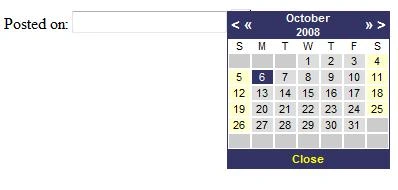
In my previous article JavaScript Calendar in ASP.NET 2.0 here, I discussed how to use a calendar control using java script. I got many emails from readers asking how to use this control with a master page. So here I am going to discuss about this.
In this article I am using a JavaScript file (Calendar.js) and a CSS file (Calendar.css). The JavaScript file has all functions and methods, which are used in calendar and CSS file has all calendar style sheets.
You can call JavaScript file on page like this:
<script language="javascript" src=Calendar.js type="text/javascript"></script>
And style sheet file like this:
<link href=Calendar.css rel="stylesheet" type="text/css">
Only diffrence is you have to change the ID of your control with the master page like this.
This is without the master page.
<form id="form1" runat="server">
<asp:Label ID="lblDateSent" runat="server" Text="Posted on:" CssClass="graytextbold"></asp:Label>
<input ID="PostedOn" runat="server" class="NormalTextBox" readonly="readOnly" type="text" />
<a onclick="showCalendarControl(PostedOn)" href="#">
<img src=calendar.gif style="width: 20px; height: 20px" border=0 /></a>
</form>
This is with the master page.
<asp:Label ID="lblDateSent" runat="server" Text="Posted on:" CssClass="graytextbold"></asp:Label>
<input ID="PostedOn" runat="server" class="NormalTextBox" readonly="readOnly" type="text" />
<a onclick="showCalendarControl(ctl00_ContentPlaceHolder1_PostedOn)" href="#">
<img src="calendar.gif" style="width: 20px; height: 20px" border=0 />
</a>
Only the changed line is onclick event(showCalendarControl(ctl00_ContentPlaceHolder1_PostedOn)). You can see id of your control in ViewSource.
Result will be same. For more details I am attaching my test application with both examples. Download it.
sumit gargPosted Feb 24, 2012, 5:32 AM
plz tell me how can i chagne year by using dropdownlist box
Sunil DhimanPosted May 30, 2011, 8:06 AM
its a nice article Raj. keep posting...
shilpa saharePosted Feb 21, 2011, 2:56 AM
I want to selected date in Textbox control..
ss ssPosted Nov 24, 2010, 2:11 AM
Its working fine without giving codes in IE...and wont work with mozilla ..... As you said i used single codes for the control while calling showcalendarcontrol function... now calendar control is visible in both the browsers but not working.....ie..selected date is not iserted in textbox plsssssssss help meeeee very very urgent
Mani KandanPosted Sep 4, 2010, 3:01 AM
Thanks Raj Kumar
Ramesh KumarPosted Aug 26, 2010, 10:31 AM
object Expected error
Donovan CarterPosted Mar 25, 2010, 10:25 AM
<!--Session data-->
charu gayPosted Mar 23, 2010, 3:58 AM
its working good...
raji sundarPosted Feb 25, 2010, 12:32 AM
How to get the selected date into textbox? Can anybody know.. please help me in this.... Thanks In Advance... Awaiting your reply dotnet buddies...
vijaya bharathiPosted Aug 26, 2009, 3:19 AM
Thank u very much to give a such nice code sir,it works fine.it helps me a lot
satya narayanaPosted Jun 28, 2009, 1:49 PM
Hi sir, Nice post , it is working in IE but not working in Mozilla , So kindly update it . satya
kinfePosted May 21, 2009, 6:38 PM
good job
Asheej TKPosted Mar 28, 2009, 11:10 AM
Thanks a lot boss....keep posting...
Manoj LalPosted Mar 25, 2009, 6:55 AM
Hello Sir, when i m using this nd clicking on the img(calendar.gif) i m getting Error on the Page. Please help me how can i over come this problem while using calandar with master page.
suma shanPosted Feb 19, 2009, 7:37 PM
I's very useful for me. Thx for your post in Master page.
Prateek RegmiPosted Dec 18, 2008, 11:34 PM
I tried with Explorer and works well. But it is not working at all in firefox. please Reply me at [email protected]
Prateek RegmiPosted Dec 18, 2008, 11:01 PM
nice job raj