

Introduction: In this application we using AJAX in ASP.NET MVC. AJAX stands for "Asynchronous JavaScript and XML." AJAX is a technique for creating fast and dynamic web pages. Now in this application we developed the Updated status Information using ASP.NET MVC. An XMLHttpRequest object is used to to exchange data asynchronously with a server. JavaScript/DOM to display and interact with the information. AJAX allows web pages to be updated asynchronously by exchanging small amounts of data with the server behind the scenes. This means that it is possible to update parts of a web page, without reloading the whole page. CSS is used to set style the data and last XML is used as the format for transferring data. Now we know that ASP.NET MVC framework was designed to enable you to write good software applications.
Step1: Open Visual Studio 2010.
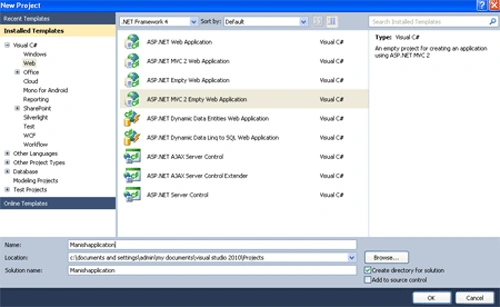
- Go to file -> New->Projects
- Create an ASP.NET MVC 2 Web Application
- The name of the application is "Manishapplication"
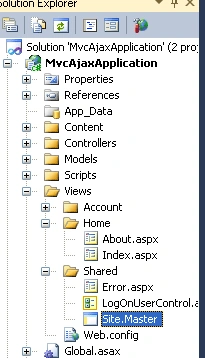
Step2: First we open site.master page.
- Open Views Folder-> Shared Folder->Site.master page
Code:
<%@
Master Language="C#"
Inherits="System.Web.Mvc.ViewMasterPage"
%>
<script
src="<%=
Url.Content("~/Scripts/MicrosoftAjax.debug.js")
%>"
type="text/javascript"></script>
<script
src="<%=
Url.Content("~/Scripts/MicrosoftMvcAjax.debug.js")
%>"
type="text/javascript"></script>
<!DOCTYPE
html PUBLIC
"-//W3C//DTD XHTML 1.0 Strict//EN"
"http://www.w3.org/TR/xhtml1/DTD/xhtml1-strict.dtd">
<html
xmlns="http://www.w3.org/1999/xhtml">
<head
runat="server">
<title><asp:ContentPlaceHolder
ID="TitleContent"
runat="server"
/></title>
<link
href="../../Content/Site.css"
rel="stylesheet"
type="text/css"
/>
</head>
<body>
<div
class="page">
<div
id="header">
<div
id="title">
<h1>Ajax
using by manish</h1>
</div>
<div
id="logindisplay">
<%
Html.RenderPartial("LogOnUserControl");
%>
</div>
<div
id="menucontainer">
<ul
id="menu">
<li><%:
Html.ActionLink("Home",
"Index", "Home")%></li>
<li><%:
Html.ActionLink("About",
"About", "Home")%></li>
</ul>
</div>
</div>
<div
id="main">
<asp:ContentPlaceHolder
ID="MainContent"
runat="server"
/>
<div
id="footer">
</div>
</div>
</div>
</body>
</html>
Step3: Second we open the Homecontroller.
- Open the controller Folder->Homecontroller.controller

Code:
using
System;
using
System.Collections.Generic;
using
System.Linq;
using System.Web;
using
System.Web.Mvc;
using
MvcAjaxApplication.Models;
namespace
MvcAjaxApplication.Controllers
{
[HandleError]
public class
HomeController :
Controller
{
public string
GetStatus()
{
return
"yes " + DateTime.Now.ToLongTimeString();
}
public string
UpdateForm(string TextBox1)
{
if (TextBox1 !=
"Plese text Enter")
{
return
"Youe Feedback: \"" + TextBox1.ToString() +
"\" at " +
DateTime.Now.ToLongTimeString();
}
return
String.Empty;
}
public
ActionResult Index()
{
ViewData["Message"] =
"This is Manish application!";
return View();
}
public
ActionResult About()
{
return View();
}
}
}
Step4:Open the index view.
- Open the Views Folder->Home Folder->Click index.aspx page

Code:
<%@
Page Language="C#"
MasterPageFile="~/Views/Shared/Site.Master"
Inherits="System.Web.Mvc.ViewPage"
%>
<asp:Content
ID="Content1"
ContentPlaceHolderID="TitleContent"
runat="server">
Home Page
</asp:Content>
<asp:Content
ID="Content2"
ContentPlaceHolderID="MainContent"
runat="server">
<h2
style="background-color:
#FF80C0"><%=
Html.Encode(ViewData["Message"])
%></h2>
<p
style="background-color:
#FF8080">
Data of Page: <%=
DateTime.Now.ToLongTimeString()
%>
</p>
<span
id="status"
style="background-color:
#00CC66">No any Data</span>
<br
/>
<%=
Ajax.ActionLink("Update Status",
"GetStatus", new
AjaxOptions{UpdateTargetId="status"
}) %>
<br
/><br
/>
<%
using(Ajax.BeginForm("UpdateForm",
new AjaxOptions{UpdateTargetId="textEntered"}))
{ %>
<%=
Html.TextBox("textBox1","Enter
text")%>
<input
type="submit"
value="Login"
style="background-color:
#00FFFF" /><br
/>
<span
id="textEntered"
style="background-color:
#FFFF00">Nothing Entered</span>
<%
} %>
</asp:Content>
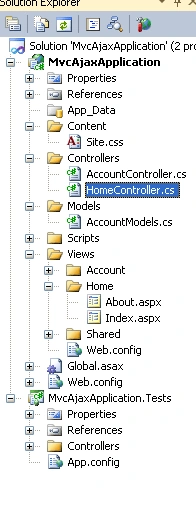
Step5: The complete application
Step6: Press crtl+f5 to run the program
Output:

Join the conversation! Your thoughts help the community grow.