

Introduction
This article explains the "angular.forEach" API of AngularJS.
AngularJS provides many types of directives and an API that helps us greatly to solve our issues in a very significant manner, here I will also show one more API provided by AngularJS, "angular.forEach".
I will create a simple application that will help you in an easy way to understand how you can use it in your complex applications.
Step 1
First of all you need to add an external Angular.js file to your application, "angular.min.js".
For this you can go to the AngularJS official site or can download my source code and then fetch it or you can click on this link to download it: ANGULARJS.
After downloading the external file you need to add this file to the Head section of your application.
- <head runat="server">
- <title></title>
- <script src="angular.min.js"></script>
- </head>
Step 2
Now after adding the external JS file the first thing you need to do is to add ng-app in the <HTML> Tag otherwise your application will not run.
- <html ng-app xmlns="http://www.w3.org/1999/xhtml">
Now I will work on the JavaScript section of this application, you need to add the following code to the head section of your application:
- <script>
- function x($scope) {
- $scope.names = [{ Name: 'Anubhav' , Male:true},
- { Name: 'Mohit', Male: true },
- { Name: 'Komal', Male: false },
- { Name: 'Anupriya', Male: false },
- { Name: 'Girish', Male: true }];
- $scope.func = function () {
- var male = 0;
- angular.forEach($scope.names, function (todo) {
- male += todo.Male ? 1 : 0;
- });
- return male;
- };
- };
- </script>
Here I have created a function "x" that will be bound as the Controller in the design part of our application.
In this function I have provided some initial values under the Name and their Gender.
After this I had again created a function "func", in this function I initialized a variable, "male", whose value is set to 0.
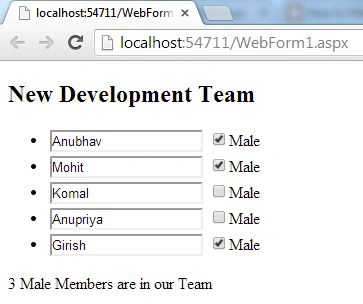
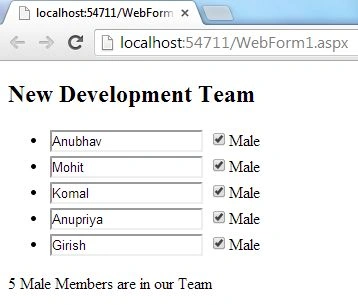
After initializing the function I used the "angular.forEach()" API. Using angular.forEach we will check whether a person is Male or Female, if male then the variable "male" will increase its value by one and in this way all the users and their genders will be checked and finally the output will be provided.
Now our work with JavaScript is completed and we can move to the design part.
Step 3
Write this code in the body section of your application:
Join the conversation! Your thoughts help the community grow.