

Introduction
In this article you will learn how to retrieve SharePoint list items using AngularJS with multiple app directives and multiple controllers. This article mainly focuses on the angular components used in different web part zones within a single page.
Generally, we will be using one single application directive with multiple controllers. Consider a scenario where angular controllers need to be placed in different web part zones. In this case, application directive should be placed on a master page or page layout elements. But master page or page layout doesn’t support ng-app directive on their elements. So ng-app directives should be placed for each controller in their respective web parts.
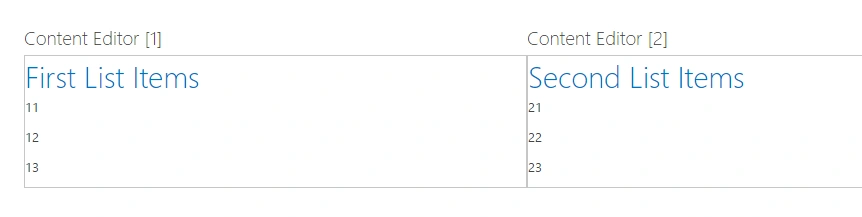
So, we will see how we can retrieve data from multiple lists and display it on multiple components. In our case, we will consider how we can show the values of 2 SharePoint list's items on two different components (different web part zones) with in single page.
AngularJS will help SharePoint developers to bind the data easily on SharePoint pages. With respect to angular context, the components will have the respective controllers defined. We will consider multiple app directive which will be defined for each components where controller is defined.
Add 2 content editor web parts to 2 different web part zones in a page. Refer the angular script file in master page or page layout or before the script loads.
For first content editor web part, declare the html as below.
- <div id="App1" ng-app="listApp1" ng-controller="controller1">
- <h1>First List Items</h1>
- <div ng-repeat="item in items">
- <p>{{item.Title}}</p>
- </div>
- </div>
Then initialize the module and the controllers. The below snippet helps you understand how app can be initialized using the module and controller.
- var appVar1 = angular.module('listApp1', []);
- appVar1.controller("controller1", function($scope){
- $.ajax({
- url: "/_api/web/lists/GetByTitle('List1')/items",
- method: "GET",
- async: false,
- headers: { "Accept": "application/json;odata=verbose" },
- success: function(data){
- $scope.items = data.d.results;
- },
- error: function(sender,args){
- console.log(args.get_message());
- }
- });
- });
adeel hafizPosted Jun 12, 2018, 5:14 AM
By adding this line of code: angular.bootstrap(document.getElementById("App2"),['listApp2']); App2 is always null. Can anyone plz help me out
Mohammed IbrahimPosted Apr 11, 2016, 1:55 PM
nice
Kuppurasu NagarajPosted Apr 11, 2016, 1:23 PM
Nice Sharing
NitinPosted Apr 11, 2016, 11:22 AM
Good one. Thanks for sharing.
Humayun Kabir MamunPosted Apr 10, 2016, 11:51 PM
Nice...