

Using Block in C#: behind the screen
This article demonstrates how to implement a using block in C#. I will assume more are less all .NET developers are familiar with using blocks and have already used a using block in their daily code development. And probably you know the advice line "Always use a using block to manage your resource efficiently" but you don't have a clear idea of how. What happens behind the scene. If you still don't know what exactly a using block is then this article is for you.
What is resource?
I hear the term "resource" very frequently from my team leader and project manager. Hmm ..in their domain resource means manpower and machine power. Dear friend, here we will discuss resources in the .NET environment.
In .NET there are two types of resources, managed resources and unmanaged resources. Let's quickly review our concept of that.
Managed resource
A single-line definition of a managed resource is "managed resources are those that are under the control of the .NET Framework". Not clear? OK let me provide one example. I have declared a class in my project and I have created an object of that class. And happily I have done some operation (maybe my business operation) with that object. What happens under the hood? When we create an object of a class in the .NET environment, memory (in the stack and the heap) is allocated for it, and all data is encapsulated with the object store in a specific memory location. And when our work has finished we forget to clear the memory location. Just joking. Yes, we do not explicitly clear the memory in our application in general. Who is the sweeper here? If you guess Garbage Collector, you are correct. The Garbage Collector runs in the background and clears unused objects from memory. But believe me, the Garbage Collector is a very costly operation. In one article we will discuss that. Let's return to the point, the summary of this paragraph is that we are not bothered at all with those objects that we create in the .NET environment or in our project. And the .Net Garbage Collector is able to do this because that code is managed code and controled under the .NET environment.
Unmanaged code
The code, which is developed outside of the .NET Framework, is known as unmanaged code. And the pain with unmanaged code is that it does not run under the control of the CLR. Why I have used the phrase under the control?. The reason is unmanaged code does not enjoy all the facilities of the CLR and the .NET Framework. Here by facility I mean to say that no garbage collection, limited debugging, code optimizing etcetera. Languages like C, C++, VB and ASP might be used to produce unmanaged code. And when we use unmanaged code over the .NET Framework it's our responsibility to clean up memory manually because we already discussed the Garbage Collector process cannot take responsibility for unmanaged code.
Let's get to our core discussion point, what is a using block?
In the above discussion we have learned there is no need to bother with a managed object because the Garbage Collector is there to take care of it, but how will it be "If we clear a managed code object immediately when will our work finish, even with a managed object"? It would be a great idea, right? And if we are really interested in doing so, we can use a using block to ensure that memory for that object will be properly disposed of after our operation finishes.
How to use a using block? And what happens behind the scenes?
It's not rocket science to implement a using block in your code. And I know that all of you have already implemented them in your project, as in the following structure.
Using(Your resource)
{
//Make your operation here.
}
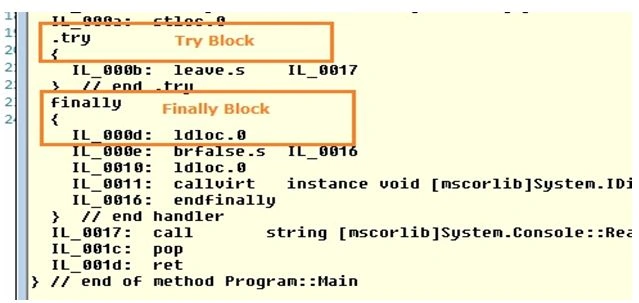
But what happens in a real scenario? When we use a using block, our code structure changes into a different form. How? As in the following:
Try
{
//Our business operation
}
Finally()
{
//Code to dispose object
}
You may be thinking I don't believe so. OK, please have a glance at the following code and screenshot of its corresponding intermediate languages.
My Code is here:
using System;
using System.Linq;
using System.Text;
using System.Collections;
using System.IO;
using System.Diagnostics;
using System.Collections.Generic;
using System.Data.SqlClient;
namespace BlogProject
{
class Program
{
static void Main(string[] args)
{
using (StreamWriter wr = new StreamWriter(@"D:\test.txt"))
{
//My Work is here
}
Console.ReadLine();
}
Hardik VinzavaPosted May 30, 2014, 2:48 AM
read once and that's it.... Great demonstration and easy to understand