


This article explains Collection Data Sources of Windows Phone App Studio. You will first learn about a collection Data Sources and then will see how to add them to an application. We will also learn about various options that we can configure in it. In this article we won't create any application but only learn the theory of this Data Source.
Collection Data Source
A Collection Data Source is a Data Source that allows you to store your own data. The data is stored in Tables. This Data Source offers full support for table schema modifications. In a table, a column represents the various fields of your data structures. These column values can be used inside the app using data bindings. The fields of data can be anything related to your application or problem, for example it can be a phone number, address, name, description, image and so on.
Windows Phone App Studio supports two types of Collection Data Sources. One is a static data resource based and another is App Studio Data Service based. Both Data Source types have their own specific use as we will see in my next few articles and the difference between them becomes very clear from the next paragraph.
Static resources
- Static resource types refer to static data.
- We can configure Data Source of our data table data only once, during the app development.
- Once the app is published, you can't change the app data.
- This Data Source can work offline.
- The data is stored in the app itself.
App Studio Data Service
- This service refers to a cloud data service of Windows Phone App Studio.
- The data can be changed even after the app is published.
- This Data Source requires an Internet Connection for the application.
- The data is stored on a cloud database.
- The app is updated with the new data if the data is changed using Windows Phone App Studio.
This article is centered on static resources.
Adding Collection Data Source
To add a Collection Data Source:
- First open the "Configure App content" page of the App Studio.

- Click on "+" and select "Add Section" from the Pop-up.
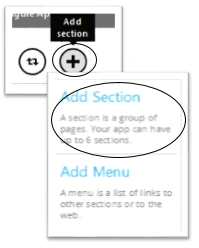
- On the add section page, add your section name
- Choose the Collections as Data Source type
- Enter the Data Source name.
- Click "Save changes".
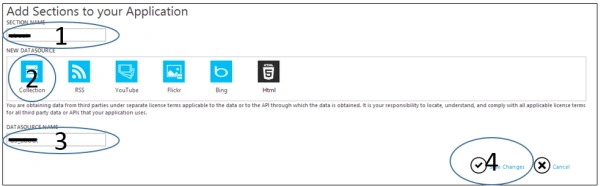
You are done with adding the Data Source. Now the next step is to make it ready for use.
Setting Collection Data Source
To add the data or content or more precisely HTML in your Data Source:
- Click on your newly added Data Source.
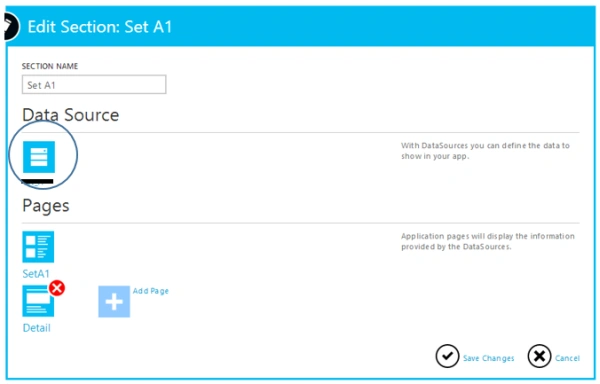
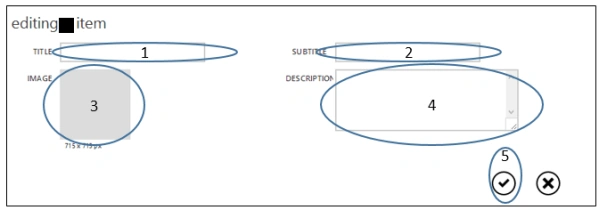
- You can add your data by clicking on the "Create item".
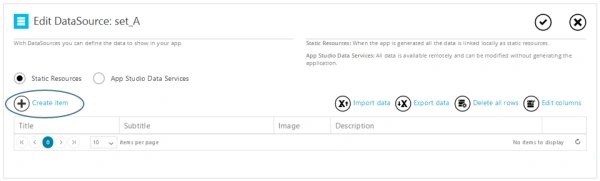
- Fill your data in the pop-up and click "Save".
- To save the Data Source, click on "Save changes".
Summary
In this article I used the static resources type collection. In my future articles I will explain import, export, table alterations and dynamic Data Sources. Thank you for reading this article. Don't forget to comment and share.
Join the conversation! Your thoughts help the community grow.