

Introduction
We use Session in ASP.NET application to maintain the state of the user. These Sessions too use Cookies in the background to associate Sessions with the correct user. But if a user has turned off his browser's cookies then our application will not work on these browsers. For this situation we use Cookie-less Sessions. In Cookie-less Sessions, the values that are required to associate users with their sessions are appended to the browser's URL.
Session
As we know HTTP is a stateless protocol and every request to a web page is treated as a new request. Session is a way of maintaining the state of a page. A session stores user specific data that persists across multiple page requests. We can store any type of object in a session.
Example
- Session.Add("Name", txtName.Text);
- Session["Name"] = " txtName.Text;
Similarly, we can also add any other object in the session, like a DataSet.
- SqlConnection con = new SqlConnection(ConString);
- SqlCommand cmd = new SqlCommand("SELECT * FROM Employee", con);
- SqlDataAdapter sda = new SqlDataAdapter(cmd);
- DataSet ds = new DataSet();
- sda.Fill(ds);
- if (Session["Name"] != null)
- {
- txtName.Text = Session["Name"].ToString();
- }
How to Cookie-less Session
By default a session uses a cookie in the background. To enable a cookie-less session, we need to change some configuration in the Web.Config file. Follow these steps:
- Open Web.Config file
- Add a <sessionState> tag under <system.web> tag
- Add an attribute "cookieless" in the <sessionState> tag and set its value to "AutoDetect" like below:
- <sessionState cookieless="AutoDetect" regenerateExpiredSessionId="true"/>
The possible values for "cookieless" attribute are:
- AutoDetect : Session uses background cookie if cookies are enabled. If cookies are disabled, then the URL is used to store session information.
- UseCookie: Session always use background cookie. This is default.
- UseDeviceProfile: Session uses background cookie if browser supports cookies else URL is used.
- UseUri: Session always use URL.
"regenerateExpiredSessionId" is used to ensure that if a cookieless url is expired a new new url is created with a new session. And if the same cookieless url is being used by multiple users an the same time, they all get a new regenerated session url.
We have configured our "Web.config" file to enable cookieless session. Now, its time to test it.
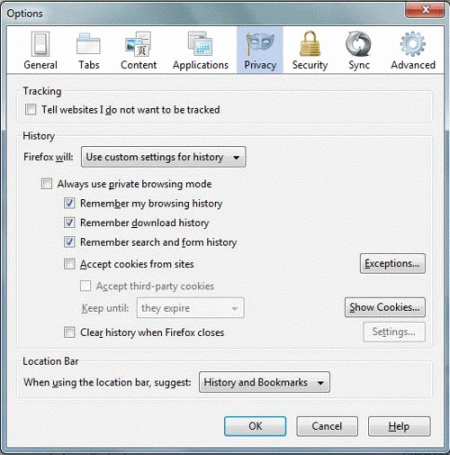
Open Mozilla Firefox and Click on (Tools -> Options -> Pricacy)
Now on History group box select (Firefox will : Use custom settings for history)
Now uncheck (Accept cookeies from sites)
You will get an URL something like this:

Yavuz MercanPosted Apr 26, 2022, 3:20 PM
Thank you my friend but not working for me
Sergii GPosted Sep 2, 2020, 3:37 PM
You have typo in the list of possible values for the attribute cookieless: UseCookies (not UseCookie)
Sam HobbsPosted Mar 30, 2016, 4:11 PM
If we are using background cookies and store something in (for) the session, is it automatically persisted as a cookie too?
Sam HobbsPosted Mar 30, 2016, 4:06 PM
I have seen many articles in this web site about cookies but only this article plus about two others describe Cookie-less Sessions and what happens when the user chooses to not allow cookies.
sinthu manikandanPosted Jun 22, 2015, 6:13 AM
its not working for me
jitendra kannaujiyaPosted Oct 5, 2013, 2:46 AM
nice .............
hassan wasefPosted Apr 19, 2012, 9:59 PM
thank you for your nice explanation
Mannava SivaAdityaPosted Feb 27, 2012, 3:13 AM
Got a clear picture. Thanks.
Deepak SharmaPosted Feb 9, 2012, 1:49 AM
Thanks friends !!!
Sonakshi SinghPosted Feb 7, 2012, 11:04 PM
Thank you so much for such an article
Alok PandeyPosted Feb 7, 2012, 11:00 PM
Well explained. Thanks for this article.
Daisy KrausePosted Feb 7, 2012, 11:00 PM
Its a very nice and useful article.
Arjun PanwarPosted Feb 7, 2012, 10:49 PM
Really thanks for this article