

Introduction
In this article I will use the CRUD (Create, Read, Update, Delete) operations in the ASP. NET Web API. These operations are used in databases. These are the basic operations for databases. Here we create a simple list of Items to be managed using these CRUD operations. For using the CRUD operations in ASP. NET Web API use the following procedure.
Step 1
First we create the Web API Project.
- Start Visual Studio 2012 and select "New Project" from the Start Page.
- In the Template window, select "Installed template" -> "Visual C#" -> "Web".
- Choose "ASP. NET MVC 4 Web Application" then change its name.
- Click on the "OK" button.
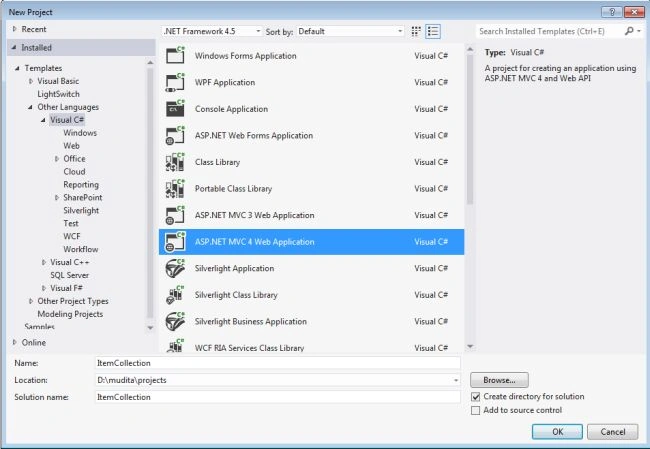
- MVC 4 Project window:
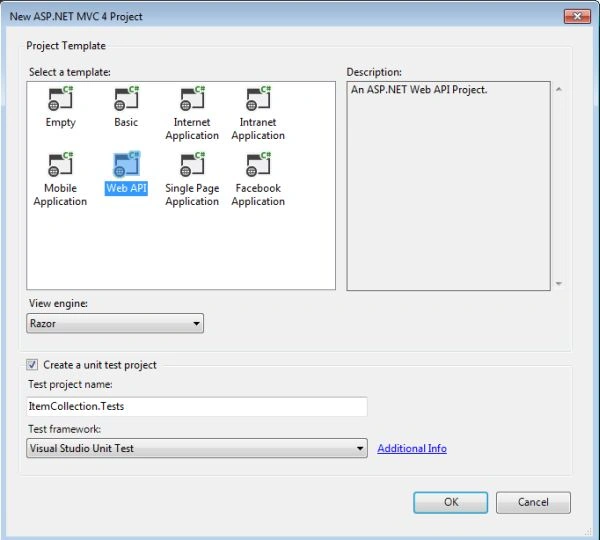
- Select "Web API" and click on the "OK" button.
Step 2
Create a Model Class and name it "Item.cs".
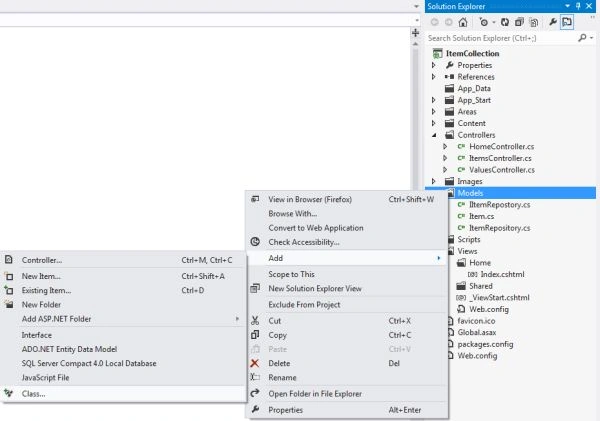
- In the "Solution Explorer", right-click on the "Model Folder" then select "Add" -> "Class".
- In the Template window, select "Installed template" -> "Visual C#".
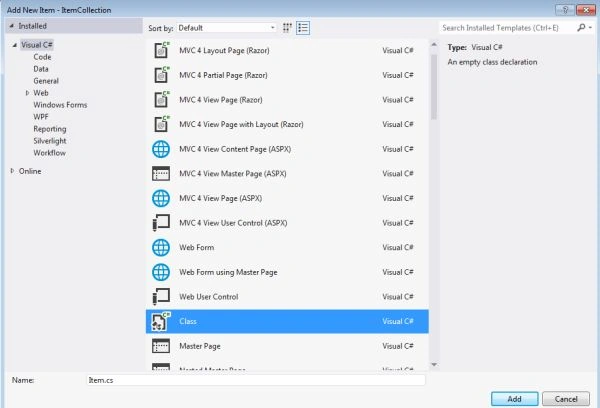
- Choose "Class". Change its name.
- Click on the "OK" button.
Now type this code in the "Item.cs" class:
- using System;
- using System.Collections.Generic;
- using System.Linq;
- using System.Web;
- namespace ItemCollection.Models
- {
- public class Item
- {
- public int Id { get; set; }
- public string Name { get; set; }
- public string Category { get; set; }
- public decimal Price { get; set; }
- }
- }
Step 3
Create an "Interface" and name it "ItemRepository".
- In the "Solution Explorer" right-click on the "Model folder" then select "Add" -> "New Item".
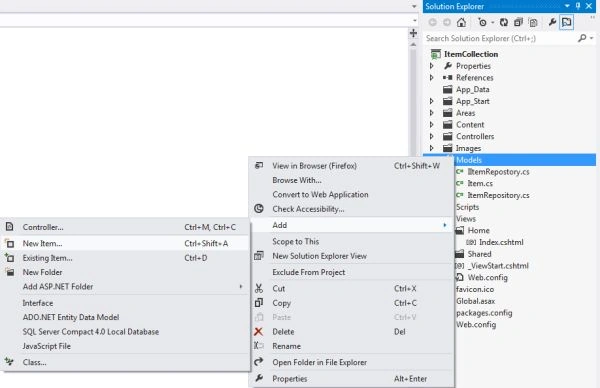
- In the Template window, select "Installed template" -> "Visual C#".
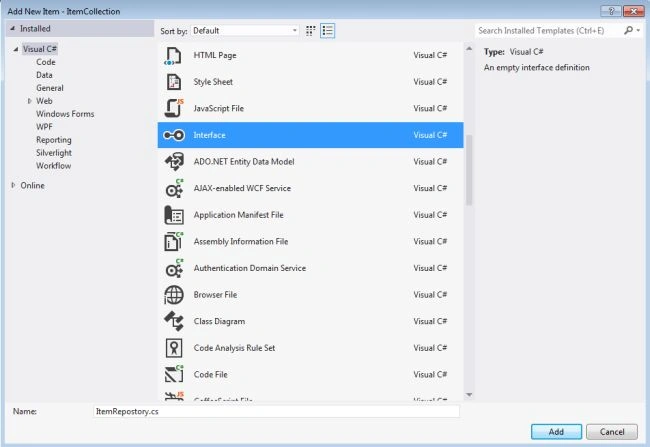
- Choose "Interface" and change its name.
- Click on the "OK" button.
Write this code in the "ItemRepository.cs":
- using System;
- using System.Collections.Generic;
- using System.Linq;
- using System.Text;
- using System.Threading.Tasks;
- namespace ItemCollection.Models
- {
- interface ItemRepository
- {
- IEnumerable<Item> GetAll();
- Item Get(int id);
- Item Add(Item item);
- void Remove(int id);
- bool Update(Item item);
- }
- }
Step 4
Create a new Model class name as "IItemRepostory.cs"
- In the "Solution Explorer" ,Right-click on the "Model Folder"->"Add"->"Class".
- In the Template window, select "Installed template"->"Visual C#".
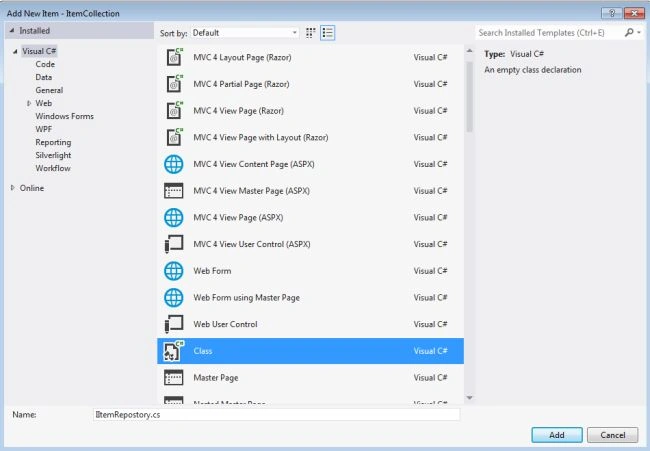
- Choose "Class". Change its name.
- Click on "OK" button.
Write this code in the "IItemRepostory.cs" file.
- using System;
- using System.Collections.Generic;
- using System.Linq;
- using System.Web;
- namespace ItemCollection.Models
- {
- public class IItemRepostory:ItemRepository
- {
- private List<Item> items = new List<Item>();
- private int _nextId = 1;
- public IItemRepostory()
- {
- Add(new Item { Name = "Tomato", Category = "Vagitable", Price = 100});
- Add(new Item { Name = "Apple", Category = "Fruit", Price = 150 });
- Add(new Item { Name = "Suit", Category = "Cloth", Price = 200});
- }
- public IEnumerable<Item> GetAll()
- {
- return items;
- }
- public Item Get(int id)
- {
- return items.Find(p => p.Id == id);
- }
- public Item Add(Item item)
- {
- if (item == null)
- {
- throw new ArgumentNullException("item");
- }
- item.Id = _nextId++;
- items.Add(item);
- return item;
- }
- public void Remove(int id)
- {
- items.RemoveAll(p => p.Id == id);
- }
- public bool Update(Item item)
- {
- if (item == null)
- {
- throw new ArgumentNullException("item");
- }
- int index = items.FindIndex(p => p.Id == item.Id);
- if (index == -1)
- {
- return false;
- }
- items.RemoveAt(index);
- items.Add(item);
- return true;
- }
- }
- }
Step 5
Create a Web API Controller Class and name it "ItemsController.cs".
- In the "Solution Explorer" right-click on the "Controller Folder" then select "Add" -> "Controller".
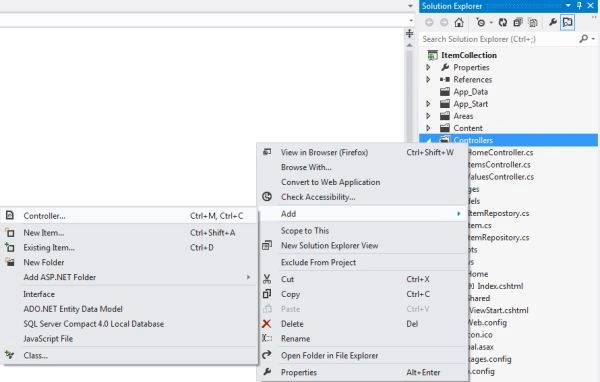
- In the Add Controller window set the Controller name.
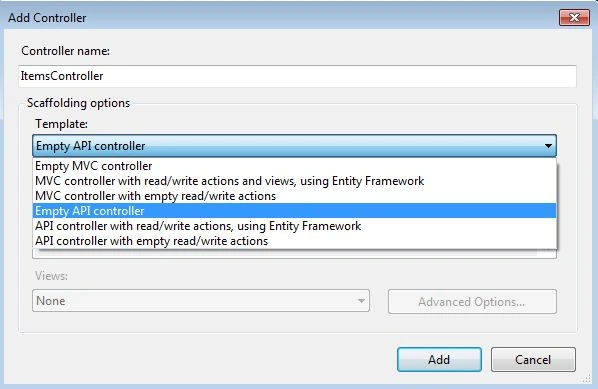
- Select "Template" -> "Empty API controller".
- Click on the "OK" button.
Write this code in the "ItemsController.cs" class:
- using System;
- using System.Collections.Generic;
- using System.Linq;
- using System.Net;
- using System.Net.Http;
- using System.Web.Http;
- using ItemCollection.Models;
- namespace ItemCollection.Controllers
- {
- public class ItemsController : ApiController
- {
- static readonly ItemRepository repository = new IItemRepostory();
- public IEnumerable<Item> GetAllProducts()
- {
- return repository.GetAll();
- }
- public Item GetProduct(int id)
- {
- Item item = repository.Get(id);
- if (item == null)
- {
- throw new HttpResponseException(HttpStatusCode.NotFound);
- }
- return item;
- }
- public IEnumerable<Item> GetProductsByCategory(string category)
- {
- return repository.GetAll().Where(
- p => string.Equals(p.Category, category, StringComparison.OrdinalIgnoreCase));
- }
- public HttpResponseMessage PostProduct(Item item)
- {
- item = repository.Add(item);
- var response = Request.CreateResponse<Item>(HttpStatusCode.Created, item);
- string uri = Url.Link("DefaultApi", new { id = item.Id });
- response.Headers.Location = new Uri(uri);
- return response;
- }
- public void PutProduct(int id, Item product)
- {
- product.Id = id;
- if (!repository.Update(product))
- {
- throw new HttpResponseException(HttpStatusCode.NotFound);
- }
- }
- public void DeleteProduct(int id)
- {
- repository.Remove(id);
- }
- }
- }
Step 6
Open the "Index.cshtml" file.
- In the "Solution Explorer".
- Select "Views" -> "Home" -> "Index.cshtml".
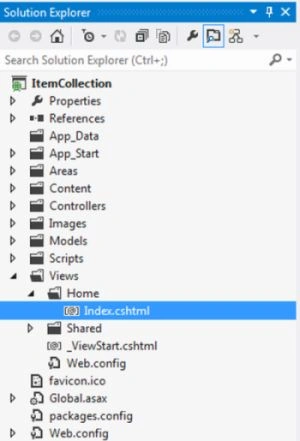
- Double-click on the "Index.cshtml" file.
Write this code in the "Index.cshtml" file:
- @{
- ViewBag.Title = "Item Collection";
- }
- @section scripts {
- <style type="text/css">
- table
- {
- border: 1px solid #000;
- border-collapse: collapse;
- color: #666666;
- min-width: 200px;
- }
- tr
- {
- border: 1px solid #000;
- line-height: 25px;
- }
- th
- {
- background-color: #B1C3CC;
- color: #000;
- font-size: 13px;
- text-align: left;
- }
- th, td
- {
- padding-left: 5px;
- }
- #status {
- color: red;
- }
- </style>
- <script src="@Url.Content("~/Scripts/knockout-2.1.0.debug.js")" type="text/javascript"></script>
- <script type="text/javascript">
- function ViewModel() {
- var self = this;
- function ItemViewModel(item) {
- var self = this;
- self.Id = item.Id;
- self.Name = item.Name;
- self.Price = item.Price;
- self.Category = item.Category;
- }
- self.items = ko.observableArray();
- self.item = ko.observable();
- self.status = ko.observable();
- self.getAll = function () {
- self.items.removeAll();
- $.getJSON("/api/items", function (items) {
- $.each(items, function (index, item) {
- self.items.push(new ItemViewModel(item));
- })
- });
- }
- self.getById = function () {
- self.status("");
- var id = $('#itemId').val();
- if (!id.length) {
- self.status("ID is required");
- return;
- }
- $.getJSON(
- 'api/items/' + id,
- function (data) {
- self.item(new ItemViewModel(data));
- })
- function (xhr, textStatus, err) {
- self.item(null);
- self.status(err);
- });
- }
- self.update = function () {
- self.status("");
- var id = $('#itemId').val();
- var item = {
- Name: $('#name').val(),
- Price: $('#price').val(),
- Category: $('#category').val()
- };
- $.ajax({
- url: 'api/items/' + id,
- cache: false,
- type: 'PUT',
- contentType: 'application/json; charset=utf-8',
- data: JSON.stringify(item),
- success: self.getAll
- })
- .fail(
- function (xhr, textStatus, err) {
- self.status(err);
- });
- }
- self.create = function () {
- self.status("");
- var item = {
- Name: $('#name2').val(),
- Price: $('#price2').val(),
- Category: $('#category2').val()
- };
- $.ajax({
- url: 'api/items',
- cache: false,
- type: 'POST',
- contentType: 'application/json; charset=utf-8',
- data: JSON.stringify(item),
- statusCode: {
- 201 : function (data) {
- self.items.push(data);
- }
- }
- })
- .fail(
- function (xhr, textStatus, err) {
- self.status(err);
- });
- }
- $.getJSON("/api/items", function (items) {
- $.each(items, function (index, item) {
- self.items.push(new ItemViewModel(item));
- })
- });
- }
- function clearStatus() {
- $('#status').html('');
- }
- function add() {
- clearStatus();
- var item = ko.toJS(viewModel);
- var json = JSON.stringify(item);
- $.ajax({
- url: API_URL,
- cache: false,
- type: 'POST',
- contentType: 'application/json; charset=utf-8',
- data: json,
- statusCode: {
- 201 : function (data) {
- self.items.push(data);
- }
- }
- });
- }
- var viewModel = new ViewModel();
- ko.applyBindings(viewModel);
- $("#tabs").tabs();
- </script>
- }
- <div id="body">
- <section class="content-wrapper main-content">
- <h3>Items</h3>
- <table id="items">
- <thead>
- <tr><th>ID</th><th>Name</th><th>Category</th><th>Price</th></tr>
- </thead>
- <tbody data-bind="foreach: items">
- <tr>
- <td data-bind="text: Id"></td>
- <td data-bind="text: Name"></td>
- <td data-bind="text: Category"></td>
- <td data-bind="text: Price"></td>
- </tr>
- </tbody>
- </table>
- </section>
- <section id="detail" class="content-wrapper">
- <div id="tabs">
- <ul>
- <li><a href="#viewTab">View Item</a></li>
- <li><a href="#addNewTab">Add New Item</a></li>
- </ul>
- <div id="viewTab">
- <label for="itemId">ID</label>
- <input type="text" title="ID" name='Id' id="itemId" size="5"/>
- <input type="button" value="Get" data-bind="click: getById"/>
- <div data-bind="if: item()">
- <div>
- <label for="name">Name</label>
- <input data-bind="value: item().Name" type="text" title="Name" id="name" />
- </div>
- <div>
- <label for="category">Category</label>
- <input data-bind="value: item().Category" type="text" title="Category" id="category" />
- </div>
- <div>
- <label for="price">Price</label>
- <input data-bind="value: item().Price" type="text" title="Price" id="price" />
- </div>
- <div>
- <input type="button" value="Update" data-bind="click: update" />
- </div>
- </div>
- </div>
- <div id="addNewTab">
- <div>
- <label for="name">Name</label>
- <input type="text" title="Name" id="name2" />
- </div>
- <div>
- <label for="category">Category</label>
- <input type="text" title="Category" id="category2" />
- </div>
- <div>
- <label for="price">Price</label>
- <input type="text" title="Price" id="price2" />
- </div>
- <div>
- <input type="button" value="Add New" data-bind="click: create"" />
- </div>
- </div>
- </div>
- <div>
- <p id="status" data-bind="text: status" />
- </div>
- </section>
- </div>
Step 7
- Now to execute the application press F5.
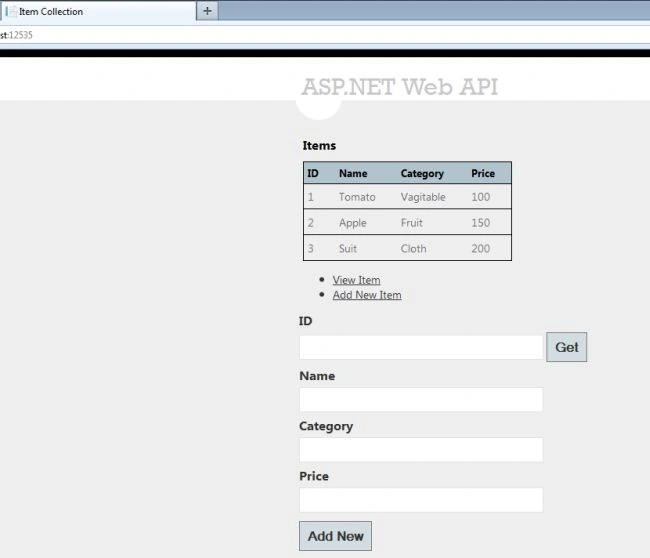
- For finding the Item click on "View Tab" and Type the "Id". Then click on the "GET" button.
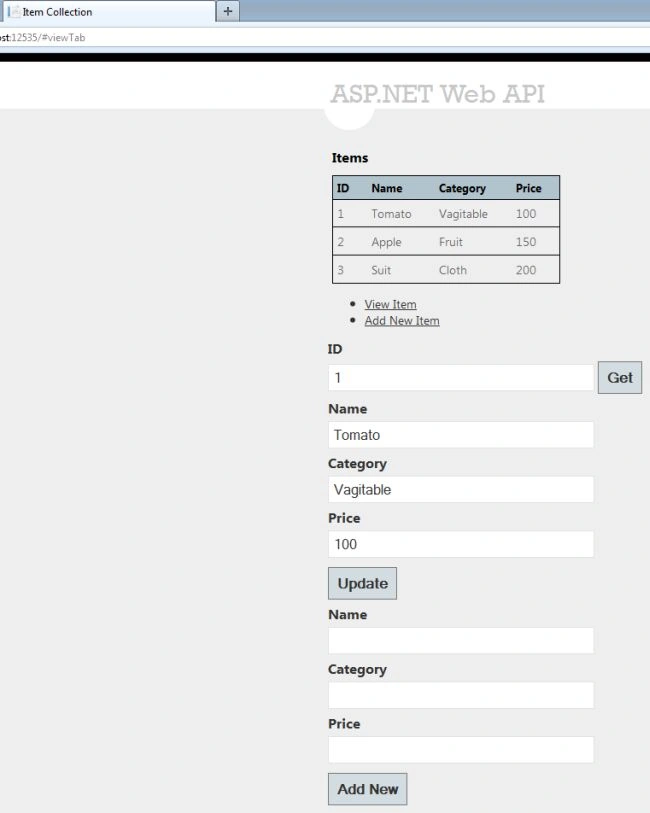
- Update the Item; change the Name or Category or Price then click on the "Update" button.
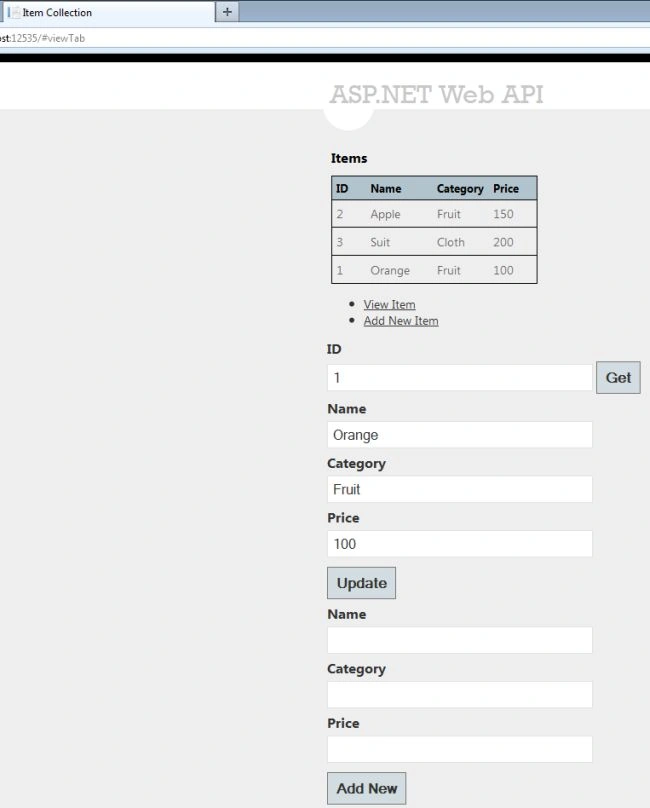
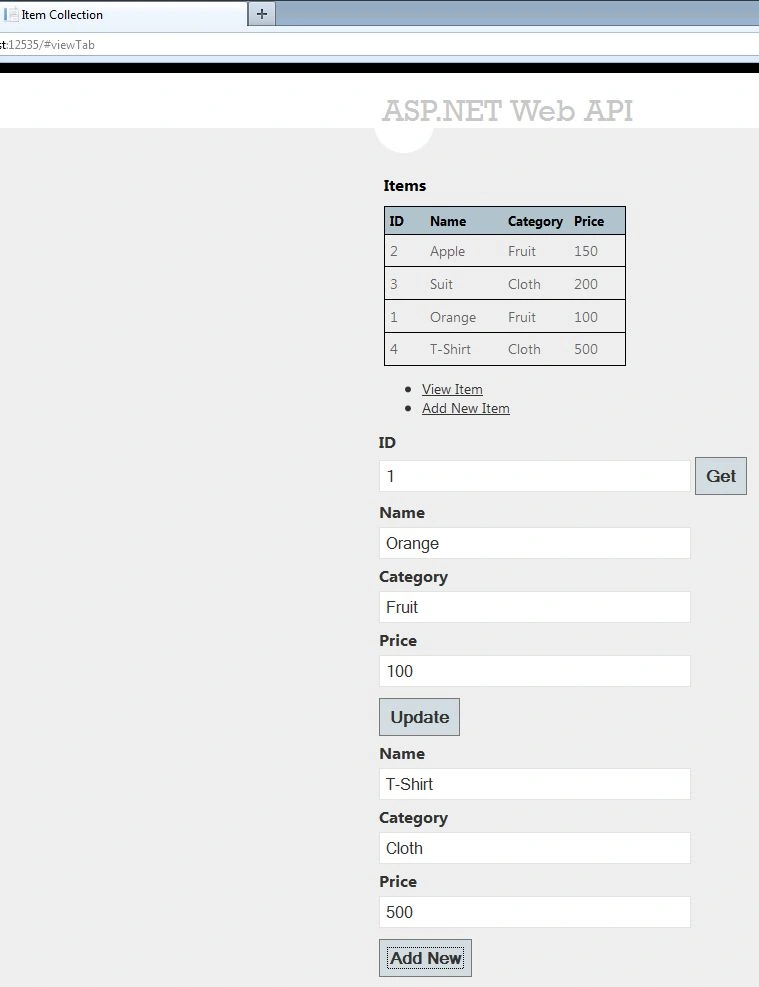
- Add a new Item. Type the Name, Category and price of the item and click on the "Add New" button.
jerson gerongPosted Feb 8, 2018, 2:23 AM
Default data from ItemRepository.cs did not load in the user interface
Shakti Singh DulawatPosted Apr 17, 2016, 3:57 AM
Wonderful
bhargava kishor mPosted Apr 8, 2015, 6:56 AM
http://www.asp.net/web-api/overview/older-versions/creating-a-web-api-that-supports-crud-operations
Kashif RezaPosted Jun 22, 2013, 5:39 PM
Well example is great but it is NOT working from UI. Please share the latest working code - looks like some problem with view