

In PhoneGap, we use four types of notifications. These are as follows:
-
Alerts
-
Confirmation dialogs
-
Beeps
-
Vibrations
Using Alerts
To show a custom alert or dialog box, use the notification.alert function, as shown below.
navigator.notification.alert(message,callback,[title],[button]);
This function takes two required and two optional parameters, in the following order:
-
message: A string that contains the dialog message (for example, "The network status is WIFI only").
-
callback: Invoked when the alert is dismissed.
-
title: A string that contains the alert's title (optional).
-
button: A string that contains the name of the button (for example, "OK") (optional).
Enter the following code in index.html for alerts in www of the Solution Explorer:
<html>
<head>
<title>Notification Example</title>
<script type="text/javascript" charset="utf-8" src="phonegap1.3.0.js"></script>
<script type="text/javascript" charset="utf-8">
// Wait for Phone Gap to load
document.addEventListener("deviceready", onDeviceReady, false);
// Phone Gap is ready
function onDeviceReady() {
// Empty
}
// alert dialog dismissed
function alertDismissed() {
// do something
}
// Show a custom alert
function showAlert() {
navigator.notification.alert(
'You are the winner!', // message
alertDismissed, // callback
'Game Over', // title
'Done' // button Name
);
}
</script>
</head>
<body>
<p><a href="#" onclick="showAlert(); return false;"><strong>Show Alert</strong></a></p>
</body>
</html
Now select Windows Phone Emulator and hit the green play button beside the top drop-down menu to start debugging or press F5 and when you click on SHOW ALERT; the output will be:

Supported Platform
- Android
- Blackberry (OS 4.6)
- Blackberry Web Works (OS 5.0 and higher)
- iPhone
- Windows Phone 7( Mango )
Using Confirmation Dialogs
A confirmation dialog is similar to an alert, except that it may contain multiple buttons, each of which might fire off a different process. For example, a confirmation dialog that asks, "Do you wish to continue?" might have a Yes and a No button. Selecting one or the other results in a different outcome. To create a confirmation dialog, we use the notification.confirm function. This function displays a native dialog box that is more customizable than the browser's confirm function. You'll need to wrap it in a function, because it is generally called from a link or button on the HTML interface. To show a custom confirmation dialog box, we use:navigator.notificatio.confirm(message,confirmCallback,[title],[buttonLabels]) This function takes two required and two optional parameters, in the following order:
- message: Dialog message (String)
- confirmCallback: Callback to invoke with the index of a button pressed (1, 2 or 3). (Number)
- title: Dialog title (String) (Optional, Default: "Confirm")
- buttonLabels: Comma separated string with button labels (String) (Optional, Default: "OK,Cancel")
Enter the following code in index.html in www of the Solution Explorer:
<!DOCTYPE html>
<html>
<head>
<title>Notification Example</title>
<script type="text/javascript" charset="utf-8" src="phonegap-1.3.0.js"></script>
<script type="text/javascript" charset="utf-8">
// Wait for PhoneGap to load
document.addEventListener("deviceready", onDeviceReady, false);
// PhoneGap is ready
function onDeviceReady() {
// Empty
}
// process the confirmation dialog result
function onConfirm(button) {
alert('You selected button ' + button);
}
// Show a custom confirmation dialog
function showConfirm() {
navigator.notification.confirm(
'You are the winner!', // message
onConfirm, // callback to invoke with index of button pressed
'Game Over', // title
'Restart,Exit' // buttonLabels
);
}
</script>
</head>
<body>
<p><a href="#" onclick="showConfirm(); return false;">Show Confirm</a></p>
</body>
</html>
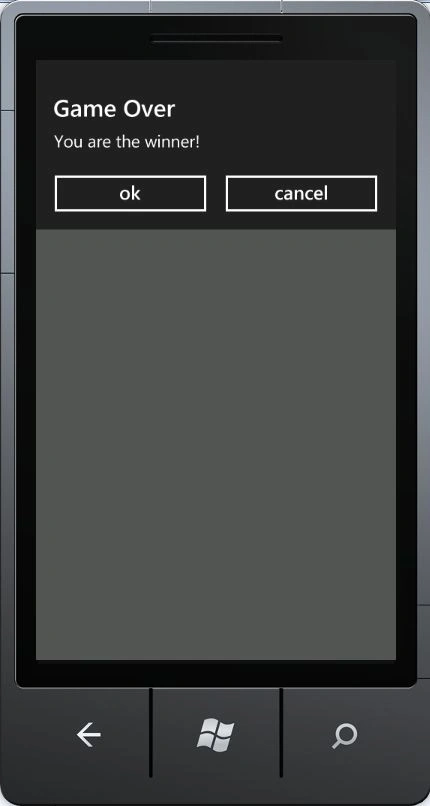
Now select Windows Phone Emulator and hit the green play button beside the top of the drop-down menu to start debugging or press F5 and when you click on SHOW CONFIRM, the output will be:
Supported Platform
- Android
- BlackBerry WebWorks (OS 5.0 and higher)
- iPhone
- Windows Phone 7 ( Mango )
Using Beeps and Vibrations
Sometimes you don't need an alert or confirmation dialog, a simple beep will do when a user does something. To create a beep, use the notification.beep function as shown below. navigator.notification.beep(times);
The function takes a single argument, an integer that indicates how many times you want it to beep.
PhoneGap also provides a vibrate function available as notification.vibrate, which takes a duration argument in milliseconds, as shown below.
navigator.notification.vibrate(milliseconds);
Here the time is the milliseconds to vibrate the device. 1000 milliseconds is 1 second (Number).
Enter the following code in index.html for beeps and vibrations in www of the Solution Explorer:
<!DOCTYPE html>
<html>
<head>
<title>Notification Example</title>
<script type="text/javascript" charset="utf-8" src="phonegap-1.3.0.js"></script>
<script type="text/javascript" charset="utf-8">
// Wait for PhoneGap to load
document.addEventListener("deviceready", onDeviceReady, false);
// PhoneGap is ready
function onDeviceReady() {
// Empty
}
// alert dialog dismissed
function alertDismissed() {
// do something
}
// Show a custom alert
function showAlert() {
navigator.notification.alert(
'You are the winner!', // message
alertDismissed, // callback
'Game Over', // title
'Done' // buttonName
);
}
// Beep three times
function playBeep() {
navigator.notification.beep(3);
}
// Vibrate for 2 seconds
function vibrate() {
navigator.notification.vibrate(2000);
}
</script>
</head>
<body>
<p><a href="#" onclick="showAlert(); return false;">Show Alert</a></p>
<p><a href="#" onclick="playBeep(); return false;">Play Beep</a></p>
<p><a href="#" onclick="vibrate(); return false;">Vibrate</a></p>
</body>
</html>
Supported Platform for Beep and Vibrations
- Android
- BlackBerry (OS 4.6)
- BlackBerry WebWorks (OS 5.0 and higher)
- iPhone
- Windows Phone 7 ( Mango )
Some of the useful resources are:
Events in PhoneGap
Media in PhoneGap
How to Get Device Information Using PhoneGap
Join the conversation! Your thoughts help the community grow.