

Introduction
Delegates are one of the wonderful features of .Net Framework. Their primary use is focused on support event handling and callback mechanism. In this article, we will explore how to use delegate as callback support to make simple communication between different opened windows forms.
In this article, I assume that you know the definition of delegate and its primary use in .Net Framework.
Scenario overview
In many scenarios, a windows form is used to open some other windows forms as modal or non-modal. The newly opened form or the opener itself (the parent form) may need to send each other some notifications or values. For example, you select a value from a ComboBox on the newly opened form, and you want to send this value immediately on select to the opener parent form. Or you changed a parameter value in the opener form (parent) that the newly opened form depends on. Such scenarios can be implemented using delegates in form of callbacks.
Scenario in action
We are going to explore 2 scenarios:
- First Scenario: The main windows form (parent) that can open deferent instances of other windows forms (children).
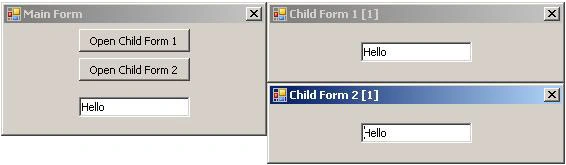
The parent form will contain a TextBox, when the text in this text box changes, all opened windows forms (children) should be notified with this change and display it.
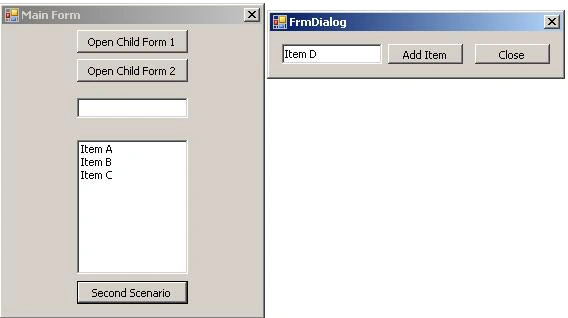
- Second Scenario: The main windows form (parent) that contains a ListBox will open a dialog form that contains a TextBox with two buttons (Add Item) & (Close). Whenever the user click the Add Item button, the item should be added to the ListBox in the main form without closing the dialog. Close button should close the dialog.
Of course these scenarios can be done by exposing controls as public instances. But many would prefer to keep controls as private and start using delegates
The Rule
First of all, you need to decide what do you want to send to the other form cause this will lead you to decide what is parameter type you will use in your delegate.
In our case here, we need only to pass string, so we need to define delegate with string as parameter for example:
public delegate void SetParameterValueDelegate(string value);
Second, you need to decide who is the owner of the communication, in other words, which form will send the notification?! In our first scenario the main form (parent) will be the owner of the communication. But in the second scenario the dialog form will be the owner.
Once you decide the owner, you'll need to declare an instance of your delegate type inside the owner class for example:
public SetParameterValueDelegate SetParameterValueCallback;
The other forms will be subscribers for the callback (delegate), only if you wish to send notification to them.
The First Scenario
The following screenshot shows the first scenario in action, just to note the simple user interface we are using to demonstrate the example:
You need to declare a delegate, should be outside any class for our example needs.
Listing 01-Declare a delegate:
public delegate void SetParameterValueDelegate(string value);
The following is the code written in the Main From "FrmMain Class":
Listing 02-FrmMain Class:
//Declare delagete callback function, the owner of communication
public SetParameterValueDelegate SetParameterValueCallback;
private void btnOpenFrm1_Click(object sender, EventArgs e)
{
    FrmChild1 frm = new FrmChild1();
    //Subscribe frm for Callback
    this.SetParameterValueCallback += new SetParameterValueDelegate(frm.SetParamValueCallbackFn);
    frm.Show();
}
private void btnOpenFrm2_Click(object sender, EventArgs e)
{
    FrmChild2 frm = new FrmChild2();
    //Subscribe frm for Callback
    this.SetParameterValueCallback += new SetParameterValueDelegate(frm.SetParamValueCallbackFn);
    frm.Show();
}
private void txtParam_TextChanged(object sender, EventArgs e)
{
    //Send Notification to all subscribers
    SetParameterValueCallback(txtParam.Text);
}
Did you note the frm.SetParamValueCallbackFn?! Well this is method defined in both FrmChild1 & FrmChild2 forms, of course the method can have different names on each class.
What you should know and note, this method should have the same signature as the delegate, which means, the delegate is void, your method should be void, the delegate accepts only one string parameter, your method also should accept only one string parameter.
The following shows the definition of the SetParamValueCallbackFn method:
Listing 03-SetParamValueCallbackFn Method:
public void SetParamValueCallbackFn(string param)
{
    txtParam.Text = param;
}
The Second Scenario
You might guess what we should do in this scenario, first we will create a new delegate that takes a string parameter, we will call it AddItemDelegate. In the Dialog form (FrmDialog) we will declare a callback method of type AddItemDelegate. In main from (FrmMain) we will define the callback function.
Listing 04-AddItemDelegate:
public delegate void AddItemDelegate(string item);
Listing 05-FrmDialog Class:
//Declare delagete callback function, the owner of communication
public AddItemDelegate AddItemCallback;
private void btnAdd_Click(object sender, EventArgs e)
{
    //Notification subscribers
    AddItemCallback(txtItem.Text);
}
Listing 06-FrmMain Class:
private void btnScenario2_Click(object sender, EventArgs e)
{
    FrmDialog dlg = new FrmDialog();
    //Subscribe this form for callback
    dlg.AddItemCallback = new AddItemDelegate(this.AddItemCallbackFn);
    dlg.ShowDialog();
}
private void AddItemCallbackFn(string item)
{
    lstBx.Items.Add(item);
}
Conclusion
The way of using delegates to send information between windows forms is much more clear than exposing controls as public instances, well this is my opinion.
In the examples represented here, we could use on delegate instead of tow, but I represented this just for clarification. Hope you find it useful.
Peter EvansPosted Aug 27, 2023, 12:49 AM
The best explanation I've ever seen. Thank you
Oghnz EPosted Jun 30, 2023, 5:04 PM
Is there a vb.net version?
Oghnz EPosted Jan 26, 2023, 7:29 AM
Can one of the form be in a dll while the other be in the main GUI?
Sanjeev KohliPosted Feb 23, 2022, 1:38 PM
Very Good Example !!!!! Thanks a Ton !!!!
nobbicheckPosted Jan 19, 2017, 5:40 AM
Fantastic example. I had some problem understanding where to define Delegates. So this helped a lot for finding out how to send and receive Information from and to a class. So I also use my classes in a Backgroundworker and even that works fine.Thanks a lot for your work.
MarianPosted Jun 22, 2016, 9:05 AM
Thanks for code and description Dear Sir :). Very usefull.
achintya mandalPosted Apr 30, 2016, 9:19 AM
Saved a lot of time for me. Looking here and there ... people should give example with full source code like this. Otherwise, very difficult to follow.
Anjum RazaPosted Sep 21, 2014, 8:46 AM
Thanks. very Good, its Usefull
Ian HowiePosted Sep 29, 2013, 1:01 PM
Regarding me me's solution to the null exception problem, there's no need to introduce the 'handler' variable'. private void txtParam_TextChanged(object sender, EventArgs e){if (SetParameterValueCallback != null){//Send Notification to all subscribers SetParameterValueCallback(txtParam.Text);}} works and, I think, makes more sense on reading.
moh mohPosted May 29, 2013, 10:30 PM
thanks < Good article > its very usefull
chrisPosted May 14, 2013, 4:36 PM
Very good explained. Just what I needed, thanks!
me mePosted Oct 23, 2012, 5:02 AM
found a solution.. if you type in text before clicking the button you get a error. why.. because at that time the delegate is empty it has no Invoke yet. like this"this.SetParameterValueCallback += new SetParameterValueDelegate(frm.SetParamValueCallbackFn);" this is how you solved the problem private void txtParam_TextChanged(object sender, EventArgs e) { SetParameterValueDelegate handler = SetParameterValueCallback; if (handler != null) { //Send Notification to all subscribers SetParameterValueCallback(txtParam.Text); } }
me meeditedPosted Oct 20, 2012, 8:45 AMEdited Oct 20, 2012, 8:47 AM
nice article.. when you don't click on the buttons and just start fill the textbox.. i get error "NullReferenceException was unhandled" what is the best way to solve this..
Nishantha HettigodaPosted Jul 4, 2012, 5:59 AM
Thanks a lot !...
Nishantha HettigodaPosted Jul 4, 2012, 5:59 AM
Thanks a lot !...
rehman_922Posted Jun 11, 2012, 10:22 AM
is it possible to use same delegate(i mean global declaring). I have several forms with lookups, once user selected item in lookup i add it to parent form. i use delete to do this for one form. i want to implement same in other forms with out repeating the delegate name in parent forms is it possible to declare delegate in gloabally and call that delegate .... (declaring the delegate globally)
RohanPosted May 21, 2012, 12:15 PM
Thanks a TON !... gr8 demo ...finally got hold of delegates !
DongPosted May 16, 2012, 11:03 PM
great article.
decoPosted May 16, 2012, 8:25 AM
thankyou! excellent tutorial
Prashant JainPosted Feb 23, 2012, 12:57 PM
Read your article. I have a similar kind of problem. The difference is I have two different executables where one(master) is launching the other (child) application.I want to pass message from child to master.How can it be done ? Thanks Prashant
Paul LeePosted Jan 12, 2012, 12:11 AM
You article is very helpful for me. Thanks a lot
Mayur GujrathiPosted Jun 9, 2011, 3:09 AM
Now i got how exactly delegate works
ehab nourPosted Jan 21, 2011, 5:33 PM
sometimes you have a class in one user control which should alarm a class in another user control, how could we benefit delegates in this situations? Ehab mohamed
PhilPosted Nov 9, 2010, 4:24 PM
Best Tutorial on C# Delegates I've seen
Kristian NordahlPosted Oct 10, 2010, 3:20 PM
You realy hit the nail with this one. Thank you, great explanation! best regards Kristian
hatazu juongPosted May 12, 2010, 11:46 PM
your file not run. it showed error at method private void txtParam_TextChanged(object sender, EventArgs e) { //Send Notification to all subscribers SetParameterValueCallback(txtParam.Text); } please debug when you upload
EdwinPosted Mar 18, 2010, 6:23 PM
Very nice & understandfull tutorial, it helped me a lot to learn to work with delegates. Keep going with this nice work. Greez ExQ
tom eglingPosted Jan 13, 2010, 1:01 PM
Muhammad, Thank you very much for the explanation. it is very good. Do you by any chance have a c++ example as I am having some trouble trying to get it to work in vc++2008. Thank you Tom
ben kurtzPosted Dec 28, 2009, 2:35 PM
really like this tutorial. helped me understand delegates quiet well. thanks you.
Sandip DhagePosted Dec 18, 2009, 1:49 AM
Thanks , This article very much helpful for me.. it gives good idea about how to use delegates in application. and also its zip file is more good to see actual use of delegate practically.. thank u so much.. keep help..
Alina BadauPosted Aug 23, 2009, 6:20 PM
Thanks a lot! Your article saved me a lot of time! Really good! Thanks !
kwixPosted Oct 7, 2008, 3:29 AM
Thank you! This is exactly what i was looking for. Keep posting great articles and real-world examples. :)
kwixPosted Oct 7, 2008, 3:28 AM
Thank you! This is exactly what i was looking for. Keep posting great articles and real-world examples. :)
iman awadPosted Oct 28, 2007, 6:00 PM
Hi! Thanks a lot for the article! Never seen it explained better! My situation is slightly different though... I have a peer to peer application that is built on ICE. I need to change the value of a textbox from a C++ class created within one of the forms's methods. It is not a form though. I want to pass it a pointer to the form so that it might change the value of the textbox but it isnt working. I try to send "this". and ofcourse I get errors such as that I should use ^ instead, etc... Any advice?
MadhanPosted Jun 27, 2007, 4:16 PM
A good job Muhammad. Your article gave a clear idea of implementing delegates
Santiago MolinaPosted Jun 15, 2007, 9:09 PM
oh almighty muhammad u were the one that really helped me to solve my question about this, and that delegates are really cool, thanks a lot
nayana psPosted May 14, 2007, 5:26 AM
I am having two forms with one checkbox each. When the checkbox of one form is checked it should be reflected in the other form also. But as i am writing code in checkbox_checkchanged and it is contained in both the forms its getting into loop.Can u help me to find a solution for this.
Jim HobanPosted Apr 3, 2007, 8:56 AM
Muhammad, Nice job explaining the use of delegates. It helped me understand it a lot better. Jim Hoban