

Introduction
There are some popular libraries that can help us deal with Excel files, such as DotNetCore.NPOI, npoi and EPPlus .etc.
In this article, we will use EPPlus to import and export Excel files in ASP.NET Core. EPPlus is a .NET library that reads and writes Excel files using the Office Open XML format (.xlsx). EPPlus has no dependencies other than .NET.
Let's take a look at how to do that.
Preparations
Create a new ASP.NET Core Web API Application and install EPPlus via nuGet.
- Install-Package EPPlus -Version 4.5.2.1
Create two classes we need for this demo, one is UserInfo class that contains two properties.
- public class UserInfo
- {
- public string UserName { get; set; }
- public int Age { get; set; }
- }
The other one is DemoResponse which unifies the response structure.
- public class DemoResponse<T>
- {
- public int Code { get; set; }
- public string Msg { get; set; }
- public T Data { get; set; }
- public static DemoResponse<T> GetResult(int code, string msg, T data = default(T))
- {
- return new DemoResponse<T>
- {
- Code = code,
- Msg = msg,
- Data = data
- };
- }
- }
Adding a new Web API controller named EPPlusController, we will add import and export methods here.
Import
In the real world, import functionality is complex and it involves validation, applying business rules and finally saving it in the database. But to show you, will define an import handler method to read and return the data of the Excel file.
- [HttpPost("import")]
- public async Task<DemoResponse<List<UserInfo>>> Import(IFormFile formFile, CancellationToken cancellationToken)
- {
- if (formFile == null || formFile.Length <= 0)
- {
- return DemoResponse<List<UserInfo>>.GetResult(-1, "formfile is empty");
- }
- if (!Path.GetExtension(formFile.FileName).Equals(".xlsx", StringComparison.OrdinalIgnoreCase))
- {
- return DemoResponse<List<UserInfo>>.GetResult(-1, "Not Support file extension");
- }
- var list = new List<UserInfo>();
- using (var stream = new MemoryStream())
- {
- await formFile.CopyToAsync(stream, cancellationToken);
- using (var package = new ExcelPackage(stream))
- {
- ExcelWorksheet worksheet = package.Workbook.Worksheets[0];
- var rowCount = worksheet.Dimension.Rows;
- for (int row = 2; row <= rowCount; row++)
- {
- list.Add(new UserInfo
- {
- UserName = worksheet.Cells[row, 1].Value.ToString().Trim(),
- Age = int.Parse(worksheet.Cells[row, 2].Value.ToString().Trim()),
- });
- }
- }
- }
- // add list to db ..
- // here just read and return
- return DemoResponse<List<UserInfo>>.GetResult(0, "OK", list);
- }
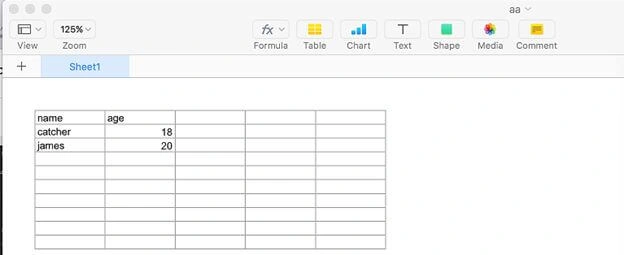
We have an Excel file named aa.xlsx, and the following screenshot shows the contents of it.
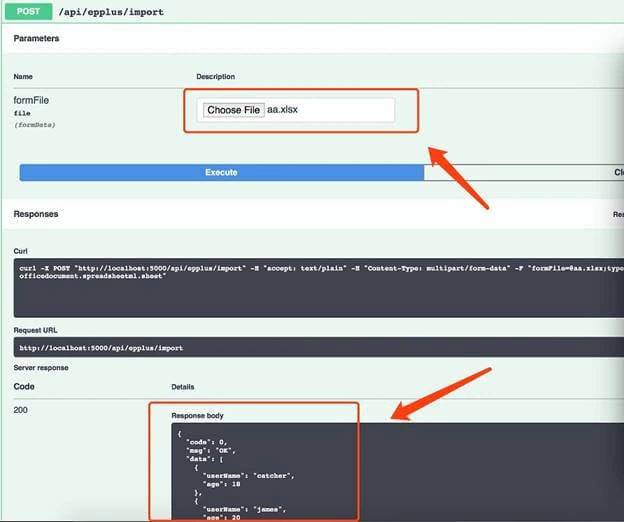
We will import this file, and may get the following result.
Export
There are two ways to export an Excel file.
- Create a file and return the download link
- Return the file directly
For the first way,
- private readonly IHostingEnvironment _hostingEnvironment;
- public EPPlusController(IHostingEnvironment hostingEnvironment)
- {
- this._hostingEnvironment = hostingEnvironment;
- }
- [HttpGet("export")]
- public async Task<DemoResponse<string>> Export(CancellationToken cancellationToken)
- {
- string folder = _hostingEnvironment.WebRootPath;
- string excelName = $"UserList-{DateTime.Now.ToString("yyyyMMddHHmmssfff")}.xlsx";
- string downloadUrl = string.Format("{0}://{1}/{2}", Request.Scheme, Request.Host, excelName);
- FileInfo file = new FileInfo(Path.Combine(folder, excelName));
- if (file.Exists)
- {
- file.Delete();
- file = new FileInfo(Path.Combine(folder, excelName));
- }
- // query data from database
- await Task.Yield();
- var list = new List<UserInfo>()
- {
- new UserInfo { UserName = "catcher", Age = 18 },
- new UserInfo { UserName = "james", Age = 20 },
- };
- using (var package = new ExcelPackage(file))
- {
- var workSheet = package.Workbook.Worksheets.Add("Sheet1");
- workSheet.Cells.LoadFromCollection(list, true);
- package.Save();
- }
- return DemoResponse<string>.GetResult(0, "OK", downloadUrl);
- }
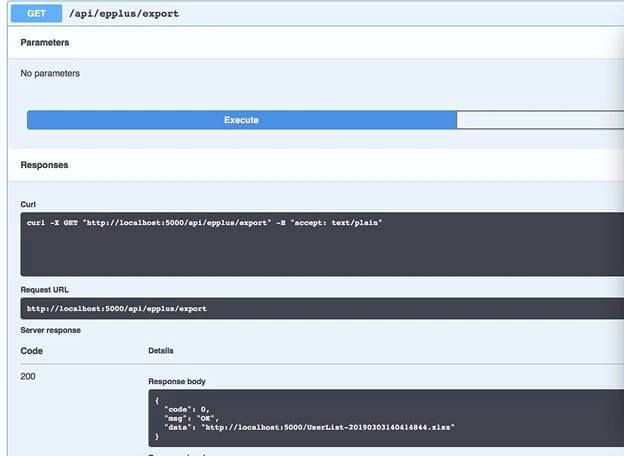

Opening this file, you may get the following content.

For the second way,
- [HttpGet("exportv2")]
- public async Task<IActionResult> ExportV2(CancellationToken cancellationToken)
- {
- // query data from database
- await Task.Yield();
- var list = new List<UserInfo>()
- {
- new UserInfo { UserName = "catcher", Age = 18 },
- new UserInfo { UserName = "james", Age = 20 },
- };
- var stream = new MemoryStream();
- using (var package = new ExcelPackage(stream))
- {
- var workSheet = package.Workbook.Worksheets.Add("Sheet1");
- workSheet.Cells.LoadFromCollection(list, true);
- package.Save();
- }
- stream.Position = 0;
- string excelName = $"UserList-{DateTime.Now.ToString("yyyyMMddHHmmssfff")}.xlsx";
- //return File(stream, "application/octet-stream", excelName);
- return File(stream, "application/vnd.openxmlformats-officedocument.spreadsheetml.sheet", excelName);
- }
After executing this method, we will get the file directly.

Here is the source code you can find in my GitHub page.
Summary
This short article shows how to use EPPlus library to import and export the Excel 2007+ file in ASP.NET Core simply. There are many other usages you can do with EPPlus, such as Cell styling, Charts. etc. We can visit its Github page for more information.
Mahima KapoorPosted Jul 23, 2020, 6:01 AM
So awesome code and explanation, saved me .. thank you so much ..
abd nadaPosted Oct 10, 2019, 12:34 AM
I use it and work correctly at localhost but server not, what I need to make it work at server
Geho Da FirenzePosted Oct 8, 2019, 11:40 AM
How can I export info from a Database / Stored Procedure in SQL Server?? And also, there is someway to only export a few columns instead all of them??
SardorPosted Sep 7, 2019, 7:22 AM
Why cuts "_" symbols in solumn headers like "order_id" to "order id"?
Quy TranPosted Aug 5, 2019, 12:00 AM
How add list to db .. in import do ?