

Background
In the last article, I introduced the basic usage of FluentValidation in .NET Core with a Console App.
And in this article, I will introduce some usages based on ASP.NET Core.
Suppose we have a class named Student.
public class Student
{
    public int Id { get; set; }
    public string Name { get; set; }
    public List<string> Hobbies { get; set; }
}
Now, we want to create an API to query students' hobbies.
So, we create a QueryStudentHobbiesDto class to define the request parameters.
public class QueryStudentHobbiesDto
{
    public int? Id { get; set; }
    public string Name { get; set; }
}
And let's create the validator first.
public class QueryStudentHobbiesDtoValidator: AbstractValidator<QueryStudentHobbiesDto>
{
    public QueryStudentHobbiesDtoValidator()
    {
        RuleSet("all", () =>
        {
            RuleFor(x => x.Id).Must(CheckId).WithMessage("id must greater than 0");
            RuleFor(x => x.Name).NotNull().When(x=>!x.Id.HasValue).WithMessage("name could not be null");
        });

        RuleSet("id", () =>
        {
            RuleFor(x => x.Id).NotNull().WithMessage("id could not be null")
                     .GreaterThan(0).WithMessage("id must greater than 0");
        });

        RuleSet("name", () =>
        {
            RuleFor(x => x.Name).NotNull().WithMessage("name could not be null");
        });
    }

    private bool CheckId(int? id)
    {
        return !id.HasValue || id.Value > 0;
    }
}
Let's begin with a familiar way.
Manual validation
You can regard this usage as a copy of the Console App sample that I showed you in the last article.
// GET api/values/hobbies1
[HttpGet("hobbies1")]
public ActionResult GetHobbies1([FromQuery]QueryStudentHobbiesDto dto)
{
    var validator = new QueryStudentHobbiesDtoValidator();
    var results = validator.Validate(dto, ruleSet: "all");

    return !results.IsValid
               ? Ok(new { code = -1, data = new List<string>(), msg = results.Errors.FirstOrDefault().ErrorMessage })
               : Ok(new { code = 0, data = new List<string> { "v1", "v2" }, msg = "" });
What we need to do are three steps.
- Create a new instance of the validator.
- Call the Validate method
- Return something based on the result of the Validate method.
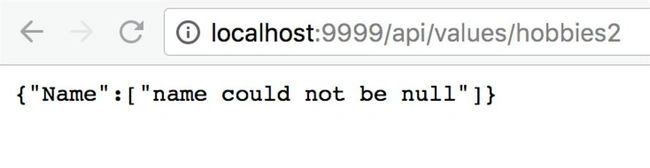
After running up this project, we may get the following result.

Most of the time, we create a new instance directly. It is not a very good choice. We may use Dependency Injection in the next section.
Dependency Injection(DI)
There are two ways to use DI here. One is using the IValidator directly, the other one is using a middle layer to handle this, such as the BLL layer.
Use IValidator directly
What we need to do is inject IValidator<QueryStudentHobbiesDto> and call the Validate method to handle.
private readonly IValidator<QueryStudentHobbiesDto> _validator;
public ValuesController(IValidator<QueryStudentHobbiesDto> validator)
{
    this._validator = validator;
}

// GET api/values/hobbies5
[HttpGet("hobbies5")]
public ActionResult GetHobbies5([FromQuery]QueryStudentHobbiesDto dto)
{
    var res = _validator.Validate(dto, ruleSet: "all");

    return !res.IsValid
               ? Ok(new { code = -1, data = new List<string>(), msg = res.Errors.FirstOrDefault().ErrorMessage })
               : Ok(new { code = 0, data = new List<string> { "v1", "v2" }, msg = "" });
}
And don't forget to add the following code in the Startup class.
public void ConfigureServices(IServiceCollection services)
{
    //inject validator
    services.AddSingleton<IValidator<QueryStudentHobbiesDto>, QueryStudentHobbiesDtoValidator>();
} 

Anil PomarPosted Jan 23, 2020, 1:48 PM
Can you provide a link for the Previous article
zhu leiPosted Nov 9, 2018, 12:22 AM
Good,artile