

Introduction
In today’s article, we will look at Init-only properties how they work and what are the advantages of having them. This is a new feature in C# 9.0.
What are Init-only properties?
Microsoft recently announced the availability of .NET 5 release candidate at Microsoft Ignite 2020. This included the latest features in C# 9.0. In order to code in .NET 5.0, we would need to install the latest preview of Visual Studio 2019 (Version 16.8.0 Preview 3.1). As I had read about some cool features in C# 9.0including Init-only properties, I downloaded and installed the required version as below.

We have all created immutable classes in previous versions of C#. The way to set values of properties in these immutable classes is by passing values via the constructor.
This is where Init-only properties come in. By using them, we can set values at the time of creating the class instance. However, this is the only time we can set these values.
After that, we are not allowed to change the values. Hence, the class is immutable without us having to create a constructor just to set the values of the properties.
Using Init-only properties
Let us see them in action.
Let us create a console application in Visual Studio 2019 (Version 16.8.0 Preview 3.1) as below.



Let us look at the properties of the project. These are as below.

Now, we enter the below code
using System;

namespace ConsoleAppInit
{
    class Program
    {
        static void Main(string[] args)
        {
            var employee = new Employee(1, "John Smith", 30);
            Console.Write($"Employee details: Id={employee.ID}, Name={employee.Name}, Age={employee.Age}");
            Console.ReadKey();
        }
    }

    public class Employee
    {
        public int ID
        {
            get;
            private set;
        }

        public string Name
        {
            get;
            private set;
        }

        public int Age
        {
            get;
            private set;
        }

        public Employee() { }

        public Employee(int id, string name, int age)
        {
            ID = id;
            Name = name;
            Age = age;
        }
    }
}
When we run the application, we get the desired results as below.

However, we have set values of the immutable class by using a special constructor. If we try to add values directly at the time of the creation of the class instance, we get the below,
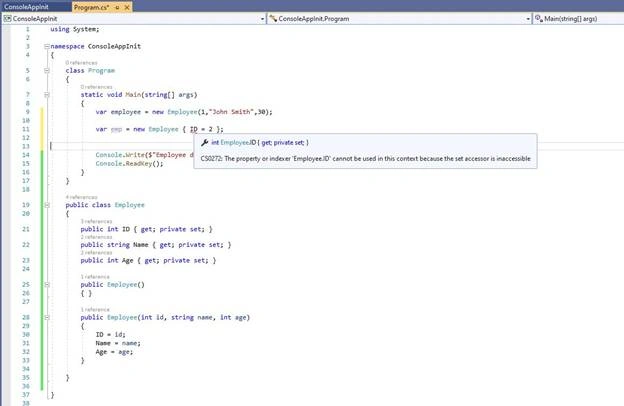
Next, we will change the properties of the project and set the Target Framework to .NET 5.0, as below.

Now replace your code with the below
using System;

namespace ConsoleAppInit
{
    class Program
    {
        static void Main(string[] args)
        {
            var employee = new Employee
            {
                ID = 2,
                Name = "Jane Smith",
                Age = 31
            };
            Console.Write($"Employee details: Id={employee.ID}, Name={employee.Name}, Age={employee.Age}");
            Console.ReadKey();
        }
    }

    public class Employee
    {
        public int ID
        {
            get;
            init;
        }

        public string Name
        {
            get;
            init;
        }

        public int Age
        {
            get;
            init;
        }
    }
}
In the above code, we specify the properties as get and init. This means that a value can be read from the property and can only be set at the time of creation of the class instance. Hence, the class is immutable, but we did not need to create a special constructor for it.
We can execute the code and confirm all works fine.

If we try to change a value after initial creation, we get an error as below.
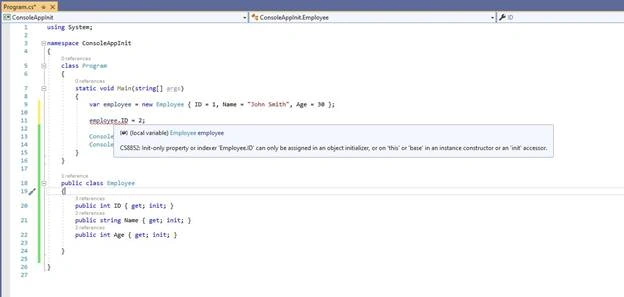
In the past declaring a class as immutable was not very declarative. We had to create a special constructor. With Init-only properties the process is clearer as we declare the property with the init keyword. This makes our code easier to understand and shows our intention to declare a class as immutable.
Summary
In this article, we looked at it-only properties, a new feature in C# 9.0. The main advantage I see is that it is now clear for us to communicate that we are declaring an immutable class.
Happy Coding.
Join the conversation! Your thoughts help the community grow.