Introduction
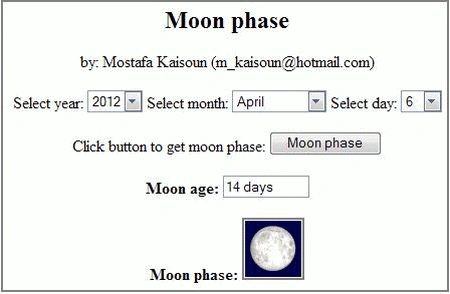
I wrote an article to calculate and display the Moon's phase using C#. Now, this article shows how to calculate and display the Moon's phase using JavaScript; the code for calculating the Moon's age in days (approximately).
The code
- <!-- Moon phase by: Mostafa Kaisoun ([email protected]) -->
- <html>
- <head>
- <title >Moon age</title>
- <script type="text/javascript">
- var n=31;
- var feb;
- var leap;
- months = ["January","February","March","April","May","June",
- "July","August","September","October","November","December"];
- function Start()
- {
- FillYearCombo();
- FillMonthCombo();
- FillDayCombo();
- <!-- Display moon today -->
- getAge(MyForm);
- }
- <!-- Fill first combo with years from 2000 to 2020 -->
- function FillYearCombo()
- {
- for (var i=2000;i<2021;i++)
- {
- var optYear = new Option(i,i);
- document.getElementById("cmbYears").add(optYear, undefined);
- }
- <!-- Set current year to combo -->
- var curDate = new Date();
- var y = curDate.getFullYear();
- MyForm.YearCombo.value=y;
- }
-
- <!-- Fill second combo with months array -->
- function FillMonthCombo()
- {
- for (var i=0;i<months.length;i++)
- {
- var optMonth = new Option(months[i],i+1);
- document.getElementById("cmbMonths").add(optMonth, undefined);
- }
- <!-- Set current month to combo
- var curDate = new Date();
- var m = curDate.getMonth();
- MyForm.MonthCombo.value=m+1;
- }
-
- <!-- Fill third combo with days of selected month -->
- function FillDayCombo()
- {
- for (var i=1;i<n+1;i++)
- {
- var optDay = new Option(i,i);
- document.getElementById("cmbDays").add(optDay, undefined);
- }
- <!-- Set current day to combo -->
- var curDate = new Date();
- var d = curDate.getDate();
- MyForm.DayCombo.value=d;
- }
-
- <!-- Test selected year if it is leap or not -->
- function TestLeap()
- {
- var y=parseInt(MyForm.YearCombo.value);
- if ((y%4)==0)
- {
- if ((y%100)==0 && (y%400)!=0)
- leap=false;
- else
- leap=true;
- }
- else
- leap=false;
- }
-
- <!-- Get days of selected month then fill third combo again -->
- function GetDays(MonthCombo)
- {
- var m=parseInt(MyForm.MonthCombo.value);
- switch(m)
- {
- case 2:
- TestLeap();
- if (leap)
- feb=29;
- else
- feb=28;
- n=feb;
- break;
- case 4:
- case 6:
- case 9:
- case 11:
- n=30;
- break;
- default:n=31;
- }
- document.forms["MyForm"].elements["DayCombo"].options.length=0;
- FillDayCombo();
- }
-
- <!-- Get days of February month when select year then fill third combo again -->
- function FebruaryDays(YearCombo)
- {
- TestLeap();
- if (leap)
- feb=29;
- else
- feb=28;
- if(MyForm.MonthCombo.value==2)
- {
- n=feb;
- document.forms["MyForm"].elements["DayCombo"].options.length=0;
- FillDayCombo();
- }
- }
-
- <!-- Calculate moon age -->
- function moonage(d, m, y)
- {
- var j;
- var ip, ag;
- j = juliandate(d, m, y);
- ip = (j + 4.867) / 29.53059;
- ip = ip - Math.floor(ip);
- if(ip < 0.5)
- {
- ag = ip * 29.53059 + 29.53059 / 2;
- }
- else
- {
- ag = ip * 29.53059 - 29.53059 / 2;
- }
- ag = Math.floor(ag) + 1;
- return ag;
- }
-
- <!-- Calculate Julian date -->
- function juliandate ( d, m, y )
- {
- var d, m, y;
- var mm, yy;
- var k1, k2, k3;
- var j;
- yy = y - Math.floor((12 - m) / 10);
- mm = m + 9;
- if (mm >= 12)
- {
- mm = mm - 12;
- }
- k1 = Math.floor(365.25 * (yy + 4712));
- k2 = Math.floor(30.6001 * mm + 0.5);
- k3 = Math.floor(Math.floor((yy / 100) + 49) * 0.75) - 38;
- j = k1 + k2 + d + 59;
- if (j > 2299160)
- {
- j = j - k3;
- }
- return j ;
- }
- <!-- Display moon age -->
- function getAge(form)
- {
- var imgName;
- var d=parseInt(MyForm.DayCombo.value);
- var m=parseInt(MyForm.MonthCombo.value);
- var y=parseInt(MyForm.YearCombo.value);
- var ag=moonage(d, m, y);
- if(ag==1)
- {
- form.age.value=ag.toString()+" day";
- }
- else
- {
- form.age.value=ag.toString()+" days";
- }
- var imgName="images/phase"+ag.toString()+".bmp";
- ShowMoonPhase(imgName);
- }
-
- <!-- Display moon phase -->
- function ShowMoonPhase(imgFile)
- {
- document["MoonImage"].src=imgFile;
- }
- </script>
- </head>
- <body onload="Start();">
- <form name="MyForm" method="post">
- <h2><p align=center> Moon phase </h2>
- <p align=center> by: Mostafa Kaisoun ([email protected])
- <p align=center>
- Select year:
- <select id="cmbYears" name="YearCombo" onchange="FebruaryDays(this);">
- </select>
- Select month:
- <select id="cmbMonths" name="MonthCombo" onchange="GetDays(this);">
- </select>
- Select day:
- <select id="cmbDays" name="DayCombo";>
- </select>
- <p align=center> Click button to get moon phase:
- <input name="moon" value="Moon phase" type=button onClick="getAge(MyForm)";>
- <p align=center> <b>Moon age:</b>
- <input name="age" readonly size=10>
- <p align=center> <b>Moon phase:</b>
- <img id="PhaseImage" name="MoonImage" src="images/phase0.bmp";>
- </form>
- </body>
- </html>
Summary
I hope this article is useful. If you have any idea, please tell me.


jumpjack2 jumpjack2Posted Oct 2, 2019, 10:10 AM
Thanks a lot. I am a bit confused with moon age, moon phase and moon illumination percentage, how do these relate each other?
darren kleidonPosted Jun 12, 2019, 2:26 AM
I echo Artur Duda comments - Great work and thanks!
Artur DudaPosted Oct 11, 2013, 6:36 AM
THX!! Great work!!
Sam HobbsPosted Apr 13, 2012, 2:23 PM
Congratulations, you did it. There are a few articles in this web site that show how to create Gadgets using JavaScript so with this article we have everything we need to create a Gadget showing the Moon's age.