
Introduction
Language Integrated Query (LINQ) is one of the main features of Microsoft .NET
Framework 3.5.
As you perhaps already know, LINQ lets you execute queries onto a larger number
of data sources. Among the big amount of data sources we can query, we can also,
in example, query Microsoft Word 2007 document properties. This is possible when
developing a document-level solution with Visual Studio 2008 Tools for Office
System.
VSTO are now part of Visual Studio 2008 IDE (Professional edition or greater is
needed). Until 2005 edition, you had to download and install VSTO as separate
components, but now this is no more necessary.
First of all, open Visual Studio 2008 and create a new Word 2007 Document
project (you can find this project template in the Office folder). You can
choose to create a new document or import an existing one.
In this article we're going to consider a Word 2007 document which contains
revisions applied from two different people (in this case, two user accounts on
my pc). Each of the reviewer applied his own corrections. As you can see in the
following figure, first reviewers revisions are red marked, while second
reviewers' revisions are blue marked:
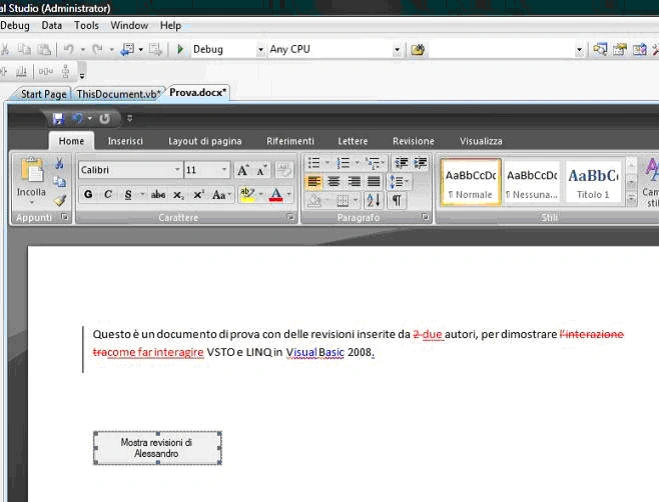
First of all, you should add a button onto the document. You can drag a Windows
Forms button from the toolbox onto the document surface, as you can see in the
above figure. Now we decide to extract and count only revisions applied by the
user "Alessandro". The Click event handler could be written in the following
way:
Private
Sub
Button1_Click(ByVal
sender
As
System.Object,
ByVal
e As
System.EventArgs)
Handles
Button1.Click
Join the conversation! Your thoughts help the community grow.