

Code is a bit like an animal.
If a great deal of effort is placed into training the animal (through proper design practices, testing methodologies and reviews) then it can easily be domesticated by an experienced developer and can do just about any trick that its owner desires. In contrast, an untrained, untested and poorly written piece of code is the kind that you worry about when you leave the house and it proceeds to destroy everything you hold dear.
This is why testing is such a crucial part of software development and why it can often help to have any many tools as possible to help you train the animal within your code so it doesn't harbor bugs.
Microsoft Research's Pex team recently released the Microsoft Code Digger, which is a handy extension for Visual Studio 2012 that will allow you analyze all of the possible execution paths that a particular snippet of code could take. This can be extremely helpful when dealing with areas of complex code and to help better understand the code, discover why it behaves in a certain way and to uncover any bugs lurking within it.
About Pex

Pex is one of the many wonderful things going on at Microsoft Research and it is intended to a tool to assist with automating white-box and unit-testing. It can help with generating all kinds of different inputs that can be thrown at a specific set of code and will display each of these execution branches along with the corresponding output of the function. It can provide an easy way for those that aren’t crazy about writing unit tests to simply test their code by letting the Pex Engine run through it.
Pex can provide an excellent way for you to find those small edge-cases that can so often plague software and the fact that the process is completely automated makes it even easier!
Let's Get Digging
To get started using the Code Digger, you’ll just need to go and download the extension from the following site:
After installing it, you should be good to go and ready to get started!
A minor caveat; Code Digger was very recently released and as a result currently only works for Visual Studio 2012 and can only target code that is contained within Portable Class Libraries. But fear not, as there are still numerous other ways that you can use Pex even outside of Visual Studio 2012, which will be covered later within this post.
Getting Started and Swimming with Sharks
Let's take a look at the Code Digger in action, which can help provide a much better explanation of what is going on behind-the-scenes and what makes Pex so magical!
Firstly, we will create a simple Portable Class Library file that we can use to create a very simple function and get an idea of how the Code Digger works.
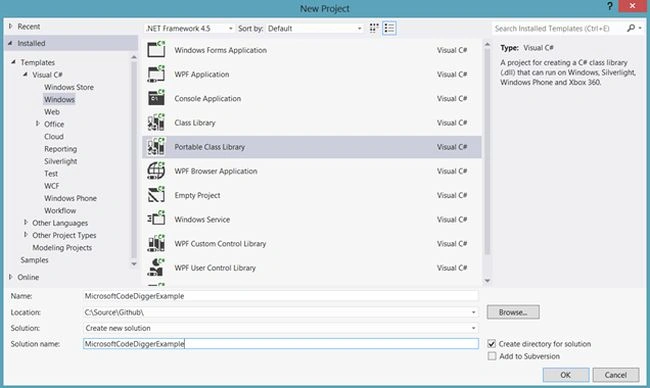
You'll be prompted to select which environments that you want the code to be compatible with after. Since this is for demonstration purposes, just click OK. Then we will need to create a very simple function to begin with, such as summing an array of integers:
- // Simple method to sum an array of integers
- public static int Sum(int[] values)
- {
- return values.Sum();
- }
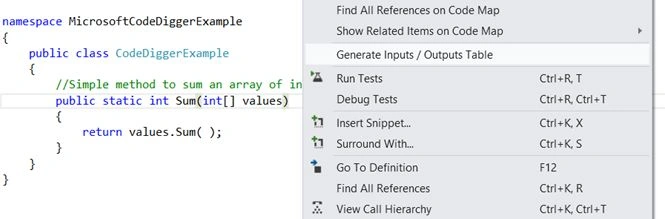
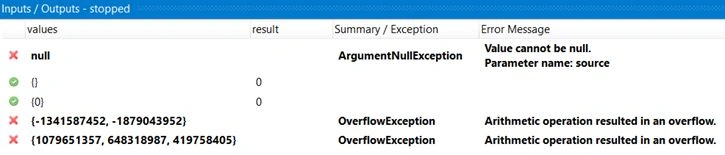
As you can see, the Code Digger provided the following valuable inputs that the function might receive as well as the different behaviors that it might exhibit. This information can be very useful in finding weaknesses and avoiding exceptions within our code as well as finding edge cases that may remain unseen:
Adding a bit more complexity
Now that we know it will work for a simple integer values, let’s try passing in a more complex model and see what kind of results it provides:
- // More Complex Example
- public static decimal CalculateCandyPricePerServing(IEnumerable < BagOfCandy > bagsOfCandy)
- {
- return bagsOfCandy.Average(p => p.Servings / p.Price);
- }
- // A Bag of Candy
- public class BagOfCandy
- {
- public int Servings
- {
- get;
- set;
- }
- public decimal Price
- {
- get;
- set;
- }
- public BagOfCandy()
- {}
- }
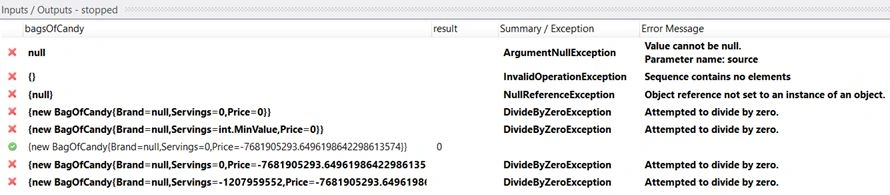
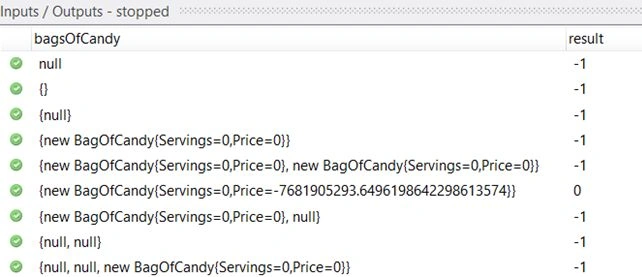
As you can see from the output, adding some additional complexity can also introduce other execution paths which require testing to be performed.
We will need to add the necessary checks within this statement to fix up some of these problems, which should be able to be done through a few simple logic checks:
- // A simple method to calculate the average price per
- // piece of candy given several bags of candy
- public static decimal CalculateCandyPricePerServing(IEnumerable < BagOfCandy > bagsOfCandy)
- {
- // Rough attempt to fix several more of the issues
- // apparent in the first table
- if(bagsOfCandy == null || !bagsOfCandy.Any(p => p != null && p.Price != 0 && p.Servings != 0))
- {
- // Return -1 for invalid results
- return -1;
- }
- else
- {
- // Attempt to average the values otherwise
- return bagsOfCandy.Average(p => p.Servings / p.Price);
- }
- }




Ipsita SethiPosted Apr 30, 2016, 1:53 PM
Nice
Nilesh JadavPosted Oct 30, 2015, 11:52 AM
Good one sir !
Chandradev PrasadPosted Oct 30, 2015, 7:18 AM
Nice tool.
Harshad PansuriyaPosted Oct 30, 2015, 7:16 AM
Nice one