

Background
When our applications need to communicate with many other services or components, we will meet temporary faults due to some of services or components that cannot respond in time.
There are many reasons for those temporary faults -- timeouts, overloaded resources, networking hiccups and so on. Most of them are hard to reproduce because these failures are usually self-correcting.
We can't avoid failures, but we can respond in ways that will keep our system up or at least minimize downtime.
For example, an application service with a throttling strategy is processing plenty of concurrent requests, and some of the requests will be rejected quickly. But if we can try again after a delay, it might succeed. Retry is an effective and easy way to handle transient failures.
And in this article, we will discuss it in ASP.NET Core via Polly.
What Is Polly?

Polly is a .NET resilience and transient-fault-handling library that allows developers to express policies such as Retry, Circuit Breaker, Timeout, Bulkhead Isolation, and Fallback in a fluent and thread-safe manner.
How To Use?
HTTP(s) request
Retry pattern with HTTP(s) request is very easy, because of the combination of Polly and HttpClientFactory.
What we need to do is use an extension method named AddPolicyHandler to add the retry policy for the HttpClient.
Here is the sample code to configure.
- public void ConfigureServices(IServiceCollection services)
- {
- services.AddHttpClient("csharpcorner")
- .SetHandlerLifetime(TimeSpan.FromMinutes(5))
- // important step
- .AddPolicyHandler(GetRetryPolicy())
- ;
- services.AddMvc().SetCompatibilityVersion(CompatibilityVersion.Version_2_2);
- }
- private IAsyncPolicy<HttpResponseMessage> GetRetryPolicy()
- {
- return HttpPolicyExtensions
- // HttpRequestException, 5XX and 408
- .HandleTransientHttpError()
- // 404
- .OrResult(msg => msg.StatusCode == System.Net.HttpStatusCode.NotFound)
- // Retry two times after delay
- .WaitAndRetryAsync(2, retryAttempt => TimeSpan.FromSeconds(Math.Pow(2, retryAttempt)))
- ;
- }
To run the controller, we don't need to add some additional code before we send the HTTP(s) request, just keep the same behavior when we use HttpClient.
- [Route("api/[controller]")]
- [ApiController]
- public class ValuesController : ControllerBase
- {
- private readonly IHttpClientFactory _clientFactory;
- public ValuesController(IHttpClientFactory clientFactory)
- {
- _clientFactory = clientFactory;
- }
- // GET api/values
- [HttpGet]
- public async Task<string> GetAsync()
- {
- // define a 404 page
- var url = $"https://www.c-sharpcorner.com/mytestpagefor404";
- var client = _clientFactory.CreateClient("csharpcorner");
- var response = await client.GetAsync(url);
- var result = await response.Content.ReadAsStringAsync();
- return result;
- }
- }
After running up this project and visiting it, we may get the following logs.
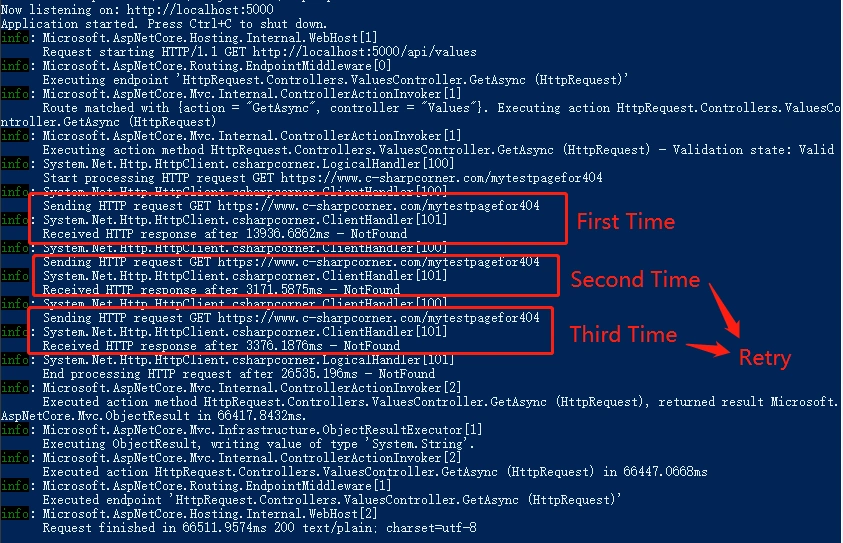
As you can see, it sends three requests to the link; the last two are triggered by retry policy.
Sending a message to the message bus
When our applications communicate with RabbitMQ, we should deal with the retry mechanism via conventional usage of Polly.
- [Route("api/[controller]")]
- [ApiController]
- public class ValuesController : ControllerBase
- {
- // GET api/values
- [HttpGet]
- public ActionResult<IEnumerable<string>> Get()
- {
- var message = Encoding.UTF8.GetBytes("hello, retry pattern");
- var retry = Policy
- .Handle<Exception>()
- .WaitAndRetry(2, retryAttempt => TimeSpan.FromSeconds(Math.Pow(2, retryAttempt)));
- try
- {
- retry.Execute(() =>
- {
- Console.WriteLine($"begin at {DateTime.Now.ToString("yyyy-MM-dd HH:mm:ss")}.");
- var factory = new ConnectionFactory
- {
- HostName = "localhost",
- UserName = "guest",
- Password = "guest"
- };
- var connection = factory.CreateConnection();
- var model = connection.CreateModel();
- model.ExchangeDeclare("retrypattern", ExchangeType.Topic, true, false, null);
- model.BasicPublish("retrypattern", "retrypattern.#", false, null, message);
- });
- }
- catch
- {
- Console.WriteLine("exception here.");
- }
- return new string[] { "value1", "value2" };
- }
- }
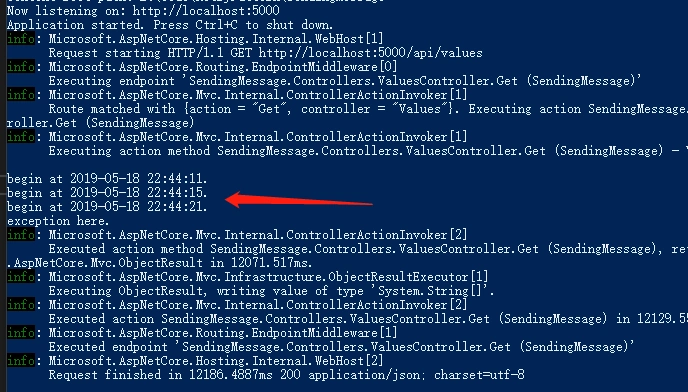
After running up this project and visiting it, we may get the following logs.
Summary
I hope this article can help you!
Ano MepaniPosted May 20, 2019, 8:29 AM
Very good article , very useful if we are calling webapi from code behind