
In the previous
article I have talked about how to show Silverlight pages inside XNA Window.
Now we're going deeper.
We will be integrating Silverlight & XNA.
And there will be methods of exchanging datas between 2 technologies:
ClipBoard & WCF
WCF will be explained in the next article. But we will be using ClipBoard and
show how you can send and receive datas.
As Silverlight only accepts Text Messages stored on ClipBoard we will limit only
sending datas between Silverlight and XNA.
Ok then lets start building our application.We will continue developing from our
previous article's project.
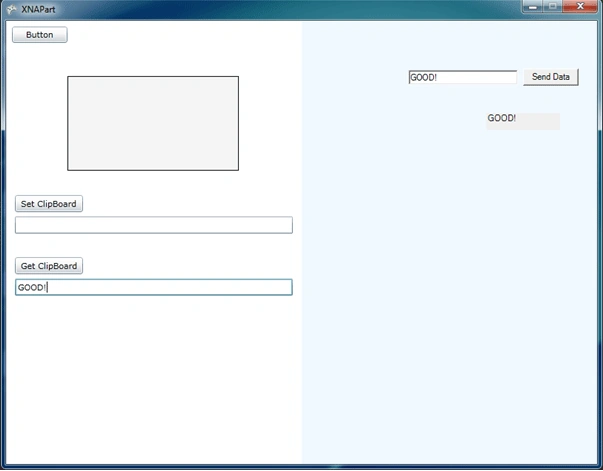
First of all update your Silverlight Page as seen below:
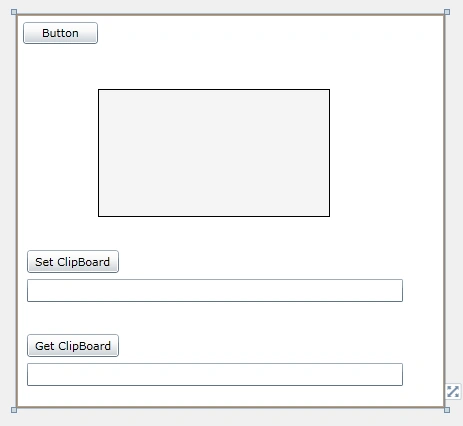
Add 2 Buttons and 2 Textboxes.
1st Button(Set ClipBoard) will help us send ClipBoard and 2nd Button(Get
ClipBoard) will help us to read it.
Ok.now lets write these codes on our MainPage.xaml.cs
//Button1 -> Set ClipBoard
private
void button1_Click(object
sender, RoutedEventArgs e)
{
Clipboard.SetText(textBox1.Text);
}
//Button2 -> Get ClipBoard
private
void button2_Click(object
sender, RoutedEventArgs e)
{
textBox2.Text=Clipboard.GetText();
}
Ok now build your application.And lets see on Web Browser(IE8):

After Clicking Set ClipBoard,we click Get ClipBoard and get our data.

Ok we have tested in Silverlight.It worked as its meant to be.Now lets copy the
.xap and .html files of the Silverlight Part into XNAPart's bin->Debug folder.
After that open XNAPart Project(Game.cs)
First of all add reference to System.Drawing and then add it on reference
region.
using
System.Drawing;

Using Silverlight in XNA: Part II
Join the conversation! Your thoughts help the community grow.
Sign in to leave a comment
It is the same account you read, post and publish with — and you will come straight back to this page.
Mahesh ChandPosted Jun 21, 2010, 8:43 AM
Good work Ibrahim.