

Several months ago, I was looking at a question posted on ask.sqlservercentral.com. I discovered an answer to that question regarding how to move a large amount of data around quickly. The solution was related to an aspect of table partitioning that I was not aware of. If you aren’t familiar with partitions in SQL Server, here is the takeaway - you can “divide” up a table into different segments or partitions. Often this is found in large tables (think millions/billions of rows) in order to quickly and efficiently move the data around. Moving partitions around is a meta-data operation which is what makes it so efficient.
The data of partitioned tables and indexes is divided into units that can be spread across more than one filegroup in a database. The data is partitioned horizontally so that groups of rows are mapped into individual partitions. All partitions of a single index or table must reside in the same database. The table or index is treated as a single logical entity when queries or updates are performed on the data.
In SQL Server 2012 and later, you can have up to 15,000 partitions per partitioned table or index as long as you were running the x64 bit version of SQL Server. If you happen to be running the x32 bit version of SQL Server, you are limited to 1,000 partitions.
Note - If you are still running an x32 bit version of SQL Server, you really need to move to x64 bit. You’ll do yourself and your organization a huge favor if you do.
Single Partition SWITCH
In a nutshell, you can use the SWITCH function to quickly move a table, which is a single partition, and all of its data to a new table or schema.
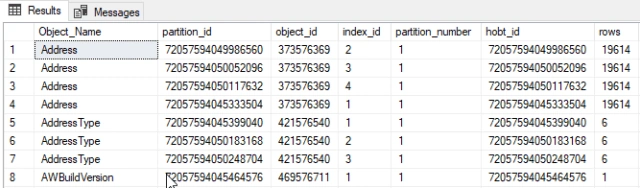
You can see partitions by executing a SELECT against sys.partitions. Using AdventureWorks2014, we can see below that the Person.Address table has a clustered index (Index_id = 1) and 4 non-clustered indexes on it. Every index has at least one partition, which is partition_number of one. If any of the objects has multiple partitions, you’d see it there with a corresponding “partition_number” that is greater than one.
Of course, as with anything, there are limitations. The list below is not inclusive, so be sure to read the documentation thoroughly.
- Both tables must exist before the SWITCH operation.
- The target partition must be empty.
- Tables must have the same column structure (including nullability) and order.
- The index structure(s) must be identical between the source and target tables.
- Any foreign key constraints must be identical and cannot be marked "is not trusted".
Let’s try out a demo!
The Fun Stuff
For simplicity, I will,
- Create a simple table and load 1000 records into it.
- Create a secondary empty table that is identical in structure to the first table.
- This table will be in a different schema, the Archive schema
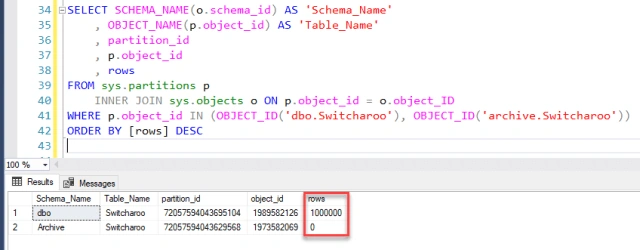
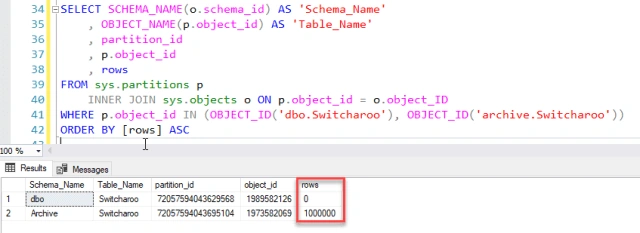
Use the SWITCH command to switch the partition from the first table into the second table.
- create the source table
- CREATE TABLE dbo.Switcharoo(id INT);
- GO
- CREATE TABLE archive.Switcharoo(id INT);
- GO
Now that the table structures are created, I’ll load the source table, dbo.Switcharoo, with 1 million records. I’m using a numbers table courtesy of this blog post, slightly modified for the tables that I’m using. If you are not familiar with a numbers table, it is a very quick and efficient way to load a large amount of numbers. Using a numbers table, I was able to insert 1 million records into the source table in less than 3 seconds. Your mileage may vary depending on your hardware, but it will be faster than an iterative based solution.
Hadshana KamalanathanPosted Jul 15, 2018, 8:55 PM
Thank you for sharing
Dinesh BeniwalPosted Mar 13, 2018, 9:07 AM
Welcome john at C# Corner.
Mahesh ChandPosted Mar 12, 2018, 1:45 PM
Welcome John. It was nice meeting you. Best!