

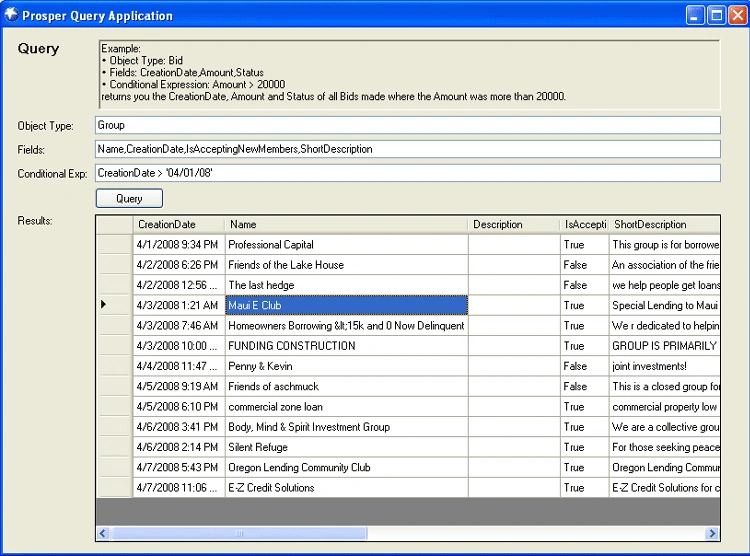
Figure 1 - Sample Loan Query Application Courtesy of Prosper Development
Introduction
In the past, the way to secure a loan was to go to a bank or broker, go through hours of tedious financial discovery and wait a month for approval. The internet has changed all that. Sites such as LendingTree and E-Loan make it much easier to obtain a loan. Not only can you obtain a loan quicker, but these sites force banks to compete for your business (Nothing like putting the power back into the hands of the consumer!). The founder of E-Loan, Chris Larsen, decided one day (probably after seeing how e-bay works), that there was another way to provide loans. Why not let individuals lend or borrow money from other individuals through an auction system. So what exactly gets auctioned? Interest rates! And that is how Prosper was born...
How Does Prosper Work?
Prosper allows a borrower request a certain amount of money that they would like to borrow (up to $25,000). The borrower places their request on the auction block. In exchange, the lender gets to know quite a lot of financial detail about the borrower (their credit rating, salary, length of employment, number of delinquencies). The lender uses this information along with the borrower's requested interest rate to decide whether or not they will lend money to the borrower. Keep in mind that this auction is completely blind like e-bay. The lender never knows the identity of the borrower and visa versa. The credit information is real, though. Lenders are allowed to ask questions to the borrower, such as, "Please break down your monthly income and expenses." Or, "Please explain the delinquencies." Once the lender decides to lend money, they can bid as little as $50 on the borrower towards the loan. A loan is not issued unless the full amount requested by the borrower is funded by the multiple lenders. (Many requested loans are not fulfilled for this reason.) Once the loan has been completely filled to the total amount requested by the borrower, a new lender can still bid on the loan until the time runs out. The new lender "ups" the bid by bidding a lower interest rate than the previous lenders who have bid on the borrower so far. Often you'll see a successful loan's interest rate drop as much as 50%! It seems borrowers flock to prosper to pay off high interest credit cards, higher interest loans, or to borrow money to start a business.
The Risk
The risk is always that the borrower defaults on the loan (stops making monthly payments). The lower the credit grade, the larger the risk to the lender. Grades range from AA, A, B, C, D, E, and HR (High Risk). Higher risk credit grades tend to pay much larger interest rates, but are more likely to default. AA grade is the safest, and rarely defaults, but doesn't usually command a high rate. Prosper makes the lender aware of the risks before placing the bid. They even statistically calculate risk of default and return based on historical site statistics. Still there is no guarantee, so it's always best to diversify if you are a lender.
Groups
Prosper allows you to form Groups. As a member of a group, you have the guidance of the Group Leader to help you obtain the loan. The Group Leader can endorse you as a good loan prospect, if he or she feels you are low risk. The group leader can also request proof of salary and let lenders know that you can be trusted. Figure 1, shows a list of groups just started this April.
Prosper API
Prosper has opened up its API to the developer world which is pretty exciting for financial software engineers. The API makes it easy to write .NET Applications to automate tasks and metrics produced by the Prosper website. Prosper provides good documentation on the API so you can get started using it right away. The API works through a WebService. The WebService allows you to Login, Logout, and Query or Retrieve certain data. It does not seem like you can automate bidding yet, but I suspect this will be added in a future release. In this article we will talk about using the Query web method, since this is what was provided in the sample application.
Objects to Query
Prosper has provided a host of objects that you can query on, each providing multiple properties containing loan data. Table 1 are a list of objects and some of their properties.
Table 1 - Queryable Prosper Objects
| Object | Description | Useful Properties |
| Listing | Contains information about a borrower listing including credit history information | BidCount, CreditGrade, AmountDelinquent, AmountFunded, BorrowerRate |
| Group | A Group in Prosper consisting of borrowers, lenders, and a group leader. | Name, ShortDescription,GroupRating |
| Bid | Bid coming from a lender on a loan | Amount, ListingKey, MemberKey,Status |
| LenderLoan | the part of the loan owned by a lender | BidSource, PrincipalLoaned, PrincipalRepaid, LoanNumber |
| Loan | the loan object created after a borrower has received the fully requested loan amount | CreationDate, AmountBorrowed,BorrowerRate,Term |
| MarketPlace | contains useful statistics about Prosper | LoanVolumeToDate,MembersToDate |
| Member | information about a particular member | GroupKey,Roles,ScreenName |
Setting up the API
To use the API, we just need to generate a Web Service object using .NET.
Here are the steps:
1) Create a new Windows Forms Project or ASP.NET Project
2) Right Click on Solution Explorer and choose Add Web Reference.
3) Fill in the url as shown in figure 2 and press Go. Click Add Reference:
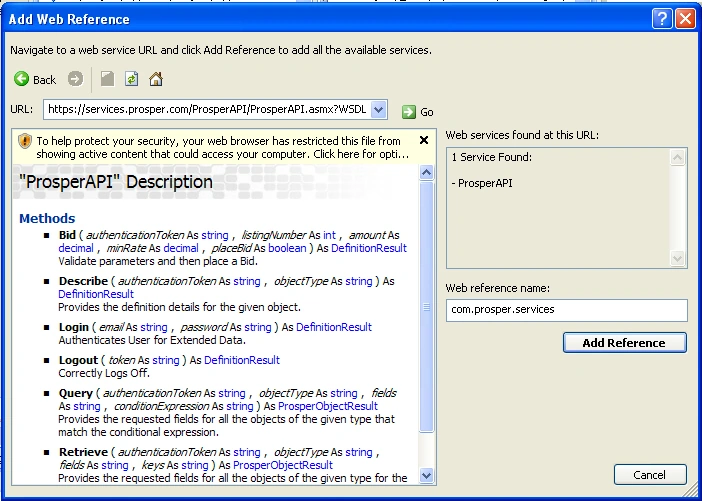
Figure 2 - Adding a Web Reference Object
Join the conversation! Your thoughts help the community grow.