
Web Services
The topics of this article are
- Overview of Web Services
- How to create Web Service with ASP.Net
- How to use a Web Service from Windows Form client
What is Web Services?
Web Services are server-side programs that listen for messages from client applications and return specific information. This information may come from the Web Service itself, from other components in the same domain, or the other Web Services. One big feature of Web Services is, that Web Services can communicate with heterogeneous applications because Web Services present the information in XML format. The following figure shows how Web Services can communicate with a heterogeneous application.

Web service architecture
Web Services can use the SOAP protocol, which is a standard defined by many companies. A big advantage of a Web Service is its platform independence. Web Services are also useful for developing a .NET application on both the client and server side. The advantage here is that the client and the server can emerge independently. A service description is created with the Web Service Description Language (WSDL). WSDL is the XML-based description of a Web Service.
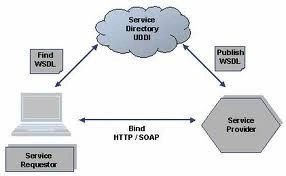
A WSDL document contains information about the method that a Web Service supports and how it can be called.
What is UDDI?
UDDI is an XML-based standard for describing, publishing, and finding Web Services.
- UDDI stands for Universal Description, Discovery, and Integration.
- UDDI is a specification for a distributed registry of Web Services.
- UDDI is a platform-independent, open framework.
- UDDI can communicate via SOAP, CORBA, and Java RMI Protocol.
- UDDI uses WSDL to describe interfaces to Web Services.
- UDDI is seen with SOAP and WSDL as one of the three foundation standards of Web Services.
- UDDI is an open industry initiative enabling businesses to discover each other and define how they interact over the Internet.
Creating web service
To implement the Web Service you can derive the Web Service class from "System.Web.Services.WebService".
Web Service attribute
The subclass of a web service should be marked with the WebService attribute. The WebService attribute has the following properties:
- Description: A description of the service that will be in the WSDL document.
- Name: Gets or Sets the name of the Web Service.
- Namespace: Gets or sets XML namespace for Web Service. The default value is http://tempuri.org, which is ok for testing, but before you make a service public you should change the namespace.
WebMethod Attribute: All the methods available from the Web Services must be marked with the WebMethod attribute. The method that is not marked with the WebMethod attribute, can not be called from the client side.
Creating A Simple ASP.Net Web Service
Creating a Web Service Project
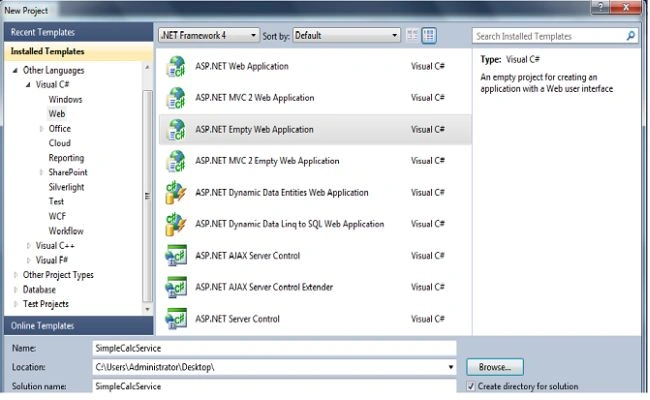
Create a new Web Service project by selecting "File" -> "New" -> "Project..." and choose the "ASP.Net Empty Web Application" template. Give the name to the project "SimpleCalcService":


Join the conversation! Your thoughts help the community grow.